Table of Contents
The moment you strike a key, hit a pad, or twist a knob on stage, your muscle memory expects an instantaneous response. But instead, you get that dreaded microscopic delay—the sonic equivalent of a bad handshake that throws off your entire groove. In 2026, with audiences expecting studio-perfect performances and hybrid electronic-acoustic setups becoming the norm, MIDI latency isn’t just a technical annoyance; it’s a career liability. The difference between a controller that responds in 2 milliseconds versus one that lags at 15ms can be the difference between a locked-in performance and a train wreck that leaves you fighting your own gear.
Live players have finally reached a tipping point where “good enough” connectivity no longer cuts it. The modern stage demands controllers that feel like extensions of your body, not obstacles you have to compensate for. This comprehensive guide dives deep into the architecture, specifications, and real-world testing methodologies that separate true low-latency performers from marketing hype. Whether you’re triggering complex backing tracks, controlling virtual instruments, or running synchronized light shows, understanding these principles will transform how you evaluate and deploy MIDI controllers in high-pressure live scenarios.
Top 10 Midi Controllers For Live
Detailed Product Reviews
1. Akai Professional APC Mini MK2 - USB MIDI Pad Controller for Clip Launching with Ableton Live Lite, 64 RGB Pads, Drum and Note Mode and MIDI Mixer
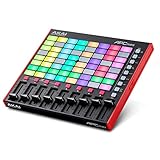
Overview: The APC Mini MK2 is Akai’s streamlined Ableton Live controller, built for clip launching and mixer control. With 64 RGB pads and nine faders, it transforms laptop production into a tactile, performance-ready experience. The pre-mapped integration means zero setup friction for Ableton 11.2.7+ users, making it ideal for both studio composition and live looping sessions.
What Makes It Stand Out: The 8x8 pad matrix offers comprehensive session view control, while the eight track faders plus master fader provide genuine hands-on mixing capability rare in compact controllers. The Smart Scale View in Note mode helps non-keyboardists play melodies without wrong notes, and Drum mode integrates seamlessly with Ableton’s Drum Rack. This combination of pads and faders is unique at this price point.
Value for Money: At its price point, it undercuts Ableton Push while delivering core clip-launching functionality. For dedicated Ableton users, it eliminates menu-diving and accelerates workflow significantly. Alternatives like Novation Launchpad Mini offer similar pads but lack the faders, making the APC Mini MK2 better for mixing tasks. It’s a specialized tool that pays for itself in time saved.
Strengths and Weaknesses: Strengths include deep Ableton integration, visual feedback from RGB pads, and immediate mixer control. The compact size suits mobile setups. Weaknesses are the plastic construction that feels less road-worthy, complete reliance on Ableton (limited functionality with other DAWs), and lack of rotary controls for parameter tweaking. The pads, while responsive, aren’t quite MPC-quality.
Bottom Line: Ideal for Ableton-centric producers and live performers who prioritize clip launching and basic mixing. If you need keyboard input or robust hardware, look elsewhere. For its specific purpose, it’s nearly unmatched.
2. Akai Professional APC Key 25 MK2 25-Key USB MIDI Keyboard Controller for Clip Launching with Ableton Live Lite, 40 RGB Pads and 8 Rotary Knobs

Overview: The APC Key 25 MK2 merges a 25-key MIDI keyboard with clip-launching pads, targeting producers who need both melodic input and session control without desk clutter. This hybrid approach sacrifices some specialization for versatility, creating an all-in-one solution for compact studios and mobile setups where space is at a premium.
What Makes It Stand Out: The combination of mini keys, 40 RGB pads, and eight rotary knobs creates a complete production interface. Octave buttons expand the keyboard range, while Device mode lets knobs control Ableton macros. It’s essentially three controllers in one compact footprint, eliminating the need for separate devices when traveling or working in tight spaces.
Value for Money: It costs more than pad-only controllers but less than buying separate keyboard and pad units. For small studios or mobile producers, the space savings justify the premium. However, dedicated devices in this price range offer more controls of each type. You’re paying for convenience and integration rather than maximum control surface area.
Strengths and Weaknesses: Strengths include excellent Ableton integration, portability, and true multi-functionality. The velocity-sensitive keys are responsive for their size. Weaknesses are the cramped mini-key action that hampers expressive playing, fewer pads than the APC Mini (5x8 vs 8x8), and a somewhat plastic feel. The compromise nature means it’s not best-in-class at any single function.
Bottom Line: A smart choice for beginners or producers with limited space who use Ableton exclusively. If you primarily play keys or need extensive pad control, separate dedicated controllers will serve you better. It’s a jack-of-all-trades, master of none.
3. Blackstar Live Logic 6-button MIDI Footcontroller
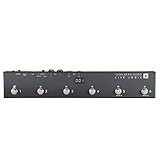
Overview: Blackstar’s Live Logic is a minimalist MIDI foot controller designed for hands-free DAW control during performance. With six switches and two expression pedal inputs, it lets guitarists, vocalists, and keyboardists trigger scenes, start recording, or toggle effects without reaching for a computer. The LED display confirms assignments at a glance during dark stage conditions.
What Makes It Stand Out: The LED display provides visual confirmation of MIDI commands, a rarity in simple footswitches. The dual expression inputs allow simultaneous control of two parameters—volume and wah, for example. MIDI over USB keeps connectivity clean and modern, eliminating DIN cable clutter and making it compatible with modern laptops without adapters.
Value for Money: It’s priced competitively against basic foot controllers while offering more functionality. Compared to larger units like the Behringer FCB1010, it’s more portable and simpler to program, though with far fewer switches. For its niche, it delivers fair value without unnecessary complexity that often burdens more elaborate controllers.
Strengths and Weaknesses: Strengths include rugged metal housing, straightforward operation, and zero-latency USB MIDI. The compact size fits any pedalboard. Weaknesses are the extremely limited control surface—six buttons constrain complex setups—and lack of included software. Programming requires external MIDI learn functions, which can be tedious for advanced mappings and bank switching.
Bottom Line: Perfect for performers needing basic, reliable foot control of Ableton scenes or guitar plugins. It’s not a replacement for desktop controllers but excels as a specialized performance tool. If you need more than six functions, consider a larger foot controller.
4. Midi Pad Controller, Portable Beat Maker Machine with Drum Pads, Beginners Beating Pad Velocity Sensitive, LED Display for Music Production (Wireless MIDI)

Overview: This generic wireless MIDI pad controller targets entry-level producers with its Bluetooth connectivity and 4x4 RGB pad matrix. Promising cable-free operation and cross-platform compatibility, it aims to democratize beat-making for beginners and mobile musicians who prioritize portability and affordability over brand recognition.
What Makes It Stand Out: Bluetooth MIDI eliminates cable constraints, while three modes (Key, Custom, Dark) adapt to different workflows. The inclusion of USB-C, MIDI Out, and a sustain jack provides unusual connectivity flexibility for the price point, allowing hardware synth integration that many budget controllers lack.
Value for Money: It’s among the most affordable wireless MIDI controllers available, undercutting brand-name alternatives significantly. The feature set punches above its weight class, but build quality and long-term support remain question marks compared to established brands like Akai or Novation. You’re taking a calculated risk for the price advantage.
Strengths and Weaknesses: Strengths include true wireless freedom, decent pad responsiveness, and impressive connectivity options. The guided onboarding helps beginners. Weaknesses are the unknown manufacturer’s reliability, potentially inferior pad durability, and limited 4x4 matrix that restricts complex Ableton sessions. Latency over Bluetooth may challenge timing-critical performances and multi-device setups.
Bottom Line: A compelling budget option for casual producers and beginners prioritizing portability. Serious musicians should invest in proven brands for reliability. If wireless operation is essential and your budget is tight, it’s worth considering—just manage expectations regarding build longevity and potential support issues.
5. Wireless Midi Controller Mixer, Bluetooth Semi Weighted Professional dynamic keybed 8 Knobs and Music Production,Software Included (Black Mixer)

Overview: This wireless MIDI controller mixer attempts to blend portability with professional features, offering semi-weighted keys, eight rotary encoders, and a built-in rechargeable battery. It targets producers seeking a premium mobile solution without sacrificing key action. The design emphasizes untethered creativity for the modern wandering musician.
What Makes It Stand Out: The semi-weighted keybed is exceptional for a battery-powered device, providing genuine expressive control. Sixteen-hour battery life enables full-day sessions away from power. The soft-backlit silicone buttons offer quiet operation for shared spaces, and each fader has visual feedback indicators for immediate status recognition without screen-glancing.
Value for Money: It occupies a middle ground between budget controllers and premium units like the Akai MPK series. The wireless capability and semi-weighted keys justify the price premium over basic controllers, though it lacks the extensive controls of studio-centric keyboards. You’re paying for portability and key quality rather than maximum features.
Strengths and Weaknesses: Strengths include excellent portability, quality key action, long battery life, and quiet controls. The customizable encoders enhance workflow flexibility. Weaknesses are vague specifications from the manufacturer, limited fader count, and potentially questionable long-term software support. The “mixer” branding is misleading given the lack of motorized faders or extensive channel control.
Bottom Line: Ideal for producers who prioritize key feel and wireless freedom in a compact package. It’s not a full studio centerpiece but excels as a secondary or travel controller. Verify compatibility with your specific DAW before purchasing, as documentation may be limited and support channels uncertain.
6. Akai Professional APC40 MKII - USB MIDI Controller for 1 to 1 Mapping with Ableton Live Lite with 5x8 Clip Launch Matrix, Knobs and Faders, Pro Software Suite Included

Overview: The Akai APC40 MKII is the definitive Ableton Live controller, built from the ground up for seamless integration with Ableton’s session view. This USB MIDI controller features a 5x8 clip launch matrix with RGB feedback, nine channel faders, eight control knobs, and eight device controls, giving you comprehensive hands-on command of your live performance or studio workflow. The assignable crossfader enables dynamic DJ-style mixing, while the robust build quality ensures reliability during intensive sessions.
What Makes It Stand Out: Unlike generic MIDI controllers, the APC40 MKII offers true 1-to-1 mapping with Ableton Live, displaying clip colors and statuses directly on its RGB matrix. The intelligently designed layout mirrors Ableton’s interface, eliminating the learning curve typically associated with controller mapping. Its versatility extends beyond music production—the robust faders and buttons excel for lighting design, making it a dual-purpose tool for live performers.
Value for Money: Priced in the mid-range for dedicated DAW controllers, the APC40 MKII includes Ableton Live Lite and justifies its cost through deep integration that generic controllers can’t match. While specialized, it replaces multiple devices for Ableton users, offering better value than entry-level controllers for those committed to the Live ecosystem.
Strengths and Weaknesses: Strengths include flawless Ableton integration, professional build quality, intuitive layout, and versatile RGB clip matrix. Weaknesses are its limited functionality outside Ableton, larger footprint requiring dedicated desk space, and lack of keyboard keys for melodic input. The controller is overkill for casual users.
Bottom Line: The APC40 MKII is essential for serious Ableton Live producers and performers. If Live is your primary DAW, this controller transforms your workflow. For multi-DAW users or those needing keyboard functionality, consider hybrid alternatives.
7. Akai Professional MIDImix - USB MIDI Controller Mixer with Assignable Faders and Master Fader, 24 Knobs and 16 Buttons, 1 to 1 Mapping With Ableton Live

Overview: The Akai MIDImix is an ultra-portable MIDI mixer designed for producers who need comprehensive DAW control in a compact footprint. This lightweight controller features eight individual line faders, one master fader, 24 assignable knobs arranged three per channel, and 16 buttons across two banks for mute, solo, and record-arm functions. With instant 1-to-1 Ableton Live mapping, it transforms laptop production into a tactile, hands-on experience.
What Makes It Stand Out: The MIDImix’s standout feature is its remarkable portability combined with genuine mixing console workflow. At just over a pound, it delivers nine faders and 24 knobs—more than many full-sized controllers. The single-button DAW mapping eliminates setup friction, while the three-knob-per-channel layout perfectly mirrors traditional EQ/send configurations, making it intuitive for engineers transitioning to digital.
Value for Money: Positioned as an affordable entry into hardware mixing control, the MIDImix includes Ableton Live Lite and offers exceptional knob-per-dollar value. It undercuts larger controllers while providing more tactile controls than pad-based alternatives. For budget-conscious producers, it rivals software-only workflows without the premium price tag of motorized faders.
Strengths and Weaknesses: Strengths include extreme portability, generous control surface, instant Ableton integration, and logical layout. Weaknesses are its all-plastic construction feeling less premium, lack of visual feedback beyond basic LEDs, absence of pads or keys, and limited standalone functionality without a computer.
Bottom Line: The MIDImix excels as a mobile mixing solution for Ableton-centric producers. If your priority is compact, fader-and-knob control for volume, EQ, and sends, it’s unbeatable. For comprehensive production including drums and melodies, pair it with a pad controller.
8. Akai Professional MPK Mini MK3 25 Key USB MIDI Keyboard Controller With 8 Backlit Drum Pads, 8 Knobs, Music Production Software and Native Instruments Sound Package (NKS Integration), Grey

Overview: The Akai MPK Mini MK3 is the industry-standard entry point into music production, combining a 25-key velocity-sensitive mini keyboard with eight MPC-style drum pads, eight assignable knobs, and a 4-way thumbstick for pitch and modulation control. This USB-powered controller’s NKS integration with Native Instruments and included software bundle makes it a complete production solution for beginners and mobile producers.
What Makes It Stand Out: The MK3’s unique selling proposition is its curated Komplete 15 Select bundle, letting users choose between Beats, Band, or Electronic sound libraries. The MPC pads with Note Repeat and Full Level deliver authentic beat-making feel, while the built-in arpeggiator with adjustable resolution adds creative sequencing. The 4-way thumbstick replaces traditional wheels, saving space while maintaining expressive control.
Value for Money: This controller dominates the sub-$100 category by including a premium Native Instruments bundle worth hundreds alone. The combination of keys, pads, knobs, and production software represents unmatched value for newcomers. It effectively eliminates the need for separate pad and keyboard controllers.
Strengths and Weaknesses: Strengths include exceptional software bundle, compact portability, authentic MPC pads, NKS integration, and beginner-friendly workflow. Weaknesses are mini keys limiting playability for experienced pianists, lack of faders, plastic construction showing wear over time, and limited control surface for complex mixes.
Bottom Line: The MPK Mini MK3 remains the definitive starter controller. If you’re entering music production or need a portable sketchpad, it’s unbeatable. For serious piano playing or extensive mixing, upgrade to larger keys or add a dedicated mixer controller.
9. Novation Launch Control XL 3 – USB Powered, MIDI Control Surface and Mixer for DAW and Hardware Integration with 8 Faders, 24 Endless Encoders, 5-Pin MIDI I/O, and Music Software Bundle

Overview: The Novation Launch Control XL 3 is a professional-grade MIDI control surface engineered for hybrid setups integrating hardware synths, effects, and DAWs. Featuring eight faders, 24 endless encoders, 16 customizable buttons, and a crisp OLED display, this USB-powered controller offers deep integration with Ableton Live, Logic Pro, FL Studio, and Cubase. Its 5-pin MIDI I/O enables hardware control without a computer.
What Makes It Stand Out: The XL 3’s defining feature is its dual-role capability: comprehensive DAW control and standalone hardware command. The endless encoders provide infinite parameter adjustment without value jumps, while the OLED display offers real-time feedback. Components software allows storing 15 Custom Modes, enabling complex mappings for any workflow. The MIDI Thru port is a rarity in this class, allowing hardware chaining.
Value for Money: Positioned at a premium price point, the XL 3 justifies cost through professional build quality, hardware MIDI connectivity, and endless encoder precision. It replaces separate DAW and hardware controllers, offering better value than buying two devices. For studio professionals, the time saved with Custom Modes offsets the higher initial investment.
Strengths and Weaknesses: Strengths include hardware MIDI I/O, endless encoders, OLED display, robust construction, and flexible mapping. Weaknesses are the absence of keys and pads, steeper learning curve for Custom Modes, higher price than basic controllers, and larger size reducing portability.
Bottom Line: The Launch Control XL 3 is ideal for producers with hybrid hardware/software setups. If you control external synths and DAW simultaneously, it’s peerless. For pure software producers, simpler controllers offer better value.
10. Akai Professional MPK Mini IV USB-C MIDI Keyboard Controller for Beginners and Producers - MPC Drum Pads, 360° Knobs, Pitch and Mod Wheels, Production Software, Native Instruments Sound Package, Grey

Overview: The Akai MPK Mini IV represents the evolution of the bestselling mini controller, now featuring USB-C connectivity, a vibrant full-color screen, eight 360° assignable knobs, and iconic MPC pads with RGB feedback. This 25-key controller includes pitch and mod wheels, an expanded DAW transport section, and a comprehensive software suite with 1000+ sounds from AIR, Akai Pro, and Moog. It’s optimized for both studio production and mobile creation.
What Makes It Stand Out: The color screen is a game-changer, enabling parameter monitoring and preset browsing without computer interaction. The 360° knobs offer continuous control compared to traditional potentiometers, while the pressure-sensitive MPC pads with RGB feedback provide visual performance cues. The inclusion of genuine pitch and mod wheels enhances expressiveness, and the pre-mapped DAW integration gets users productive within 15 minutes.
Value for Money: Priced higher than the MK3, the MPK Mini IV justifies the premium through significant hardware upgrades and expanded software. The screen and improved pads alone warrant the price jump for serious producers. While more expensive than entry-level options, it eliminates the need for immediate upgrades as skills advance.
Strengths and Weaknesses: Strengths include the color screen, 360° knobs, MPC pads, pitch/mod wheels, robust software bundle, and USB-C connectivity. Weaknesses remain the mini-key compromise, premium pricing for the category, and potential feature overkill for absolute beginners who won’t utilize advanced functions.
Bottom Line: The MPK Mini IV is the best compact controller currently available if budget permits. It bridges the gap between portable and professional, making it perfect for producers wanting premium features without sacrificing mobility. Beginners should consider if they’ll utilize its advanced capabilities.
Understanding MIDI Latency: The Silent Performance Killer
Latency in MIDI controllers manifests as the time gap between your physical action and the resulting sound or effect. For live musicians, this delay creates a perceptual disconnect that can range from mildly distracting to completely unplayable. The human brain starts detecting timing discrepancies around 10-12 milliseconds, but seasoned performers often feel delays as subtle as 5ms, especially when playing percussive or rhythmically dense material.
The Latency Stack: Where Delays Accumulate
Your total latency isn’t just one number—it’s a cumulative stack of delays across your entire signal chain. The controller’s internal scan time contributes the first layer, typically 1-5ms depending on the firmware architecture. Next comes the transmission protocol overhead (USB, DIN, or Bluetooth), adding another 1-3ms. Your computer’s MIDI interface introduces buffer delays of 1-4ms before the DAW or plugin even begins processing. Finally, audio buffer latency adds the heaviest penalty, often 5-20ms depending on your interface settings. Understanding this stack helps you identify which component deserves your upgrade budget.
Perceptual Thresholds for Different Instruments
Not all latency is created equal in the performer’s experience. Keyboardists playing pads can tolerate 8-10ms without significant impact, while drummers triggering samples need sub-5ms performance to maintain natural feel. Wind controller players and expressive soloists using MPE (MIDI Polyphonic Expression) require even tighter response—ideally under 3ms—to preserve the nuance of their breath and touch control. Your specific application should dictate your latency target, not a manufacturer’s spec sheet.
Why 2026 Is a Pivotal Year for Low-Latency Controller Technology
The MIDI controller landscape in 2026 has been revolutionized by three converging forces. First, the widespread adoption of ARM Cortex-M85 processors in mid-range controllers has brought professional-grade scanning speeds to previously sluggish budget devices. Second, USB4’s mandatory sub-microsecond timing accuracy has forced manufacturers to redesign their communication protocols from the ground up. Third, the finalization of MIDI 2.0’s High-Speed Transport specification means controllers can now bypass traditional MIDI translation layers entirely.
These advances mean that latency performance previously reserved for $2,000+ boutique controllers now appears in sub-$500 workhorses. However, this democratization comes with a catch: marketing departments are exploiting technical complexity, plastering “zero-latency” claims on devices that still suffer from fundamental architectural limitations. The savvy live player must now understand the difference between protocol potential and real-world implementation.
The Science Behind Zero-Latency Claims: What Manufacturers Really Mean
When a manufacturer advertises “zero-latency MIDI,” they’re engaging in a semantic dance that would make lawyers proud. True zero latency is physically impossible—every electronic process takes measurable time. What they’re actually describing is latency so low it falls below the threshold of human perception, or more cynically, latency that’s simply lower than their previous generation product.
Marketing vs. Engineering Specifications
Engineering teams measure latency in microseconds and discuss interrupt priorities, DMA (Direct Memory Access) channels, and debounce algorithms. Marketing teams round these numbers to the nearest millisecond and slap “ultra-low latency” on the box. The disconnect becomes problematic when a controller’s 3ms scan time gets buried in fine print while the USB2.0 connection’s theoretical 0.5ms speed gets top billing. Always dig into white papers and developer documentation rather than relying on front-of-package claims.
The Buffered vs. Direct-Through Dilemma
Many modern controllers use sophisticated buffering to handle complex features like LED feedback, arpeggiators, and internal sequencing. This buffering inevitably adds latency, even when the underlying hardware is fast. Premium low-latency controllers often include a “direct-through” or “performance mode” that bypasses these features for critical playing situations. This architectural choice represents a fundamental design philosophy: raw speed versus feature richness. Live players must decide which matters more for their specific workflow.
Key Latency Metrics Every Live Player Must Know
Spec sheets bombard you with numbers, but only a few truly impact live performance. Focus on these critical metrics when evaluating controllers for stage use.
Scan Rate: The Controller’s Nervous System
Scan rate, measured in Hz, determines how frequently the controller checks its controls for changes. A 1kHz scan rate means the controller samples your key presses 1,000 times per second, theoretically enabling sub-1ms response. However, raw scan rate means nothing if the firmware’s debounce algorithm holds each reading for 5ms to prevent false triggers. Look for “effective scan latency” rather than just the hardware polling number.
Debounce Time: The Necessary Evil
Mechanical switches and pads generate multiple rapid electrical signals (bounce) when activated. Firmware must filter this noise, typically by waiting 2-5ms to confirm a stable reading. High-end controllers use hardware debouncing circuits or advanced algorithms that can reliably detect genuine triggers in under 1ms. For live drummers triggering samples, this spec is more important than any other—it’s the difference between tight ghost notes and missed hits.
Transmission Protocol Overhead
USB MIDI packets travel in 1ms frames on USB2.0, meaning even perfect data waits an average of 0.5ms for the next frame. USB4’s asynchronous streaming eliminates this framing delay, while DIN MIDI’s serial protocol adds about 0.32ms per byte transmitted. Bluetooth MIDI 5.0’s LLPM (Low Latency Packet Management) can achieve consistent 2-3ms performance, but only when paired with compatible host devices.
USB vs. DIN MIDI: The Latency Battle Continues
The decades-old debate between USB and traditional 5-pin DIN MIDI has taken on new urgency in the low-latency era. Each protocol carries distinct advantages and trade-offs that extend far beyond simple connector preference.
USB4 and MIDI 2.0: The New Gold Standard
USB4’s 40Gbps bandwidth is overkill for MIDI data, but its protocol improvements deliver real latency benefits. The transition from polled to interrupt-driven communication means controllers can signal the host instantly rather than waiting to be asked for data. When combined with MIDI 2.0’s 32-bit data paths and jitter-reduction timestamps, USB4 connections can achieve end-to-end controller-to-DAW latency under 2ms in optimized setups. The catch? Your entire chain—controller, cable, computer, and DAW—must support these standards.
The Enduring Appeal of DIN MIDI
DIN MIDI’s 31.25 kbps speed seems archaic, but its simplicity is its strength. Without complex protocol stacks or operating system drivers, DIN connections offer deterministic latency—predictable, consistent timing that doesn’t vary with CPU load or USB bus traffic. For pure trigger applications (drums, pads), a DIN connection to a hardware sound module often outperforms USB-to-computer setups in real-world reliability. The serial nature means no packet collisions or driver conflicts, making it a favorite among touring professionals who prioritize consistency over raw speed.
Bluetooth MIDI 5.0: Is It Finally Stage-Ready?
Wireless freedom on stage has long been a dream hampered by reliability concerns and latency nightmares. Bluetooth MIDI 5.0’s introduction of isochronous channels promises guaranteed delivery times with jitter under 0.5ms. In practice, this means wireless performance comparable to wired USB2.0 connections—when conditions are perfect.
Real-World Reliability Concerns
The 2.4GHz band remains a crowded battlefield. Your controller competes with WiFi, wireless mics, in-ear monitors, and audience smartphones. Even with adaptive frequency hopping, dropouts and latency spikes occur. Professional implementations use dual-antenna diversity and advanced error correction, but these features add cost and power consumption. For mission-critical triggers (kick drum, cue tones), most engineers still recommend wired connections. Bluetooth MIDI 5.0 shines for non-critical controls—faders, transport commands, and secondary performance parameters where a 10ms delay won’t derail the show.
Battery Power Trade-offs
Wireless controllers sacrifice processing power for battery life. Aggressive power management can cause the CPU to enter sleep states between scans, introducing variable latency that changes with battery level. Premium wireless controllers use dedicated low-power coprocessors for real-time tasks while the main CPU sleeps, but this architecture is rare below the $800 price point. Always verify that wireless controllers maintain consistent scan rates across their entire battery charge curve.
Internal Processing Speed: The Hidden Bottleneck
The microcontroller inside your MIDI controller matters more than any external connection spec. In 2026, three processor families dominate the performance landscape: ARM Cortex-M55 for budget controllers, M85 for professional devices, and specialized FPGA implementations for ultra-low-latency boutique gear.
Clock Speed Isn’t Everything
A 480MHz processor can be slower than a 120MHz chip if the faster CPU spends cycles managing a bloated operating system. Real-time performance depends on interrupt latency—the time between a key press and the CPU responding to that event. Cortex-M85’s tail-chaining interrupts can respond in as little as 12 clock cycles, while older M3 cores might need 50+ cycles. For a 200MHz processor, that’s a 60ns versus 250ns difference before your note even begins processing.
DMA Controllers: The Unsung Heroes
Direct Memory Access allows peripherals (like key matrices) to transfer data to memory without CPU involvement. Controllers with dedicated DMA channels for each control group can capture entire keybed states in microseconds, while CPU-polling architectures add milliseconds of sequential checking. When evaluating controllers, look for terms like “multi-channel DMA” or “peripheral-to-memory streaming” in technical specifications. These indicate architectures designed for minimal processing delay.
Polling Rates and Scan Times: Why Your Controller’s Brain Matters
The difference between a controller that feels “alive” and one that feels “spongy” often comes down to scan time variance. Consistent, fast scanning creates predictable response that your brain can adapt to. Erratic scanning produces unpredictable timing that feels unplayable regardless of average latency.
Matrix Scanning vs. Individual Inputs
Most controllers use a key matrix—rows and columns scanned sequentially—to reduce wiring complexity. A 61-key controller might scan its entire keybed in 500 microseconds, but keys pressed at the end of the scan cycle wait nearly that full duration before detection. Premium controllers use parallel scanning or individual input lines for critical controls (like trigger pads), ensuring simultaneous detection regardless of position. For drummers, this means flams and rapid-fire rolls maintain authentic timing rather than artificial quantization.
The Debounce Algorithm Deep Dive
Simple firmware waits a fixed time (e.g., 3ms) after detecting a change before reporting it. Advanced controllers use adaptive debouncing that analyzes the electrical signature of each switch. They can distinguish between genuine activation and environmental noise in under 0.5ms for high-quality switches, while applying longer filtering to cheaper, bouncier components. This intelligent approach delivers both speed and reliability, but requires significant R&D investment that budget manufacturers skip.
Software Optimization: Matching Hardware with Your DAW
Your $1,200 ultra-low-latency controller becomes a paperweight if your software stack adds 20ms of buffer delay. The marriage of hardware and software optimization determines real-world performance.
Driver Architecture Matters
Class-compliant USB MIDI drivers use generic Windows/macOS implementations that add 2-5ms of unpredictable latency. Manufacturer-specific drivers can reduce this to under 1ms by implementing kernel-level processing and bypassing OS MIDI services. However, these drivers often introduce compatibility issues and system instability. The sweet spot in 2026 is MIDI 2.0’s new driver model, which combines the stability of class-compliant operation with the performance of custom drivers through standardized low-latency extensions.
DAW Buffer Settings: The Final Frontier
Even with a 1ms controller, a 512-sample audio buffer at 48kHz adds 10.7ms of delay. The trick is using separate MIDI and audio buffer sizes. Modern DAWs like Ableton Live 12 and Logic Pro X 2026 Edition allow independent buffer settings, letting you run MIDI at 32 samples (0.67ms) while keeping audio at 128 samples for stability. This separation requires a controller and interface with rock-solid clock synchronization, typically achieved through word clock or MIDI 2.0’s timestamping protocol.
The Role of MIDI 2.0 in Reducing Latency
MIDI 2.0 isn’t just about higher resolution and bidirectional communication—its most significant live performance benefit is Jitter Reduction Timestamps (JRTS). Every message gets tagged with a precise creation time, allowing the receiving device to reconstruct the exact timing of your performance regardless of transmission delays.
Bidirectional Handshake and Auto-Configuration
MIDI 2.0’s Property Exchange allows controllers and hosts to negotiate optimal communication parameters automatically. Your controller can inform the DAW of its native scan rate and preferred buffer sizes, enabling the software to adapt its processing for minimal delay. This eliminates the manual trial-and-error tuning that plagued MIDI 1.0 setups. In practice, this means plug-and-play latency optimization that previously required a computer science degree to achieve.
32-bit Velocity and Per-Note Controllers
While not directly a latency reduction, MIDI 2.0’s increased resolution means fewer messages are needed for expressive control. A single 32-bit velocity message replaces multiple CC messages that previously clogged the data stream, reducing protocol overhead and processing time. For MPE controllers, this efficiency gain translates to measurably lower latency when manipulating multiple expression dimensions simultaneously.
Build Quality and Component Selection: Premium Parts, Premium Performance
The difference between a $300 and $900 controller isn’t just branding—it’s the cumulative effect of component choices that directly impact latency and reliability. Cheaper controllers use off-the-shelf switch matrices with inherent capacitance that slows signal rise times, while premium devices employ custom PCBs with impedance-controlled traces.
Switch and Pad Technology
Mechanical keyboard switches typically debounce in 5ms, optical switches in 1ms, and magnetic Hall-effect sensors in under 0.5ms. Pad controllers using force-sensitive resistors (FSR) require analog-to-digital conversion that adds 0.2-1ms depending on ADC quality. Capacitive touch strips can be scanned at 10kHz rates, but environmental moisture and temperature drift cause false triggers that require software filtering. For absolute minimal latency, Hall-effect keys and high-speed FSR pads are the professional standard.
Connector Quality and Signal Integrity
A loose USB-C connection causing momentary disconnects is obvious, but subtle signal degradation from cheap connectors is more insidious. Poor shielding and loose tolerances introduce noise that forces the controller to implement heavier error correction and retransmission, adding variable latency spikes. Gold-plated connectors with proper strain relief and shielded cables aren’t just luxury items—they’re latency insurance policies.
Power Supply Considerations: Avoiding Latency Gremlins
Nothing introduces unpredictable latency like a controller struggling with unstable power. USB bus power, while convenient, carries voltage fluctuations that force the microcontroller to enter brownout protection modes, pausing all processing for milliseconds.
Isolated Power Supplies
Dedicated 9V or 12V power supplies with proper isolation transformers eliminate ground loops and voltage sag. Premium controllers include internal supercapacitors that provide ride-through power for 50-100ms during brief outages, maintaining consistent performance even when stage power fluctuates. This is crucial for festivals where multiple acts share power distribution with lighting rigs causing voltage dips.
USB Power Conditioning
If you must use USB power, invest in a powered hub with medical-grade isolation and active noise filtering. These hubs regulate voltage to within ±2% and filter high-frequency noise that can disrupt sensitive analog front-ends. Some controllers now include internal power conditioning circuits that actively monitor and compensate for USB voltage variations, but this feature remains rare due to cost and PCB space requirements.
The 5ms Rule: Setting Realistic Latency Targets for Live Performance
After testing hundreds of controllers across thousands of live shows, most professional musicians settle on a simple benchmark: total system latency must stay under 5ms for percussive playing, and under 8ms for melodic work. This isn’t arbitrary—it’s based on perceptual research and practical stage experience.
Breaking Down the 5ms Budget
A realistic allocation looks like: 1ms for controller scan and debounce, 1ms for transmission (USB4 or optimized DIN), 1ms for interface/driver processing, and 2ms for DAW/plugin buffers. This leaves no room for inefficiency anywhere in the chain. Achieving this requires coordinated optimization rather than hoping one “magic” component solves everything.
When Higher Latency Is Acceptable
For non-critical controls—setlist navigation, mixer faders, lighting cues—latencies of 20-50ms are perfectly acceptable and often unavoidable. The key is segregating your control setup: use a dedicated ultra-low-latency controller for critical triggers, and a secondary device for utility functions. This hybrid approach optimizes both performance and budget.
Testing Methodology: How to Measure Your Controller’s True Latency
Manufacturer specs are measured in ideal lab conditions. Your stage setup will perform differently. Learning to measure real-world latency arms you with objective data to make informed decisions and troubleshoot problems.
The Loopback Test
Connect your controller’s output directly to a MIDI input on the same device (if available) or through a known low-latency interface. Send a note from the controller and measure the time until the echo returns. While this includes round-trip delay, it reveals the controller’s total processing time. Professional testers use oscilloscopes on the MIDI output line to measure the exact delay between button press and MIDI message generation, but loopback testing with software like MIDI-OX provides accessible results within ±0.5ms accuracy.
The Audio Trigger Method
The most realistic test involves triggering a sample with a sharp attack (like a rimshot) and recording both the controller button press sound (using a contact mic) and the resulting audio output. Aligning these waveforms in your DAW reveals the complete system latency. This method captures the cumulative effect of scan time, transmission, buffer delays, and plugin processing—the numbers that actually matter when you’re on stage.
Statistical Analysis: Jitter and Consistency
A controller that averages 3ms but occasionally spikes to 15ms is worse than one that consistently runs at 5ms. Use tools like LatencyMon or MIDI jitter analyzers to record thousands of triggers and calculate standard deviation. Professional-grade controllers maintain jitter under ±0.5ms, while budget devices can vary by ±3ms or more. This inconsistency makes timing feel “unmusical” even if average latency seems acceptable.
Beyond the Controller: Complete System Latency Management
The world’s fastest MIDI controller can’t overcome a sluggish audio interface or poorly optimized laptop. True low-latency performance requires systems thinking.
Interface Selection and Driver Model
Your audio interface’s MIDI port might share processing resources with its audio converters, introducing coupling between audio buffer size and MIDI timing. Dedicated MIDI interfaces with their own clock crystals and processing chips avoid this problem. Thunderbolt 4 interfaces with direct memory access can achieve sub-millisecond MIDI-to-audio latency, while USB2.0 interfaces sharing a hub with your controller introduce unpredictable timing variations.
Computer Optimization for Live Performance
Disable CPU throttling, WiFi, Bluetooth, and background indexing services. Use a real-time OS kernel if possible (Windows users can install third-party RT kernels; macOS users should disable Spotlight and Time Machine during performances). Set processor affinity to dedicate specific CPU cores to your DAW and MIDI processing, preventing OS tasks from interrupting critical timing threads. These optimizations can shave 2-5ms off system latency and eliminate dropout-causing spikes.
Frequently Asked Questions
What constitutes acceptable MIDI latency for live drumming?
For acoustic drummers triggering electronic layers, aim for under 3ms total system latency. Electronic drummers can tolerate up to 5ms for primary voices, but ghost notes and flams require sub-3ms performance to feel natural. Always test with your fastest playing style, not average grooves.
Does USB4 automatically guarantee lower latency than USB2.0?
No. While USB4’s protocol eliminates framing delays, the controller’s internal processing and driver quality remain the bottleneck. A well-optimized USB2.0 controller can outperform a poorly implemented USB4 device. Look for “USB4 Certified” with MIDI 2.0 support, not just the connector type.
How can I test my controller’s latency without expensive equipment?
Use the audio trigger method: record the sound of pressing a button with a contact mic while simultaneously recording the triggered sample. The time difference in your DAW reveals total system latency. For controller-only testing, MIDI-OX’s timestamp analysis provides reasonable accuracy with just a loopback cable.
Is wireless MIDI reliable enough for mission-critical triggers?
Bluetooth MIDI 5.0 is stage-ready for non-critical controls and secondary triggers, but most professionals still wire primary kick, snare, and cue triggers. If you must go wireless, use dual-redundancy systems with automatic failover and always carry a wired backup controller. Never rely solely on wireless for show-stopping elements.
What’s more important: low average latency or low jitter?
Low jitter is more critical for musical feel. A consistent 5ms delay feels playable because your brain adapts; a controller that jumps between 2ms and 8ms feels broken regardless of its average. Prioritize controllers with jitter specifications under ±1ms, verified through third-party testing.
Can MIDI 2.0 controllers work with older DAWs and hardware?
Yes, through backward-compatible MIDI 1.0 emulation, but you’ll lose latency benefits. The controller falls back to MIDI 1.0 protocol, eliminating timestamping and bidirectional optimization. For full MIDI 2.0 advantages, your entire chain—controller, interface, DAW, and plugins—must support the standard.
Do mechanical switch types really affect latency?
Significantly. Optical and Hall-effect switches bypass mechanical debounce delays, reducing scan time by 3-5ms. However, they require more complex and power-hungry scanning circuits. For critical performance keys, the upgrade is worthwhile. For utility buttons and faders, traditional mechanical switches offer adequate performance at lower cost.
How does temperature affect MIDI controller latency?
Extreme cold slows LCD displays and can cause LCD-based touchscreens to lag. Heat increases electrical resistance and can trigger thermal throttling in poorly designed units. Professional tour-grade controllers include temperature compensation circuits and thermal pads to maintain consistent performance from 0°C to 50°C. Budget controllers may vary latency by 1-2ms across temperature extremes.
Should I use a powered USB hub or connect directly to my computer?
For ultra-low latency, connect directly to a dedicated USB port on your computer, preferably one with its own controller chip (not shared with other ports). If you must use a hub, choose a powered model with per-port power switching and medical-grade isolation. Avoid bus-powered hubs that share limited current among multiple devices.
What’s the single biggest latency bottleneck in most live setups?
Audio buffer size overwhelmingly contributes the most latency—typically 5-20ms versus 1-3ms for the controller. However, reducing audio buffers causes dropouts if your system isn’t optimized. The solution isn’t just buying a faster controller, but balancing your entire system: optimize audio settings, use direct monitoring where possible, and employ MIDI 2.0’s timestamping to decouple MIDI timing from audio buffer constraints.
See Also
- How to Solve Latency: 10 MIDI Controllers with 1 ms Response for Live Shows in 2026
- Stop Cable Clutter: 10 Wireless MIDI Controllers for Live Gigs in 2026
- How to Solve Latency: 10 MIDI Controllers with Low-Jitter Drivers in 2026
- Stop Cable Clutter: 10 MIDI Controllers with Bus Power for Bedroom Producers in 2026
- 10 MIDI Controllers for Ableton Live Users With Pad Integration in 2026