Table of Contents
The landscape of electronic dance music production has evolved beyond recognition in recent years, and as we barrel through 2026, the relationship between artist and technology has become more intimate than ever. MIDI controllers have transformed from simple note-triggering devices into sophisticated command centers that translate your creative impulses directly into sonic reality. For EDM beat makers, the right controller isn’t just a tool—it’s an extension of your artistic identity, capable of capturing the subtle nuances that separate a good track from a festival anthem.
Whether you’re crafting hard-hitting techno kicks in a Berlin studio or sketching out future bass chord progressions in your bedroom, understanding what makes a MIDI controller truly essential in today’s hyper-competitive landscape will define your workflow efficiency and creative potential. Let’s dive deep into the features, technologies, and considerations that matter most for modern electronic music producers.
Top 10 Midi Controllers For Edm
Detailed Product Reviews
1. Akai Professional MPK Mini MK3 25 Key USB MIDI Keyboard Controller With 8 Backlit Drum Pads, 8 Knobs, Music Production Software and Native Instruments Sound Package (NKS Integration)

Overview: The Akai Professional MPK Mini MK3 is the Swiss Army knife of portable MIDI controllers, packing 25 velocity-sensitive mini keys, 8 MPC-style drum pads, and 8 assignable knobs into a backpack-friendly footprint. This third-generation iteration refines the formula that made its predecessors the go-to choice for bedroom producers and touring musicians alike. USB-powered and class-compliant, it works seamlessly with any major DAW, while the included software bundle transforms it from a simple controller into a complete production starter kit.
What Makes It Stand Out: The star attraction is Native Kontrol Standard (NKS) integration, a rare feature in this price class that lets you browse and control Native Instruments’ Komplete libraries directly from the hardware. The 4-way thumbstick for pitch and modulation control is more ergonomic than traditional wheels on a device this small. Akai’s legendary MPC pads deliver satisfying velocity response with RGB backlighting, while the built-in arpeggiator adds creative sequencing possibilities without menu diving. The ability to choose one of three Komplete 15 Select bundles (Beats, Band, or Electronic) adds tremendous value, essentially giving you a professional sound library worth hundreds of dollars.
Value for Money: At approximately $120, the MPK Mini MK3 sits in the sweet spot between budget controllers and professional gear. Competitors like the Arturia MiniLab MkII offer similar features but lack NKS integration and the MPC pad heritage. The included software alone justifies the price tag, making this essentially a free controller when you factor in the Komplete bundle’s retail value. For producers seeking their first serious controller or a mobile companion to a larger studio setup, the return on investment is exceptional.
Strengths and Weaknesses: Strengths include class-leading pad quality, robust software bundle, excellent portability, and intuitive layout. The joystick controller feels modern and responsive. Weaknesses are the inevitable compromise of mini keys for players with larger hands, only eight pads and knobs which may feel limiting for complex performances, and the lack of traditional pitch/mod wheels that some users prefer. The plastic construction, while sturdy, doesn’t match the premium feel of more expensive controllers.
Bottom Line: The MPK Mini MK3 remains the benchmark for portable MIDI controllers, offering professional features at an entry-level price. It’s an ideal choice for aspiring producers, beatmakers needing a travel setup, or anyone wanting to dip their toes into Native Instruments’ ecosystem without breaking the bank. While the mini keys require adjustment, the overall package is unmatched in its class.
2. Akai Professional MPK Mini MK3 25 Key USB MIDI Keyboard Controller With 8 Backlit Drum Pads, 8 Knobs, Music Production Software and Native Instruments Sound Package (NKS Integration), Black
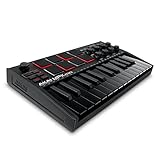
Overview: The Akai Professional MPK Mini MK3 in Black delivers the same powerhouse feature set as the standard edition, wrapping it in a sleek, stage-ready dark finish. This 25-key USB MIDI controller continues to dominate the entry-level market by offering professional-grade MPC pads, comprehensive software integration, and remarkable portability. The black variant appeals to producers who prefer their gear to match a darker studio aesthetic or stage setup, while maintaining identical functionality to its colored counterparts.
What Makes It Stand Out: Beyond the classic MPK Mini MK3 features—NKS integration, 4-way thumbstick, and choice of Komplete 15 Select bundles—the black finish offers a subtle professional appearance that resists visible wear and fingerprints better than lighter colors. The 8 RGB-backlit MPC pads retain Akai’s legendary responsiveness, making drum programming feel musical rather than mechanical. The built-in arpeggiator with adjustable resolution and modes provides instant inspiration, while the 8 assignable knobs map seamlessly to your DAW’s mixer and virtual instruments. The NKS partnership with Native Instruments remains a standout feature rarely found in sub-$150 controllers.
Value for Money: Priced identically to other color variants at around $120, the black version offers the same exceptional value proposition. The included software bundle—your choice of three Komplete 15 Select packages—represents a value several times the controller’s price. Compared to alternatives like the Novation Launchkey Mini, which focuses more on Ableton integration, the MPK Mini’s NKS support and MPC pads give it an edge for producers working across multiple DAWs or within NI’s ecosystem. This is essentially a paid software bundle with a free world-class controller attached.
Strengths and Weaknesses: Strengths include the fingerprint-resistant black finish, industry-standard MPC pad feel, comprehensive software package, and compact durability. The 4-way joystick offers expressive control in minimal space. Weaknesses mirror the standard model: mini keys can frustrate experienced pianists, the eight-pad limitation restricts complex finger drumming, and the plastic chassis lacks the heft of premium gear. No aftertouch on keys or pads may disappoint advanced users.
Bottom Line: The MPK Mini MK3 Black is the perfect choice for producers seeking a discreet, professional-looking controller that doesn’t compromise on features. It’s equally at home in a bedroom studio or on stage, making it one of the smartest purchases for electronic music creators. The color preference is subjective, but the performance is objectively excellent.
3. Akai Professional MPK Mini MK3 25 Key USB MIDI Keyboard Controller With 8 Backlit Drum Pads, 8 Knobs, Music Production Software and Native Instruments Sound Package (NKS Integration), Grey

Overview: The Akai Professional MPK Mini MK3 in Grey offers a fresh aesthetic alternative while maintaining the exact feature set that has made this 25-key controller a market leader. This USB-powered MIDI workstation combines velocity-sensitive mini keys, 8 backlit MPC drum pads, and 8 assignable knobs in a compact package perfect for mobile production. The grey finish provides a modern, understated look that stands out from the typical black studio gear without being flashy, appealing to producers who want subtle differentiation.
What Makes It Stand Out: The grey colorway distinguishes this from the standard black model while retaining all core features: Native Kontrol Standard (NKS) integration, the innovative 4-way thumbstick for pitch and modulation, and a built-in arpeggiator with comprehensive parameter control. The 8 MPC-style pads deliver the same legendary response that defined the original Music Production Center, complete with Note Repeat and Full Level functions. The ability to select one of three Komplete 15 Select bundles (Beats, Band, or Electronic) adds personalized value, letting you tailor the software to your genre preferences. The grey finish also shows less dust than black surfaces.
Value for Money: Matching the $120 price point of its siblings, the grey variant delivers identical value. The software bundle alone—which includes your choice of curated Native Instruments libraries—would cost significantly more purchased separately. When compared to similarly priced controllers like the M-Audio Oxygen Pro Mini, the MPK Mini’s NKS integration and MPC heritage provide clear advantages. For producers who prioritize both functionality and aesthetic cohesion in their studio, this color option adds visual value without financial penalty. It’s an investment in workflow that pays dividends through included sounds and seamless software integration.
Strengths and Weaknesses: Strengths include the unique grey finish, professional MPC pad quality, extensive software bundle, and robust build for its class. The thumbstick controller is ergonomic and precise. Weaknesses remain consistent across all color variants: the mini key size challenges players accustomed to full-sized keyboards, the limited number of pads and knobs constrains elaborate live performances, and the absence of aftertouch limits expressive potential. The grey plastic may discolor over time with heavy use, unlike the more forgiving black.
Bottom Line: The MPK Mini MK3 Grey is functionally identical to its black counterpart but offers aesthetic variety for producers curating their studio’s visual identity. It remains the definitive entry-level controller for beatmakers and mobile musicians, combining Akai’s legendary pad heritage with modern software integration. Choose this color if you prefer a lighter studio aesthetic or want gear that photographs well for content creation.
4. Akai Professional LPD8 - USB MIDI Controller with 8 Responsive RGB MPC Drum Pads for Mac and PC, 8 Assignable Knobs and Music Production Software

Overview: The Akai Professional LPD8 strips away the keys to deliver pure pad-and-knob control in an ultra-portable package. Measuring just 13 inches wide, this USB MIDI controller features 8 responsive RGB MPC drum pads and 8 assignable Q-Link knobs, making it the ultimate companion for laptop producers who already own a keyboard or prefer to program melodies with a mouse. It’s a focused tool designed for beatmakers who prioritize pad performance above all else, inheriting the MPC lineage in its most compact form factor.
What Makes It Stand Out: The LPD8’s MPC pads are its crown jewel, offering the same velocity-sensitive response and RGB feedback found in Akai’s more expensive controllers. Four programmable preset slots let you instantly switch between DAW mappings, virtual instrument controls, and effect parameters without reprogramming. The slim-line design weighs under a pound and fits in any laptop bag, while the sturdy build quality defies its budget price point. Unlike pad controllers that try to do everything, the LPD8 focuses on doing one thing exceptionally well: providing tactile control for drums, samples, and mixer parameters wherever inspiration strikes.
Value for Money: Typically priced around $70-80, the LPD8 competes directly with the Korg nanoPAD2 but offers superior pad quality and RGB lighting. For producers who already own a MIDI keyboard, it provides dedicated pad control without redundant keys, saving money and desk space. The included software, while less extensive than the MPK Mini’s bundle, covers essential production needs. Considering Akai’s MPC heritage is baked into every pad, you’re getting professional-grade triggering technology at a fraction of the cost of a full MPC. It’s a specialized tool that delivers exceptional value to its target user.
Strengths and Weaknesses: Strengths include authentic MPC pad feel, extreme portability, RGB feedback, four user presets, and straightforward functionality. The knobs offer precise parameter control without menu diving. Weaknesses are its single-purpose design—no keys, no faders, limited DAW integration compared to NKS-equipped devices. The plastic construction feels less premium than metal controllers, and the lack of a screen makes deep editing cumbersome. It’s not a standalone solution for producers needing melodic input.
Bottom Line: The LPD8 is the perfect secondary controller for beatmakers who demand MPC-quality pads in a go-anywhere package. It’s an essential tool for finger drummers, sample-triggering performers, and producers seeking to augment their existing setup. While not a complete production solution on its own, it excels at its specific mission with zero compromises on pad performance.
5. Akai Professional MIDImix - USB MIDI Controller Mixer with Assignable Faders and Master Fader, 24 Knobs and 16 Buttons, 1 to 1 Mapping With Ableton Live

Overview: The Akai Professional MIDImix reimagines the MIDI controller as a dedicated mixing surface, replacing pads and keys with 9 faders, 24 knobs, and 16 buttons in a compact, road-ready enclosure. Designed specifically for hands-on DAW control, this USB-powered device offers instant 1-to-1 mapping with Ableton Live, making it a mixing console that fits in your backpack. It’s a purpose-built tool for producers who spend more time balancing tracks and tweaking effects than playing melodies.
What Makes It Stand Out: The MIDImix’s single-button Ableton mapping is its killer feature, instantly assigning all controls to Live’s mixer without manual MIDI mapping. Eight individual line faders plus a master fader provide genuine mixing console workflow, while 24 knobs (three per channel) offer dedicated control over EQ, sends, and device parameters. The 16 buttons handle mute, solo, and record-arm functions across two banks. Unlike generic controllers, every element is designed for mixing efficiency, making it feel like a miniature version of professional studio surfaces costing thousands more.
Value for Money: At roughly $80-90, the MIDImix undercuts the Novation Launch Control XL while offering similar functionality. For Ableton Live users, its seamless integration eliminates hours of controller mapping frustration. While it lacks the versatility of pad-equipped controllers, it provides triple the faders of most competitors in its class. The included Ableton Live Lite adds value for newcomers. If your workflow centers on mixing and arrangement rather than performance, this specialized tool delivers better ROI than jack-of-all-trades controllers.
Strengths and Weaknesses: Strengths include flawless Ableton integration, generous fader and knob count, sturdy construction, and focused workflow. The one-to-one mapping is genuinely time-saving. Weaknesses are its DAW-specific design—while it works with other software, the magic is in Ableton. No pads, keys, or transport controls limit its versatility. The faders are short-throw, lacking the precision of full-sized mixing consoles. It’s a one-trick pony, albeit one that performs its trick brilliantly.
Bottom Line: The MIDImix is the ultimate mixing controller for Ableton Live devotees who crave physical faders and knobs. It’s not for everyone, but for its target audience, it’s nearly perfect. If your productions live in Ableton and you’re tired of mouse-heavy mixing, this is the most cost-effective way to reclaim hands-on control. Consider it an essential mixing accessory rather than an all-in-one solution.
6. Wireless Midi Controller Mixer, Bluetooth Semi Weighted Professional dynamic keybed 8 Knobs and Music Production,Software Included (Black Mixer)

Overview:
This wireless MIDI controller delivers Bluetooth connectivity with low-latency performance, targeting producers who demand cable-free creativity. It features a semi-weighted keybed—rare in portable units—eight customizable knobs, and a 16-hour rechargeable battery. The smart DAW integration eliminates manual MIDI mapping, while backlit silicone buttons ensure quiet operation during late-night sessions. Designed for mobile musicians, it combines professional feel with untethered flexibility.
What Makes It Stand Out:
The semi-weighted keys provide authentic piano response unmatched by typical mini-key controllers. Sixteen-hour battery life leads its class, and the wireless design removes studio clutter. Each control unit offers deep customization with visual feedback indicators, enabling personalized workflows. The soft backlit buttons operate silently, letting you focus purely on musical inspiration without mechanical distractions.
Value for Money:
Mid-range pricing is justified by premium features like semi-weighted keys and robust wireless capability. Comparable wired controllers cost more when factoring in cable management, while the included software bundle adds significant value for beginners building their production suite. The 16-hour battery eliminates frequent recharging downtime, making it cost-effective for serious mobile producers.
Strengths and Weaknesses:
Strengths include exceptional wireless stability, professional-grade key feel, robust battery life, intuitive customization, and silent operation. Weaknesses: Bluetooth may introduce minimal latency for critical listeners, the black finish shows fingerprints, and the learning curve for deep customization could intimidate newcomers. Limited pad controls may disappoint beatmakers.
Bottom Line:
Ideal for mobile producers prioritizing key quality and wireless freedom. The semi-weighted keys and marathon battery make it perfect for serious musicians on the move, though pad-centric producers should consider alternatives with more drum triggers.
7. Btuty BT MIDI Foot Controller Wireless MIDI Controller Rechargeable 4 Buttons Pedal APP Control Chocolate Rechargeable Midi Controller

Overview:
This ultra-portable Bluetooth MIDI foot controller offers four robust footswitches for hands-free DAW control, targeting gigging musicians and live performers. The dedicated CubeSuite app enables deep customization from your smartphone, while a bright display provides real-time visual feedback. With 12-hour battery life and broad cross-platform compatibility, it delivers reliable wireless control for effects, loops, and transport functions in a durable, lightweight package.
What Makes It Stand Out:
The intelligent app integration sets this apart, allowing on-the-fly adjustments without bending down during performances. The distinctive chocolate color and clear display provide instant preset confirmation, reducing live errors. Four switches hit the optimal balance between functionality and portability, fitting effortlessly into any gig bag while offering enough control for most performance scenarios.
Value for Money:
Competitively priced against established foot controllers, the rechargeable battery eliminates ongoing costs of disposables. The app integration adds premium value typically found in higher-end units. For performers needing reliable wireless control, it undercuts many brand-name alternatives while delivering comparable build quality and superior convenience.
Strengths and Weaknesses:
Strengths include exceptional portability, intuitive app control, long battery life, clear visual feedback, and seamless compatibility across Windows, iOS, and Android. Weaknesses: Only four buttons limit complex setups, Bluetooth can drop in crowded RF environments, and the plastic construction may not withstand heavy touring abuse. App dependency might concern traditionalists.
Bottom Line:
Perfect for performing musicians seeking affordable wireless foot control. The app integration and display make it gig-ready, though those needing more switches should look elsewhere. A solid value for solo artists and small bands wanting to streamline their live workflow.
8. Donner Mini MIDI Keyboard, N-25 25 Key MIDI Controller for Beginner with Velocity-Sensitive Mini Keys&Light-up Rocker&Music Production Software, Small Controlador MIDI with 40 Teaching Courses

Overview:
The Donner N-25 targets absolute beginners with a 25-key velocity-sensitive controller integrated with 40 structured teaching courses. This compact unit includes a pitch-bend wheel, light-up buttons for visual feedback, and plug-and-play USB-MIDI connectivity across Mac, PC, and iOS. Four programmable banks provide growth potential beyond novice status, while the simplified layout reduces overwhelm for those new to music production.
What Makes It Stand Out:
The 40 built-in teaching courses are genuinely unique, providing structured learning absent in all competitors. Light-up buttons reinforce lessons visually, making theory more engaging. Donner transforms this from a mere controller into a complete educational package, offering step-by-step progression from basic arrangement to advanced techniques without requiring separate learning materials.
Value for Money:
Extremely affordable, delivering exceptional value for entry-level users. Comparable controllers lack educational content, forcing separate purchases of courses. The included software and 40 lessons provide a complete music production starter kit, undercutting most competitors by 30-50% while offering more comprehensive beginner support.
Strengths and Weaknesses:
Strengths include comprehensive teaching courses, beginner-friendly design, broad compatibility, fun visual feedback, and unbeatable price. The simple layout accelerates learning. Weaknesses: Mini keys lack expressiveness, advanced producers outgrow features quickly, plasticky build quality feels less premium, and limited modulation options restrict expression compared to feature-rich alternatives.
Bottom Line:
An outstanding entry point for absolute beginners. The integrated courses provide genuine educational value, making it more than just a controller. However, serious producers should invest in more capable hardware from the start, as the N-25’s limitations become apparent within months of skill development.
9. DaierTek Midi Keyboard Controller 25 Key Portable Mini Bluetooth & USB Midi Piano with 8 Backlit Drum Pad, 8 Knobs and Music Production Software for Computer Recording, Music Production

Overview:
The DaierTek 25-key controller combines Bluetooth and USB connectivity with professional features typically found in premium units. It includes velocity-sensitive keys, eight RGB backlit drum pads with aftertouch, eight assignable encoders, and capacitive touch strips for pitch and modulation. The 2000mAh battery delivers 16 hours of operation, while smart chord and scale functions accelerate composition for both novices and experienced producers.
What Makes It Stand Out:
Aftertouch-enabled pads are exceptional at this price, offering expressive control reserved for high-end controllers. Smart chord and scale modes provide instant musical inspiration, while the combination of wireless freedom, RGB pads, and touch strips creates a surprisingly professional package. The mini-display provides essential visual feedback without cluttering the compact surface.
Value for Money:
This controller punches above its weight, offering features found in units costing twice as much. Aftertouch pads alone justify the price, while the 16-hour battery and robust DAW compatibility eliminate immediate upgrade needs. For producers seeking maximum features per dollar, particularly beatmakers and electronic musicians, it represents exceptional value.
Strengths and Weaknesses:
Strengths include aftertouch-enabled RGB pads, excellent battery life, versatile connectivity, smart composition tools, and highly responsive velocity sensitivity. Weaknesses: The unknown brand lacks Akai or Novation’s industry recognition, build quality may not match premium alternatives, Bluetooth latency could concern professionals, and mini keys feel cramped for larger hands.
Bottom Line:
A feature-packed powerhouse for budget-conscious producers. The aftertouch pads and smart functions make it ideal for beatmakers and electronic musicians, though brand-conscious buyers may prefer established alternatives. Perfect as a secondary portable controller or primary unit for cost-aware creators.
10. Akai Professional MPK Mini Play MK3 - MIDI Keyboard Controller with Built-in Speaker and Sounds Plus Dynamic Keybed, MPC Pads, Software Suite and Native Instruments Sound Package

Overview:
The MPK Mini Play MK3 revolutionizes portable controllers with standalone operation featuring built-in speakers and over 100 internal sounds. Akai’s Gen 2 dynamic keybed and legendary MPC pads deliver professional feel, while the OLED display provides crystal-clear parameter feedback. NKS integration unlocks Native Instruments’ Komplete 15 Select bundles, and you can choose between Beats, Band, or Electronic sound packages to match your genre.
What Makes It Stand Out:
Standalone capability with internal sounds and speakers eliminates computer dependency for idea sketching. The MPC pads carry Akai’s iconic responsiveness, while NKS integration provides seamless control over professional sound libraries. The OLED display is a game-changer for workflow, offering visibility that LCD competitors cannot match. Customizable Komplete bundles tailor the experience.
Value for Money:
Premium-priced but delivering unmatched value through standalone functionality and included Native Instruments bundle worth hundreds. The MPC pads and Akai build quality ensure longevity, while internal sounds provide immediate inspiration. For producers wanting a complete ecosystem, the total package value significantly exceeds the investment.
Strengths and Weaknesses:
Strengths include standalone operation, legendary MPC pads, NKS integration, premium build quality, excellent keybed feel, and comprehensive software suite. The OLED display transforms workflow efficiency. Weaknesses: Higher price deters beginners, built-in speaker lacks bass response, battery life shortens when using internal sounds, and 25 keys limit complex playing.
Bottom Line:
The ultimate compact controller for serious producers. The standalone capability and MPC pedigree justify the premium, making it ideal for beatmakers demanding Akai quality and Native Instruments integration. A worthwhile investment for committed creators, though beginners may find it overkill initially.
Why MIDI Controllers Are Essential for EDM Production in 2026
The modern EDM production environment demands speed, precision, and expressive control that mouse-and-keyboard simply cannot deliver. Today’s controllers offer tactile feedback that engages muscle memory, allowing you to program complex drum patterns, modulate synth parameters in real-time, and perform automation with human feel. The psychological shift from clicking to physically playing cannot be overstated—it transforms production from a technical exercise into a performance.
The Tactile Advantage in Beat Making
When you’re programming a trap hi-hat roll or dialing in the perfect sidechain compression, physical controls provide immediate, intuitive feedback. Your fingers develop a direct connection to the sound, enabling micro-adjustments that feel musical rather than mathematical. This tactile relationship becomes crucial during those magical flow states where creativity peaks and technical barriers disappear.
Workflow Revolution Through Physical Control
Modern EDM tracks often contain 100+ channels with intricate automation. A well-designed controller lets you navigate this complexity without breaking your creative stride. Imagine adjusting filter cutoffs on multiple synth layers simultaneously while triggering one-shot vocal chops—all without touching your mouse. That’s the power of a strategic hardware setup in 2026.
Understanding MIDI 2.0 and Its Impact on Your Workflow
MIDI 2.0 has finally reached mainstream adoption in 2026, and its implications for EDM producers are revolutionary. This isn’t just an incremental update—it’s a fundamental reimagining of how hardware and software communicate, offering bidirectional conversation between your controller and DAW.
Bidirectional Communication: A Two-Way Street
Gone are the days of one-way MIDI messages. Modern controllers can receive data back from your software, automatically updating LED rings around encoders, displaying parameter values on built-in screens, and even changing their control layouts based on which plugin has focus. When you load a Serum preset, your controller instantly reconfigures to show relevant macro mappings without manual intervention.
Higher Resolution Control for Precision Editing
MIDI 2.0’s 32-bit resolution (compared to MIDI 1.0’s 7-bit) means your filter sweeps, pitch bends, and parameter automation are now butter-smooth with 4,294,967,296 possible values instead of just 128. For EDM producers, this eliminates stepping artifacts in automation and allows for incredibly nuanced sound design that translates perfectly to massive sound systems.
Key Features That Define Professional-Grade Controllers
Not all MIDI controllers are created equal, especially when you’re building tracks designed to move festival crowds. Professional-grade devices share several non-negotiable characteristics that separate them from consumer toys.
Velocity and Pressure Sensitivity Standards
In 2026, professional pad controllers feature multiple pressure sensors per pad, capturing not just initial velocity but also continuous pressure data throughout the note’s duration. This enables expressive techniques like gradually opening a filter by pressing harder on a sustained chord, adding human dynamics to otherwise static loops.
Build Quality That Withstands the Road
Touring EDM artists need gear that survives being tossed in overhead bins, subjected to temperature extremes, and played with aggressive energy night after night. Look for aircraft-grade aluminum chassis, reinforced USB connections, and buttons rated for millions of presses. The internal construction matters as much as the external—premium controllers use individual PCBs for different sections, making repairs feasible rather than forcing complete replacement.
Pad Controllers vs. Keyboard Controllers: Making the Right Choice
The eternal debate continues, but 2026’s ecosystem has clarified the use cases for each format. Your choice fundamentally shapes your creative approach and performance style.
When Pad Controllers Reign Supreme for EDM
Pad controllers excel at rhythmic programming, sample triggering, and step sequencing. Their grid layout mirrors modern DAW piano rolls and drum racks, making them intuitive for beat-focused producers. If your workflow centers around chopping breaks, finger-drumming complex patterns, or launching clips in Ableton Live, a pad-based controller should be your primary weapon.
The Keyboard Controller Advantage for Melodic Elements
Keyboard controllers remain irreplaceable for harmonic composition, bassline creation, and melodic sound design. Modern EDM keyboards combine traditional piano-style keys with RGB pads, encoders, and faders, offering hybrid functionality. The weighted vs. semi-weighted key debate rages on, but for EDM, semi-weighted keys typically provide the right balance of piano-like feel and rapid synth-style playing.
The Importance of Aftertouch and Polyphonic Expression
Aftertouch has evolved from a niche feature into a cornerstone of expressive EDM performance. Understanding its variants will dramatically impact your purchasing decision.
Channel Aftertouch vs. Polyphonic Aftertouch
Channel aftertouch sends one pressure value for all held notes, perfect for global effects like filter sweeps or reverb throws. Polyphonic aftertouch, now standard on premium controllers, sends individual pressure data for each key or pad, letting you articulate chords with independent expression on each note—a game-changer for progressive house pads and future bass supersaws.
MPE and the Future of EDM Sound Design
MIDI Polyphonic Expression (MPE) has matured in 2026, with most softsynths natively supporting it. MPE-enabled controllers allow per-note pitch bends, making it possible to create realistic guitar-style bends on individual notes within a chord or perform complex microtonal slides that define modern riddim and tearout basses. This technology has become essential for producers pushing sound design boundaries.
Integration with Modern DAWs and EDM Software
A controller’s value is directly proportional to how seamlessly it integrates with your software ecosystem. In 2026, deep integration goes far beyond basic Mackie Control protocols.
Automatic Mapping and Intelligent Control
The best controllers feature DAW-specific scripts that automatically map to your mixer, device parameters, and browser functions. When you select a track, the controller’s displays show track names, volume levels, and plugin parameters without manual mapping. Some devices even learn your usage patterns, surfacing frequently-used controls to primary positions.
Custom Scripting for Power Users
For producers using niche software or wanting personalized workflows, the ability to write custom control scripts is invaluable. Look for controllers with open-source scripting languages, active developer communities, and comprehensive API documentation. This future-proofs your investment as new software releases emerge.
Build Quality and Durability for Touring Producers
EDM producers in 2026 often split time between studio creation and live performance. Your controller must bridge both worlds without compromise.
Material Science in Modern Controllers
Premium devices now utilize carbon fiber reinforced panels, tempered glass touch surfaces, and surgical-grade stainless steel components. These materials reduce weight while increasing durability—a critical combination for artists flying between festivals. The internal frame construction matters more than exterior aesthetics; monocoque designs distribute impact forces better than assembled frames.
Weather and Environmental Resistance
Contemporary controllers feature conformal coatings on circuit boards, sealed faders, and gaskets around button openings. This protects against humidity at outdoor festivals, spilled drinks in clubs, and dust in desert events like Burning Man. Ingress protection ratings have become a legitimate spec sheet item for professional gear.
Portability vs. Studio-Centric Design: Finding Your Balance
The production landscape has fractured into mobile creators and studio commanders. Your lifestyle dictates which design philosophy serves you best.
The Mobile Producer’s Compact Arsenal
Ultra-portable controllers weighing under 2 pounds now offer surprising depth, with mini keys, touch-sensitive strips replacing traditional wheels, and foldable designs. These devices connect via Bluetooth MIDI with sub-3ms latency and run for 20+ hours on internal batteries. The compromise? Smaller pads and fewer simultaneous controls, requiring more menu diving.
Studio Command Centers: Maximum Control Density
Stationary setups benefit from controllers that prioritize control density over portability. These beasts feature full-size everything—faders, pads, keys, and displays—often spanning 49+ keys and 16+ pads. They draw power via USB-C PD and may require external power bricks, but offer immediate access to hundreds of parameters simultaneously.
Advanced Connectivity Options in 2026
The connectivity landscape has expanded dramatically, offering unprecedented flexibility in how you integrate controllers into your setup.
Wired Excellence: Beyond USB-C
While USB-C with Thunderbolt 4 integration provides power and data over a single cable, professional controllers now include multiple USB ports for daisy-chaining devices, 5-pin DIN MIDI for legacy hardware integration, and even Ethernet-based MIDI for large installations. Some devices feature audio pass-through, letting you monitor your DAW through the controller’s headphone jack, reducing cable clutter.
Wireless Freedom with Bluetooth MIDI 2.0
Bluetooth MIDI 2.0 has solved the latency issues that plagued earlier wireless protocols, achieving stable sub-4ms performance. Modern controllers maintain rock-solid connections across 30+ feet, automatically reconnecting to paired devices. This liberates you from cable spaghetti during performances and enables unconventional studio layouts where your controller isn’t tethered to your desk.
The Rise of AI-Assisted MIDI Controllers
Artificial intelligence has infiltrated MIDI controller design in fascinating ways, moving beyond gimmicks to genuinely useful creative assistants.
Intelligent Pattern Generation and Variation
Some 2026 controllers analyze your playing style in real-time, suggesting drum pattern variations that match your groove, or generating harmonic variations on your chord progressions that maintain your established musical vocabulary. This isn’t about replacing your creativity—it’s about accelerating iteration and breaking through writer’s block.
Predictive Workflow Optimization
AI algorithms observe which controls you adjust during different production phases, automatically creating contextual layouts that surface relevant parameters. When you’re sound designing, it shows filter and envelope controls; during mixing, it prioritizes volume and send levels. Over time, the controller becomes an intuitive extension of your process.
Customization and User-Programmable Workflows
Off-the-shelf mappings rarely satisfy serious producers. Deep customization capabilities separate professional tools from consumer gadgets.
Macro Programming for Complex Actions
Advanced controllers allow you to program macros that execute multiple actions with single button presses. Imagine a “drop builder” macro that simultaneously triggers a drum fill, opens a filter, increases reverb send, and activates a distortion—all timed perfectly to your track’s tempo. This level of customization transforms live performance and speeds up repetitive studio tasks.
User Scripts and Community Sharing
The most vibrant controller ecosystems feature active communities sharing custom scripts, LED themes, and workflow templates. Look for manufacturers that embrace this culture with official forums, script repositories, and developer spotlights. A controller’s value multiplies when you can download a complete mapping for your favorite VST synth in minutes rather than spending hours programming it yourself.
Visual Feedback and OLED Displays
In dark clubs and dim studios, visual feedback becomes critical for confident performance. 2026’s controllers have elevated this to an art form.
High-Resolution OLED Screens
Modern controllers feature color OLED displays above each encoder or on central panels, showing parameter names, values, and even mini waveforms. These screens update in real-time as you switch tracks or devices, eliminating the need to look at your computer screen during performance. Some displays show ADSR envelope shapes or filter curves, making sound design more visual and intuitive.
RGB Feedback Systems and LED Rings
Intelligent RGB lighting does more than look cool—it provides crucial status information. Colors can represent track types (drums=blue, synths=purple), clip playing status, or scale modes. LED rings around encoders show parameter positions at a glance, even when switching between plugin instances. The best implementations allow custom color schemes that match your DAW’s aesthetic.
The Role of Faders, Knobs, and Encoders in EDM
Each control type serves specific purposes in electronic music production. Understanding their optimal applications helps you choose a controller with the right balance.
Endless Encoders vs. Fixed-Position Knobs
Endless encoders (rotating 360 degrees) are superior for plugin parameters because they don’t have physical stop points, allowing them to represent any value range. Fixed-position knobs provide better tactile reference for mixer channels—you can feel their position without looking. The ideal controller includes both types, using encoders for synths and knobs for mixer control.
Fader Types and Their Sonic Implications
Motorized faders automatically move to reflect your DAW’s current state, essential for mixing sessions with automation. Touch-sensitive faders know when you’re touching them, preventing accidental jumps when switching between hardware and software control. For EDM, 60mm faders offer the best compromise between precision and compactness, while 100mm faders provide studio-console feel for detailed level riding.
Budget Considerations: From Bedroom to Mainstage
Price tiers in 2026’s MIDI controller market reflect genuine capability differences rather than just brand prestige. Understanding what you gain at each level helps maximize your investment.
Entry-Level Sweet Spots for Emerging Producers
Controllers in the $150-300 range now offer surprising depth, often including velocity-sensitive pads, basic aftertouch, and DAW integration scripts. The compromises typically involve plastic construction, smaller keybeds, and limited customization. These devices excel as first controllers or secondary units for specific tasks like drum programming.
Professional Tier Investments
Premium controllers ($800-2000+) justify their cost through exceptional build quality, advanced expression capabilities, deep software integration, and robust support ecosystems. They feature metal construction, multiple display types, and extensive I/O options. For career artists, this investment pays dividends in reliability, creative potential, and professional image.
Future-Proofing Your Investment
With technology evolving rapidly, smart purchasing decisions consider longevity and adaptability.
Firmware Updates and Manufacturer Support
Prioritize manufacturers with track records of multi-year firmware support, adding features to older hardware. Some 2026 controllers receive quarterly updates that add new DAW integrations, improve Bluetooth stability, or introduce AI features. Check manufacturer forums and social media to gauge their commitment to legacy products.
Modular Expansion Capabilities
Forward-thinking controllers feature expansion ports for connecting additional modules—extra fader banks, pad grids, or specialized control surfaces. This grow-as-you-go approach prevents obsolescence, letting you expand your control surface without replacing your core investment. Some systems even allow connecting modules from different manufacturers via standardized protocols.
Frequently Asked Questions
What makes a MIDI controller specifically good for EDM compared to other genres?
EDM production emphasizes rhythmic programming, real-time parameter automation, and live performance elements. Controllers optimized for EDM feature robust pad layouts for drum programming, extensive RGB feedback for clip launching, tight integration with electronic-focused DAWs, and durable builds for both studio and stage use. The ability to control multiple synth parameters simultaneously while triggering samples is far more critical than traditional piano-playing feel.
Should I prioritize more pads or more keys for beat making?
This depends entirely on your workflow. If you primarily program drums, chop samples, and trigger one-shots, prioritize pad count and quality—16 to 64 pads is ideal. If you compose melodies, write basslines, and play chords, invest in a quality keybed with at least 25 keys. Many 2026 controllers offer hybrid layouts, but spreading your budget across both compromises quality. Consider your primary creative bottleneck: is it rhythmic expression or harmonic composition?
How important is MIDI 2.0 compatibility in 2026?
It’s becoming increasingly important but isn’t yet mandatory. MIDI 2.0 offers significant benefits: higher resolution control, automatic hardware configuration, and bidirectional communication. However, most DAWs and plugins still fully support MIDI 1.0, and many excellent controllers haven’t upgraded. If you’re buying for long-term use (5+ years), prioritize MIDI 2.0. If you’re on a budget or replacing a broken unit, MIDI 1.0 controllers remain perfectly viable.
Can one controller really handle both studio production and live performance?
Absolutely, but it requires careful feature selection. Look for devices with both USB and 5-pin MIDI outputs, robust build quality, customizable LED feedback for dark stages, and the ability to store multiple configuration profiles. The key is finding a controller with “performance modes” that simplify the layout for live use while retaining deep editing capabilities for studio work. Many touring producers use the same controller for both, just with different software profiles.
What’s the realistic latency difference between wired and Bluetooth MIDI in 2026?
Modern Bluetooth MIDI 2.0 controllers achieve 3-4ms latency, while wired USB-C connections typically deliver 1-2ms. In practice, this 2ms difference is imperceptible to most users, especially for pad triggering and parameter control. Where wired connections still dominate is in reliability—Bluetooth can occasionally drop in RF-noisy environments like clubs with extensive wireless lighting systems. For critical live performances, many artists use wired connections as backup.
How many controls do I actually need before it becomes overwhelming?
The sweet spot for most EDM producers is 8-16 encoders, 8 faders, and 16-32 pads. This gives you immediate control over a standard mixer channel strip plus a drum rack without page-switching. Beyond this, you enter “control surface” territory where memorization becomes challenging. The key isn’t raw control count but intelligent grouping and visual feedback—color-coded sections and OLED labels prevent overwhelm more effectively than simply reducing controls.
Are motorized faders worth the premium price?
For mixing-intensive workflows, absolutely. Motorized faders instantly reflect your DAW’s automation states, preventing value jumps when touching a fader. This is crucial for EDM’s heavy automation—imagine your drop’s volume automation being disrupted because a physical fader was in the wrong position. For pure beat making and sound design, they’re less critical. Many producers use non-motorized controllers for production, then switch to dedicated control surfaces for final mixdown.
What’s the benefit of polyphonic aftertouch over channel aftertouch for EDM?
Polyphonic aftertouch lets you apply different pressure to individual notes within a chord, enabling complex expressive techniques. You can press harder on a sustained chord’s root note to emphasize it while keeping other notes subtle, or create evolving pad textures where each voice moves independently. For bass music and complex sound design, it’s transformative. However, for straightforward house beats and simple chord stabs, channel aftertouch (which affects all notes equally) often suffices and is more widely supported.
How do I know if a controller will integrate well with my specific DAW?
Check the manufacturer’s website for official DAW integration scripts—look for terms like “deep integration,” “automatic mapping,” or “custom scripts” specifically for your DAW. Search user forums and Reddit for real-world experiences. The best test: download the controller’s editor software before purchasing. If it offers comprehensive, logical MIDI mapping options, you can create custom integrations even without official support. Avoid controllers that rely solely on generic Mackie Control protocols for complex EDM workflows.
Should I buy a cheaper controller now and upgrade later, or invest in a premium device upfront?
If you’re serious about EDM production as a career or primary hobby, invest in a premium controller upfront. The workflow benefits, build quality, and resale value make it more economical long-term. However, if you’re exploring production as a hobby or unsure of your preferred workflow, start with a mid-tier device ($300-500) that offers solid fundamentals without extreme specialization. This lets you discover your needs before committing to a $1500+ flagship. The used market for quality controllers is robust, so you can recoup most of your investment if you decide to upgrade.
See Also
- How to Choose the 10 Best MIDI Controllers for EDM Production in 2026
- We Tested 30 MIDI Controllers—These 10 Have the Best Pad Layout for Finger Drumming in 2026
- Solving USB-C Power Issues with Mobile MIDI Controllers on iPad Pro
- 10 USB-C MIDI Controllers for Modern Producers in 2026
- How to Choose 10 Best MIDI Controllers for Finger Drumming in 2026