Table of Contents
The modern bedroom producer faces a paradox: infinite sonic possibilities trapped behind a glass screen, waiting for the right touch to bring them to life. In 2026, MIDI controllers have evolved from simple input devices into intelligent creative partners that transform your compact setup into a command center for musical innovation. Whether you’re carving out beats at 2 AM or layering ethereal pads while your roommate watches TV in the next room, the right controller doesn’t just connect you to your DAW—it becomes an extension of your musical imagination.
But here’s the truth most gear reviews won’t tell you: the “best” MIDI controller isn’t about flashy specs or influencer endorsements. It’s about finding the instrument that dissolves the barrier between your ideas and your speakers. As we navigate the landscape of 2026’s offerings, let’s focus on what actually matters for producers working in limited spaces with unlimited ambition.
Top 10 Midi Controllers For Producers
Detailed Product Reviews
1. Akai Professional MPK Mini MK3 25 Key USB MIDI Keyboard Controller With 8 Backlit Drum Pads, 8 Knobs, Music Production Software and Native Instruments Sound Package (NKS Integration)

Overview: The Akai Professional MPK Mini MK3 remains the gold standard for entry-level beat making and music production. This compact USB-powered controller packs 25 velocity-sensitive mini keys, eight MPC-style drum pads, and eight assignable knobs into a footprint that fits any desk or backpack. The included software bundle featuring MPC Beats, Ableton Live Lite, and virtual instruments provides immediate value for beginners establishing their first studio setup.
What Makes It Stand Out: The Native Kontrol Standard (NKS) integration sets this apart, offering seamless browsing of Native Instruments’ expansive sound libraries directly from the hardware. The innovative 4-way thumbstick combines pitch and modulation control in an intuitive format, while the built-in arpeggiator adds instant creative inspiration. The eight backlit MPC pads with Note Repeat and Full Level deliver authentic beat-making heritage that Akai pioneered.
Value for Money: Priced competitively under $120, the MK3 delivers professional features that punch above its weight class. The curated Komplete 15 Select bundle (choose Beats, Band, or Electronic) adds hundreds of dollars in software value, making this an unbeatable starter package compared to barebones competitors that offer little beyond basic MIDI functionality.
Strengths and Weaknesses: Pros: Exceptional software bundle, rugged build quality, intuitive layout, NKS integration, portable design. Cons: Mini keys limit expressive playing, thumbstick less precise than separate wheels, no color screen, older micro-USB connection.
Bottom Line: The MPK Mini MK3 remains the smartest first investment for aspiring producers. While newer models offer incremental upgrades, this proven workhorse delivers everything needed for professional music creation at an accessible price point that respects your budget.
2. Akai Professional MPK Mini IV USB-C MIDI Keyboard Controller for Beginners and Producers - MPC Drum Pads, 360° Knobs, Pitch and Mod Wheels, Production Software, Native Instruments Sound Package, Grey

Overview: The Akai Professional MPK Mini IV represents a significant evolutionary leap from its predecessor, modernizing the iconic compact controller with contemporary connectivity and enhanced workflow features. This USB-C powered unit retains the 25 mini-key layout but introduces a vibrant full-color screen and push-turn encoder that fundamentally changes how you interact with your DAW and plugins without reaching for your mouse.
What Makes It Stand Out: The eight 360-degree assignable knobs provide infinite rotation and precise parameter control, while the RGB-backlit MPC pads now offer pressure sensitivity for expressive performances. The inclusion of pitch and modulation wheels replaces the previous thumbstick, delivering traditional keyboard expression. The Studio Instrument Collection bundles over 1,000 pro-grade sounds from AIR, Akai Pro, and Moog, creating a complete production ecosystem.
Value for Money: At approximately $150-180, the price premium over the MK3 is justified by USB-C future-proofing, the color display that eliminates menu-diving, and the vastly superior software suite. The pre-mapped DAW integration with Ableton Live Lite 12, Logic Pro, and FL Studio gets you producing within minutes rather than hours, making it worth the investment for serious creators.
Strengths and Weaknesses: Pros: Modern USB-C connectivity, full-color screen, superior knobs and wheels, extensive sound library, pressure-sensitive pads. Cons: Higher price point, mini keys still present, steeper learning curve for beginners, software activation can be cumbersome.
Bottom Line: For producers ready to invest in a forward-looking controller, the MPK Mini IV delivers meaningful upgrades that accelerate workflow. The grey finish offers a sleek, professional aesthetic that distinguishes it from the standard black crowd while providing the same cutting-edge features.
3. Akai Professional MPK Mini IV USB-C MIDI Keyboard Controller for Beginners and Producers - MPC Drum Pads, 360° Knobs, Pitch and Mod Wheels, Production Software, Native Instruments Sound Package, Black

Overview: The Akai Professional MPK Mini IV in black offers identical next-generation features to its grey counterpart, delivering the same powerful production toolkit in a classic, understated finish. This USB-C MIDI controller continues the MPK legacy while addressing modern workflow demands through its full-color screen and enhanced control surface that keeps your hands on the hardware and off the computer.
What Makes It Stand Out: The eight 360-degree infinite rotation knobs and pressure-sensitive RGB MPC pads provide unprecedented tactile control for a controller this compact. The vibrant display combined with the push-turn encoder allows for deep plugin editing without breaking creative flow. The comprehensive Studio Instrument Collection, featuring over 1,000 sounds from legendary developers, transforms this from a simple controller into a complete production station ready for any genre.
Value for Money: Matching the grey version’s price point, this model delivers exceptional value through its future-proof USB-C connectivity and professional software bundle. The included Ableton Live Lite 12 and pre-mapped integration for major DAWs eliminates typical setup frustration, making the $150-180 investment worthwhile for serious creators who value seamless workflow over manual configuration.
Strengths and Weaknesses: Pros: Identical feature set to grey variant, classic black aesthetic, superior software bundle, modern connectivity, excellent build quality. Cons: Premium pricing, mini keys limit advanced pianists, color choice is purely aesthetic, software registration process requires patience.
Bottom Line: Choose between black and grey based purely on studio aesthetics—both MPK Mini IV variants represent the current pinnacle of compact controller design. The black version blends seamlessly with traditional studio gear while delivering the same cutting-edge features that define this next-generation series.
4. Akai Professional MPD218 - USB MIDI Controller with 16 MPC Drum Pads, 6 Assignable Knobs, Note Repeat and Full Level Buttons and Production Software
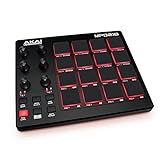
Overview: The Akai Professional MPD218 strips away the keyboard to deliver a pure pad-based production experience for finger drummers and sample-triggering specialists. This ultra-portable controller centers on 16 thick, fat MPC pads that feel substantially more responsive than typical budget controllers, providing the authentic Akai drum programming experience that defined hip-hop production.
What Makes It Stand Out: The expandable pad banks triple your available controls to 48 assignable pads without sacrificing immediacy. Dedicated Note Repeat and Full Level buttons unlock classic MPC workflows, while the 18 assignable knobs (accessed through three banks) provide surprising depth for effect and parameter control. The included Drum Synth 500 by AIR Music Tech delivers professional drum sounds that complement the hardware’s capabilities perfectly.
Value for Money: Positioned around $100, the MPD218 offers exceptional value for beat-focused producers who don’t require keys. You’re paying for premium pad quality rather than features you’ll never use. Compared to pad controllers from competitors, the MPC heritage and build quality justify every dollar, especially for hip-hop and electronic producers who prioritize feel over features.
Strengths and Weaknesses: Pros: Superior pad count and quality, authentic MPC workflow, excellent portability, dedicated note repeat/full level controls, affordable price. Cons: No keyboard limits melodic input, limited knobs without bank switching, dated micro-USB connection, smaller software bundle than MPK series.
Bottom Line: If your production style prioritizes rhythm over melody, the MPD218 is the definitive choice. It sacrifices keys to perfect the pad experience, making it ideal for sample-based producers, DJs, and beat makers who demand responsive, reliable performance in a compact, gig-ready package.
5. Akai Professional LPD8 - USB MIDI Controller with 8 Responsive RGB MPC Drum Pads for Mac and PC, 8 Assignable Knobs and Music Production Software

Overview: The Akai Professional LPD8 redefines portable production, delivering genuine MPC functionality in a package slim enough to slide into a laptop bag. This 13-inch controller proves that serious music creation doesn’t require a permanent studio setup, offering eight responsive RGB-backlit pads and eight Q-Link knobs for complete tactile control anywhere inspiration strikes.
What Makes It Stand Out: Four programmable preset slots store your custom mappings for different DAWs, virtual instruments, and effects, enabling instant recall without software intervention. The sturdy build quality, borrowed from standalone MPCs, ensures reliability despite the lightweight design. The RGB pads provide visual feedback that helps maintain orientation during performances, while the knobs offer precise control over mixing and effect parameters.
Value for Money: At under $80, the LPD8 delivers Akai’s legendary pad response and build quality at an entry-level price point. While the software bundle is modest compared to larger siblings, the hardware itself represents remarkable value for mobile producers, DJs, and live performers who need reliable control without bulk or complexity.
Strengths and Weaknesses: Pros: Extreme portability, robust construction, RGB pad feedback, preset management, unbeatable price, USB bus-powered. Cons: Only eight pads limit complex performances, no keyboard, single USB micro connection, limited included software, no pad banks for expansion.
Bottom Line: The LPD8 is the ultimate grab-and-go controller for creators who prioritize mobility. It sacrifices expansion for portability, making it perfect for sketching ideas on the road, controlling loops during live sets, or as a secondary controller in a larger studio setup. For its size and price, nothing beats its build quality and responsiveness.
6. Arturia MiniLab 3 - Universal MIDI Controller for Music Production, with All-in-One Software Package - 25 Keys, 8 Multi-Color Pads - White

Overview: The Arturia MiniLab 3 delivers a streamlined 25-key MIDI controller experience designed for intuitive music creation. Featuring eight velocity-sensitive pads, four faders, and rotary encoders, this white-finished controller emphasizes workflow fluidity. It includes Arturia’s comprehensive software bundle with Analog Lab Intro, providing immediate access to thousands of premium presets. USB-powered and compact, it’s built for producers who want tactile control without desk clutter.
What Makes It Stand Out: Unlike competitors focused solely on pads, the MiniLab 3 integrates four full-size faders for mixing control—a rarity in this price class. Its multi-color pads offer visual feedback for track status, while the included software package is genuinely production-ready, not just trialware. The controller automatically maps to major DAWs and Arturia instruments, creating a near-zero-setup experience that adapts to your creative process rather than forcing you to adapt to it.
Value for Money: Priced competitively with the Akai MPK Mini series, the MiniLab 3 justifies its cost through superior software integration. The Analog Lab Intro library alone represents significant value. While it lacks NKS integration, the included Arturia ecosystem provides comparable depth for those not invested in Native Instruments. For beginners, this eliminates immediate software purchases.
Strengths and Weaknesses: Strengths include excellent software bundle, four faders for mixer control, solid keybed feel for mini-keys, and seamless DAW integration. The white finish resists fingerprints better than black alternatives. Weaknesses are fewer drum pads than some rivals, no built-in arpeggiator, and no CV/Gate connectivity for modular users. The 25-key range limits two-handed playing.
Bottom Line: The MiniLab 3 excels for producers prioritizing software instruments and mixing control. It’s an ideal first controller that grows with your skills, though beat-makers might prefer more pads.
7. Akai Professional MPK Mini MK3 25 Key USB MIDI Keyboard Controller With 8 Backlit Drum Pads, 8 Knobs, Music Production Software and Native Instruments Sound Package (NKS Integration), Grey

Overview: The Akai MPK Mini MK3 represents the industry standard for portable beat production. This 25-key controller features eight MPC-style pads, eight assignable knobs, and a unique 4-way thumbstick for pitch and modulation control. The grey finish gives it a professional studio aesthetic. USB-powered with comprehensive software including MPC Beats and NKS integration, it’s designed for immediate creative immersion.
What Makes It Stand Out: The 4-way thumbstick offers superior expressive control compared to traditional wheels, enabling simultaneous pitch and modulation manipulation. Akai’s MPC pads are legendary—these backlit, velocity-sensitive pads include Note Repeat and Full Level functions for authentic beat-making. The NKS integration unlocks curated Komplete 15 Select bundles (Beats, Band, or Electronic), providing $200+ value in Native Instruments software you can browse directly from the hardware.
Value for Money: This controller delivers exceptional value through its software ecosystem. The NKS bundle alone makes it cheaper than buying software separately. MPC Beats provides a complete DAW experience, while the hardware itself offers more performance controls than competitors at this price point. For NI ecosystem users, it’s essentially a no-brainer.
Strengths and Weaknesses: Strengths include industry-best pads, innovative thumbstick, robust NKS integration, built-in arpeggiator with adjustable parameters, and excellent build quality. The grey finish is professional and resists wear. Weaknesses include mini keys that feel slightly cramped for complex playing, only eight knobs versus Arturia’s faders, and no OLED display for parameter feedback. Pad sensitivity requires adjustment for some users.
Bottom Line: The MPK Mini MK3 remains the top choice for hip-hop and electronic producers. Its MPC pedigree and NKS integration create an unbeatable value proposition for beat-focused workflows.
8. Akai Professional MPK Mini MK3 25 Key USB MIDI Keyboard Controller With 8 Backlit Drum Pads, 8 Knobs, Music Production Software and Native Instruments Sound Package (NKS Integration), White
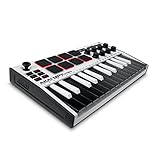
Overview: Functionally identical to its grey counterpart, the white MPK Mini MK3 offers the same professional-grade feature set in a striking, clean aesthetic. This 25-key USB MIDI controller combines Akai’s MPC heritage with modern NKS integration, featuring eight velocity-sensitive pads, eight knobs, and the signature 4-way thumbstick. It includes the complete software suite with MPC Beats and your choice of Komplete 15 Select bundle.
What Makes It Stand Out: Beyond the crisp white finish that stands out in modern studio setups, this controller maintains the series’ key innovations: the 4-way thumbstick for expressive control and MPC-quality drum pads with Note Repeat. The white chassis shows less dust and creates a minimalist visual appeal. The NKS integration remains a standout feature, allowing direct browsing of Native Instruments’ massive library without touching your mouse, streamlining workflow significantly.
Value for Money: At the same price point as the grey version, the white model offers purely aesthetic choice without compromising value. The software bundle—including MPC Beats and the NKS-selectable Komplete 15 Select bundle—provides immediate production capability worth several times the hardware cost. For studio owners concerned with visual cohesion, the white option may justify choosing this over competitors.
Strengths and Weaknesses: Strengths mirror the grey model: superior pad quality, innovative thumbstick, comprehensive NKS integration, portable form factor, and robust software bundle. The white finish adds visual distinction and better fingerprint resistance. Weaknesses include the same mini-key limitations, lack of faders, and no advanced connectivity like MIDI DIN or CV/Gate. The white plastic may yellow over years of sun exposure.
Bottom Line: Choose the white MPK Mini MK3 if you value aesthetics alongside performance. It delivers the same industry-leading beat-making experience as the grey version, making it ideal for producers wanting their gear to match their studio’s visual theme.
9. Akai Professional MPK Mini Plus - USB MIDI Keyboard Controller with 37 Mini Keys, 8 MPC Pads, Sequencer, MIDI/CV/Gate I/O, Music Production Software and Native Instruments Sound Package

Overview: The MPK Mini Plus expands Akai’s compact controller line to 37 keys while adding unprecedented connectivity. This controller features a built-in 64-step sequencer, MIDI/CV/Gate outputs, and the same eight MPC pads that define the series. USB-powered but capable of standalone operation, it bridges the gap between computer production and modular hardware setups. The software package includes MPC Beats and NKS integration with Komplete 15 Select bundles.
What Makes It Stand Out: The 37-key range provides three full octaves for more complex performances without sacrificing portability. The integrated sequencer allows pattern creation without a computer—record drum tracks and melodic sequences directly into the hardware. CV/Gate outputs are revolutionary at this price point, enabling control of analog synthesizers and Eurorack modules. This transforms it from a simple controller into a central studio hub.
Value for Money: Priced higher than the standard MPK Mini, the Plus justifies every dollar with expanded functionality. The sequencer alone adds $100+ value compared to separate hardware. CV/Gate connectivity typically requires $200+ modules. For hybrid digital/analog setups, it’s unparalleled value. The additional keys eliminate the need for octave-jumping during performances.
Strengths and Weaknesses: Strengths include 37-key range, built-in sequencer, CV/Gate/MIDI connectivity, NKS integration, and standalone operation. The MPC pads remain class-leading. Weaknesses are increased size reducing ultra-portability, steeper learning curve for beginners, and higher price point. The sequencer’s two-track limitation may restrict complex arrangements. No battery power option limits true mobility.
Bottom Line: The MPK Mini Plus is the ultimate compact controller for producers bridging software and hardware worlds. Its sequencer and CV outputs make it essential for modular enthusiasts seeking portability.
10. Donner USB-C MIDI Keyboard Controller, 25 Key Portable Mini MIDI Keyboard with 8 Drum Pads, OLED Display, 16 Smart Scales, Arpeggio, Replay, 4 DAW Software and 40 Teaching Courses, DMK 25 Pro Black

Overview: The Donner DMK 25 Pro positions itself as the ultimate beginner-friendly MIDI controller, offering features typically found in pricier units. This 25-key controller includes eight drum pads, an OLED display, and unique Smart Scale modes. The package includes four DAWs and 40 teaching courses, making it a complete learning system. USB-C connectivity ensures modern device compatibility, while the touch bar with light scale provides visual performance feedback.
What Makes It Stand Out: The 16 Smart Scale modes allow beginners to play in-key melodies without music theory knowledge—a game-changing educational feature. The OLED display provides real-time parameter feedback rarely seen at this price. The included 40 teaching courses transform this from mere hardware into a structured learning platform. The Replay function enables live performance looping, while the touch bar’s light scale offers stage-ready visual feedback even in home studios.
Value for Money: This is arguably the best value for absolute beginners. The hardware plus educational content would cost $300+ separately. While the software isn’t as premium as Arturia’s or Akai’s, it’s comprehensive and functional. For those unsure about committing to music production, this minimizes financial risk while maximizing learning potential.
Strengths and Weaknesses: Strengths include unbeatable price, educational content, Smart Scale modes, OLED display, USB-C connectivity, and mobile device support. The touch bar is innovative. Weaknesses include less robust build quality than premium brands, pads that lack Akai’s legendary feel, no NKS integration, and software that’s functional but not industry-standard. The brand lacks Akai’s legacy support.
Bottom Line: The DMK 25 Pro is perfect for beginners prioritizing learning over professional features. Its educational tools and Smart Scales provide a gentle entry ramp, though serious producers may outgrow it quickly.
Why MIDI Controllers Are the Bedroom Producer’s Secret Weapon
From Bedroom to Billboard: The Democratization of Music Production
The bedroom studio revolution has fundamentally rewritten the rules of music creation. In 2026, Grammy-nominated albums are being mixed in spaces smaller than a walk-in closet, and MIDI controllers sit at the heart of this transformation. Unlike the massive mixing consoles of yesteryear that required trust funds and dedicated buildings, today’s controllers pack unprecedented control density into footprint-friendly designs.
What makes this moment special isn’t just affordability—it’s the sophistication. Modern controllers offer polyphonic aftertouch, MPE compatibility, and AI-assisted mapping that would have seemed like science fiction five years ago. The gap between bedroom setups and commercial studios has narrowed not because professional gear got cheaper, but because compact controllers got exponentially smarter.
The Tangible Advantage: Why Touch Matters in a Digital World
Staring at waveforms and adjusting parameters with a mouse engages exactly one sense: sight. Music, however, demands more. The tactile feedback of pads, the resistance of faders, the spring of keys—these physical sensations create a feedback loop that visual interfaces simply cannot replicate. When you finger-drum a pattern, you’re not just inputting notes; you’re injecting groove, dynamics, and human imperfection that quantization algorithms struggle to synthesize.
For bedroom producers, this tangibility solves another critical problem: creative flow. Nothing kills inspiration faster than clicking through three submenus to automate a filter sweep. A well-mapped controller turns that into a single knob twist, keeping you in the zone where magic actually happens.
Seven Critical Features That Define 2026’s Best MIDI Controllers
Velocity Sensitivity and Aftertouch: Capturing Human Expression
Velocity sensitivity is table stakes in 2026, but not all implementations are created equal. Look for controllers that offer adjustable velocity curves and multi-layer sensitivity detection. The real game-changer, though, is polyphonic aftertouch. While channel aftertouch affects all notes globally, polyphonic aftertouch lets you apply pressure to individual notes within a chord—opening up expressive possibilities for pads, leads, and experimental sound design that can define your signature sound.
Test this feature personally if possible. Press a key firmly and listen for the subtle modulation that should follow. Cheap implementations feel binary; premium controllers offer a smooth, predictable response curve that becomes an instrument in itself.
Pad Quality: From Finger Drumming to Melodic Sequencing
Pads have evolved far beyond simple trigger buttons. In 2026, we’re seeing widespread adoption of silicone-rubber composites with mechanical dampening and capacitive touch layers. The best pads respond to initial strike velocity, sustained pressure, and even lateral finger movement for X/Y modulation.
For beatmakers, pad size and spacing matter immensely. 1-inch squares with 0.25-inch gaps prevent accidental triggers during complex patterns. For melodic sequencing, pads that support scale modes and chord generation can turn a 16-pad grid into a complete harmonic playground. The sweet spot for bedroom producers? Look for RGB backlighting with per-pad color customization—it transforms your controller from a drab input device into a visual composition tool.
Encoder Resolution: The Difference Between Good and Great
Those endless rotary encoders might look identical across price points, but their internal resolution tells a different story. Entry-level controllers typically use 128-step encoders (7-bit MIDI), while mid-range and premium options offer 1,024-step (10-bit) or even 16,384-step (14-bit) resolution for super-fine parameter control.
Why does this matter? When you’re automating a filter cutoff or reverb send, coarse resolution creates audible “stepping” that screams “amateur.” High-resolution encoders deliver butter-smooth sweeps that feel analog. In 2026, many controllers also feature “acceleration curves” that increase resolution based on turn speed—slow twists for precision, fast spins for dramatic changes.
Automatic DAW Integration: The End of Manual Mapping
Gone are the days of spending hours mapping CC numbers. Modern controllers feature auto-detection protocols that identify your DAW and load pre-configured mappings instantly. But the real innovation in 2026 is contextual mapping—the controller automatically reassigns its controls based on what you’re doing.
Select a track with a synth plugin, and the encoders map to filter, ADSR, and LFO parameters. Switch to a drum rack, and those same encoders now control pan, pitch, and decay per pad. This intelligence eliminates the cognitive load of remembering your mappings, letting you focus entirely on the music. When evaluating controllers, check if the manufacturer provides regular script updates for new DAW versions and popular plugins.
MPE and Expressive Control: The New Standard
MIDI Polyphonic Expression (MPE) has transitioned from niche curiosity to essential feature in 2026. MPE-compatible controllers send separate pitch bend, timbre, and pressure data for each note, effectively giving you per-note expression that rivals acoustic instruments. For bedroom producers, this means your solo violin VST can actually sound like a violin, with vibrato and bow pressure varying independently across double-stops.
Look for controllers that support MPE out of the box—not just as a firmware update afterthought. The best implementations provide visual feedback showing which notes are actively transmitting MPE data, preventing confusion during complex performances.
AI-Powered Smart Mapping: Your Controller That Learns
This is where 2026 gets futuristic. AI-assisted controllers analyze your production patterns and suggest control mappings based on your most-used parameters. After a week of sessions, your controller might notice you always reach for the filter cutoff on your favorite synth and automatically assign it to an easily accessible encoder.
Some systems even predict your next move, pre-loading mappings for plugins you typically use after certain actions. While this sounds like science fiction, the underlying technology uses simple pattern recognition that becomes remarkably accurate over time. The key is finding a controller that lets you toggle AI suggestions on or off—sometimes you want full manual control.
Build Quality and Component Longevity
That $99 controller might feel like a steal until the third pad stops registering after six months. For bedroom producers, build quality directly impacts creative consistency. Look for metal chassis components (even if it’s just the faceplate), replaceable fader caps, and encoders rated for 100,000+ rotations.
In 2026, sustainability matters too. Some manufacturers now offer repair kits and detailed disassembly guides, letting you replace worn pads or sticky faders instead of trashing the entire unit. This isn’t just eco-friendly—it saves money and maintains your muscle memory with a familiar layout.
Choosing the Right Form Factor for Your Space and Style
Keyboard Controllers: Weighted Keys vs. Synth Action
The keyboard action debate intensifies in bedroom setups where space is premium. Weighted hammer-action keys feel authentic for piano parts but add bulk and cost. Synth-action keys with semi-weighted mechanisms offer a compromise—light enough for rapid synth lines but with enough resistance for expressive dynamics.
For truly compact spaces, consider mini-keys with premium mechanisms. Modern mini-key controllers use the same high-quality keybeds as their full-size siblings, just scaled down. The trick is ensuring the key travel distance and spring tension don’t feel toy-like. Many producers keep a 25-key mini controller for travel and a 49-key semi-weighted unit at home for serious sessions.
Pad Controllers: Grid Sizes and Layout Strategies
The classic 4x4 grid (16 pads) works for many, but 2026 offers more strategic layouts. 8x2 grids let you sequence longer patterns horizontally, while 4x8 layouts provide instant access to 32 sounds without bank switching. Some controllers feature “pad split” modes, turning one physical grid into two independent zones—kick/snare on the left, hi-hats/percussion on the right.
Consider your dominant hand. Right-handed drummers might prefer pads positioned left of the keyboard, allowing right-hand melody play while triggering drums. Some controllers offer modular pad sections that attach to either side—perfect for adapting to your ergonomic preferences.
Compact All-in-One Solutions: Maximizing Minimal Space
The holy grail for bedroom producers: a single unit that handles keys, pads, and transport control without dominating your desk. These “Swiss Army knife” controllers typically feature 25-37 mini keys, 8-16 pads, and 8 encoders in a footprint smaller than a laptop.
The trade-off is density—you’re packing many functions into limited space, which can lead to accidental button presses. Look for units with “function lock” modes that disable non-essential controls during critical recording passes. Also check the encoder placement: side-mounted encoders prevent your hand from blocking the display when adjusting parameters.
Modular Systems: Building Your Dream Controller
Modularity represents the ultimate future-proofing strategy. Start with a core brain unit containing the USB interface and processor, then add pad modules, fader banks, and encoder clusters via magnetic connections. As your skills grow, your controller grows with you.
This approach shines for bedroom producers because you can spread modules across your desk based on workflow, rather than accepting a fixed layout. Keep pads near your drum rack, faders by your mixer view, and keys positioned ergonomically for extended playing. The initial investment is higher, but the long-term value and customization potential are unmatched.
Connectivity in 2026: What Matters Most
USB-C and the Death of Dongle Life
USB-C has finally achieved universal adoption, but not all USB-C ports are equal. Look for controllers that support USB 3.2 speeds (10 Gbps) and provide bus power without external adapters. Some premium units offer dual USB-C ports—one for computer connection, another for daisy-chaining additional controllers or powering a USB hub.
Power delivery matters too. A controller that can run on USB bus power but also accepts external 9V adapters gives you flexibility for mobile versus studio setups. In 2026, many controllers feature internal batteries with 8+ hour life, letting you produce on a tablet in the park without draining your mobile device’s power.
Wireless MIDI: Separating Hype from Reality
Bluetooth MIDI has matured significantly, with latency now hovering around 3-5ms—imperceptible for most applications. However, wireless still introduces jitter (inconsistent timing) that can groove with your DAW’s clock. For critical drum programming or tight rhythmic parts, wired remains king.
Where wireless excels is in casual composition and remote control. Map your controller to your DAW’s transport and mixer while recording guitar across the room, or use a secondary wireless pad controller to trigger scenes during live performance without cable clutter. The key is choosing controllers that seamlessly switch between wired and wireless modes without reconfiguring your DAW.
CV/Gate and Analog Integration
As analog synths and modular gear proliferate in bedroom setups, CV/Gate outputs transform your MIDI controller into a central sequencer. Look for controllers with at least two CV outputs (pitch and gate) and one modulation output. Some units feature microtonal scaling options, letting you sequence just intonation or custom scales that bend your analog oscillators into new harmonic territories.
The best implementations include software utilities for calibrating voltage ranges to match your specific gear—crucial for keeping your VCOs in tune across multiple octaves. This bridges the digital convenience of your DAW with the organic unpredictability of voltage-controlled circuits.
Software Ecosystem: The Hidden Decision Factor
DAW-Specific Deep Integration vs. Universal Compatibility
Ableton Live users benefit immensely from controllers with dedicated Session View navigation, clip launching, and device parameter control. Logic Pro producers should prioritize controllers with Smart Controls integration and articulation switching. FL Studio producers need seamless channel rack and piano roll control.
However, deep integration can become a prison if you switch DAWs. Universal controllers using the MIDI Remote Scripts standard (adopted by most DAWs in 2026) offer 80% of the functionality with zero lock-in. The sweet spot? Controllers that ship with both DAW-specific scripts and a robust universal mode, letting you experiment with new workflows without buying new hardware.
VST and Plugin Control Layers
Modern plugins expose hundreds of parameters, but your controller only has 8 encoders. The solution: control layers or pages. Press a button to switch from filter controls to oscillator settings, then to effects parameters. In 2026, intelligent controllers automatically name these pages on their displays, showing “FILT,” “OSC,” “FX” instead of generic “Page 1, 2, 3.”
Some controllers even generate plugin maps automatically by analyzing which parameters you adjust most frequently in your DAW. This crowdsourced wisdom means your controller gets smarter about your favorite synths over time, surfacing obscure but useful parameters you might never have discovered.
Mobile and Tablet Production Workflows
iPad Pro and Android tablets now run full DAWs, making mobile production a legitimate workflow. Controllers that support class-compliant MIDI over USB-C work seamlessly with tablets, but the best offer companion apps that extend functionality. Imagine using your tablet as a visual feedback display while the controller handles input—seeing your filter envelope shape in real-time as you twist the hardware encoder.
Check for controller-specific iPad/Android apps that provide advanced configuration without requiring a computer. This lets you reassign controls and create new mappings while producing on the go, then seamlessly transfer those settings to your desktop setup later.
Budget Strategies for Bedroom Producers
The $100-$300 Sweet Spot: Where Value Lives
This range now delivers features that cost $800+ in 2021. Expect 25-37 mini keys, 16 RGB pads, 8 encoders, and basic DAW integration. Controllers in this tier use plastic construction but often feature metal faceplates and replaceable components. The key compromise is typically encoder resolution (7-bit) and lack of MPE support.
Don’t dismiss this tier as “beginner only.” Many professional producers keep a sub-$200 controller as a secondary input device for specific tasks. The trick is identifying which features you’ll actually use versus specs that look impressive in marketing copy. A simple controller you master completely beats a complex one you only understand 30% of.
Mid-Range Investments ($300-$700): Professional Features Without the Premium
This is where bedroom producers hit the value jackpot. Expect semi-weighted keys, polyphonic aftertouch, high-res encoders, and robust metal construction. MPE support becomes standard, as does automatic DAW integration with multiple scripts. Many controllers in this range include premium software bundles worth $200+ alone, effectively reducing the hardware cost.
The differentiator here is workflow refinement. Controllers remember different mappings per DAW project, sync their displays with your DAW’s tempo and time signature, and offer advanced pad modes (polyphonic sequencing, chord generation, scale locking). If you’re serious about production but still watching your budget, this tier delivers 90% of premium functionality at half the price.
When to Consider High-End Controllers ($700+)
Premium controllers justify their cost through exceptional build quality, modular expandability, and cutting-edge features like AI-assisted mapping and internal DSP processing. These units often function as standalone sequencers and arpeggiators without a computer, making them performance powerhouses.
For bedroom producers, the investment makes sense only if you have a clear workflow bottleneck that premium features solve. If you find yourself constantly menu-diving for specific parameters, an intelligent controller with custom displays might save hours per week. If you perform live, roadworthy construction and internal memory for setlists become invaluable. Otherwise, mid-range options typically offer better ROI.
Advanced Workflow Optimization Techniques
Creating Genre-Specific Mapping Templates
Build separate control maps for different production styles. Your trap template might feature pad banks for hi-hat rolls and encoder mappings for 808 glide parameters. Your ambient template could assign encoders to reverb decay, filter resonance, and LFO rates, with pads triggering field recording samples.
Store these templates both in your DAW and on the controller itself. In 2026, most units offer cloud sync for mappings, letting you download community-created templates or share your own. This ecosystem approach means your controller’s value appreciates over time as the user community creates new mappings for emerging plugins and techniques.
Multi-Controller Setups: The Hybrid Approach
Who says you need one controller to rule them all? Many bedroom producers run a compact 25-key controller for melodic input alongside a dedicated pad controller for drums, plus a small fader bank for mixing. This distributes controls ergonomically across your desk and lets you upgrade individual components as needed.
The secret is ensuring your DAW can handle multiple MIDI devices simultaneously without conflicts. Modern DAWs create separate MIDI tracks for each controller, preventing crosstalk. Use one controller’s transport controls while another handles plugin parameters, reducing mode-switching and keeping you in creative flow.
Velocity Curves and Custom Calibration
Out of the box, most controllers use linear velocity curves that don’t match human playing dynamics. Dive into the configuration software and experiment with logarithmic or exponential curves. Heavy-handed players benefit from “soft” curves that require less force to hit high velocities, while finger drummers often prefer “hard” curves that prevent accidental max-velocity hits.
Calibrate each pad individually if your controller supports it. Pads in the corners sometimes register differently than center pads due to chassis flex. Spending 20 minutes fine-tuning these settings transforms a good controller into one that feels like a custom instrument built for your hands.
Common Pitfalls and How to Avoid Them
Feature Overload: When Less Is More
A controller with 64 pads, 24 encoders, and a built-in sequencer looks impressive on paper, but can paralyze your creativity. Decision fatigue is real—every extra button creates another choice to make. Bedroom producers often work best with focused controllers that excel at specific tasks.
Start minimal. Master a simple controller completely before adding complexity. You’ll develop muscle memory faster and make music more consistently. Remember: your favorite producer’s signature sound likely came from limitations, not infinite options.
The Firmware Update Trap
Manufacturers release firmware updates to fix bugs and add features, but updating mid-project can break your workflow. Create a dedicated “controller update day” once per quarter. Before updating, export all your custom mappings and test the new firmware with a blank project first.
Check the manufacturer’s update history before buying. A controller that hasn’t been updated in 18 months might be abandoned, while one with monthly updates suggests active development. However, beware of controllers requiring constant updates just to function properly—that indicates poor initial design.
Ergonomic Disasters in Small Spaces
Placing your controller flat on a desk forces your wrists into unnatural angles, leading to repetitive strain injuries. Invest in an adjustable stand that tilts the controller 15-30 degrees. Your wrists should remain straight while playing, with elbows at roughly 90 degrees.
Consider vertical space too. Mount a small pad controller on a boom arm above your keyboard controller, creating a two-tier system that maximizes desk real estate. Your back will thank you, and you’ll access controls faster without reaching across your desk.
Future-Proofing Your 2026 Purchase
MIDI 2.0 Readiness: Not Just a Buzzword
MIDI 2.0 has finally reached critical mass in 2026, offering bidirectional communication, 32-bit resolution, and automatic device configuration. Your controller should support MIDI 2.0 protocol even if your current DAW doesn’t fully implement it yet. This ensures compatibility with next year’s software updates and emerging hardware.
The killer feature of MIDI 2.0 is property exchange—controllers can automatically query plugins for available parameters and create sensible mappings without manual programming. This isn’t just convenient; it fundamentally changes how we interact with virtual instruments, making them feel as tangible as hardware.
Expandable Architecture and Ecosystem Lock-In
Modular controllers with expansion ports let you add functionality over time. A simple keyboard controller today can become a hybrid monster next year with an attached pad module and fader bank. This protects your initial investment and lets your setup evolve organically.
Beware of proprietary ecosystems that lock you into one manufacturer’s modules. Look for controllers using open standards like Eurorack power specs or USB-C daisy-chaining that support third-party expansions. The most future-proof controller is one that plays nice with gear from other brands.
Community Support and Third-Party Development
Controllers with active user communities and open SDKs (Software Development Kits) receive new features long after official support ends. Enthusiast developers create custom scripts, alternative firmware, and innovative mappings that extend functionality in unexpected ways.
Before buying, search Reddit, Gearspace, and Discord for active communities around the controller. Check GitHub for third-party scripts and utilities. A vibrant community means your controller improves over time, while a dead community suggests obsolescence within a year or two.
Genre-Specific Controller Strategies
Electronic and EDM: Prioritizing Performance Features
For electronic producers, clip launching and scene triggering are paramount. Prioritize controllers with RGB feedback that mirrors your DAW’s clip colors, plus dedicated navigation controls for moving through large session views. Encoders should default to macro controls, letting you perform dramatic filter sweeps and effect builds live.
Look for arpeggiators and step sequencers built into the controller itself. Hardware sequencing frees up CPU cycles and provides clock-stable timing that software sometimes struggles with during heavy sessions. The ability to store sequences in the controller also means you can develop ideas away from your computer, then transfer them later.
Hip-Hop and Lo-Fi: The Beatmaking Essentials
Hip-hop production lives and dies by drum feel. You need pads with excellent velocity layering and the ability to trigger 1/32 note rolls with pressure-sensitive repeat. Controllers with “note repeat” buttons that sync to your DAW’s tempo are non-negotiable.
For lo-fi producers, tape saturation and vinyl crackle samples should be instantly accessible. Map these to dedicated pads or encoders so you can sprinkle them throughout arrangements without breaking your creative flow. Some controllers now include built-in swing controls that apply groove templates globally—crucial for achieving that head-nodding rhythm.
Indie and Live Performance: Flexibility First
Indie producers often switch between instruments and roles. Your controller needs to handle everything from launching backing tracks to controlling vocal effects to playing synth leads. Prioritize controllers with multiple preset slots that you can switch between instantly, plus a “performance mode” that locks out accidental changes.
For live looping, you need rock-solid MIDI clock sync and the ability to send multiple MIDI channels simultaneously—one for loops, another for effects, a third for lighting control. Controllers with footswitch inputs let you keep hands free for instruments while controlling record/overdub functions with your feet.
Setting Up for Success: Implementation Guide
Initial Calibration and Testing
Before making music, spend an hour stress-testing your new controller. Use MIDI monitoring software to verify every pad, key, and encoder sends the expected data. Check for stuck notes, double triggers, and inconsistent velocity response. Document any issues immediately—most retailers have 30-day return windows, and manufacturers warranty against defects.
Create a calibration project in your DAW with test tones assigned to each controller element. This makes it easy to verify functionality months later if something feels off. Save this project as “Controller Test” and run through it quarterly to catch degradation before it ruins a session.
Building Your First Custom Map
Start by mapping just five essential parameters from your most-used plugin: filter cutoff, resonance, attack, decay, and reverb amount. Assign these to encoders 1-5 and use the controller for an entire production session. This constraint forces you to learn the mapping deeply before adding complexity.
Next session, add five more parameters. Within a month, you’ll have a custom map that feels intuitive because you built it based on actual usage patterns, not theoretical best practices. Export this map and share it with the community—you’ll likely help other producers with similar workflows.
Integrating Hardware Synths and Modular Gear
Use your controller as the central nervous system for a hybrid setup. Sequence your hardware synth’s arpeggiator via MIDI, then route the audio back into your DAW for processing. For modular gear, use the controller’s CV outputs to sequence pitch and gates while using encoders to send CC values to modules via MIDI-to-CV converters.
The magic happens when you record both the MIDI data and the resulting audio. This gives you the flexibility to edit timing later while preserving the happy accidents that occur when hardware responds to MIDI in unexpected ways. Many controllers now offer “MIDI echo” modes that pass incoming MIDI through to external gear while simultaneously recording to your DAW.
Frequently Asked Questions
Q: How many keys do I actually need for bedroom production?
A: For most producers, 49 semi-weighted keys hits the sweet spot—compact enough for a desk but large enough for two-handed playing. If space is extremely limited, 37 keys with octave shift buttons works for 80% of parts. Only consider 61+ keys if you have classical piano training or regularly compose complex chord progressions that span multiple octaves.
Q: Are wireless MIDI controllers reliable enough for serious production?
A: For composition and mixing, absolutely. Latency has dropped to 3-5ms, which is imperceptible for most tasks. However, for finger drumming and tight rhythmic programming, wired connections still provide more consistent timing. Many producers use wireless for transport control and mixing, keeping a wired connection for the main playing surface.
Q: What’s the difference between pads and keys for drum programming?
A: Pads offer better velocity control for percussion because you can strike them with fingers in different positions, creating natural dynamics. Keys work but feel less intuitive for rhythmic parts. The ideal setup uses pads for drums and keys for melodic content, but if you must choose one, prioritize pads—most controllers let you play drum sounds chromatically across the keyboard anyway.
Q: Should I prioritize more pads or more encoders?
A: This depends on your genre. Beatmakers need at least 16 pads for complete drum kits plus sample triggering. Electronic producers benefit more from 8-16 encoders for real-time parameter control. The compromise? Controllers with 8 pads and 8 encoders, or modular systems where you can add components later based on your evolving needs.
Q: How important is MPE for someone just starting out?
A: Not critical in the first year. Master basic MIDI programming, velocity, and modulation first. Once you can produce complete tracks confidently, MPE adds expressive depth that separates good productions from great ones. Think of it as the difference between playing notes and truly performing them. Many controllers now include “MPE lite” modes that simulate expression using channel pressure, which is a perfect stepping stone.
Q: Can one controller really work for both studio production and live performance?
A: Yes, but it needs specific features: internal preset memory for different setups, a performance mode that prevents accidental changes, and robust construction that survives transport. Look for controllers with locking USB connections and protective cases. Many producers use the same controller for both but maintain separate mapping sets, switching via a “studio/live” toggle button.
Q: How do I avoid buying a controller that becomes obsolete next year?
A: Focus on open standards: MIDI 2.0 support, class-compliant USB connectivity, and active community development. Avoid controllers tied to specific software versions or proprietary protocols. Check the manufacturer’s firmware update history—consistent updates indicate ongoing support. Modular controllers with expansion ports also extend lifespan by letting you add new features without replacing the core unit.
Q: What’s the deal with AI-powered controllers? Is it just marketing?
A: In 2026, legitimate AI features include predictive mapping suggestions based on your usage patterns and automatic parameter surfacing for new plugins. However, some marketing exaggerates simple automation as “AI.” Look for controllers that let you disable AI suggestions—this indicates genuine intelligence rather than gimmicky auto-mapping. The real value is time saved on repetitive mapping tasks, not creative decision-making.
Q: How do I integrate multiple controllers without MIDI conflicts?
A: Modern DAWs handle this elegantly by creating separate MIDI input tracks for each device. Assign each controller a unique MIDI channel for output, and use your DAW’s MIDI filter to route channels to specific instruments. Some controllers also include “soft MIDI merge” functionality that combines multiple devices into a single stream, letting older DAWs see them as one unified controller.
Q: Is it worth buying a used MIDI controller from 2023-2024?
A: Absolutely, if it meets your core needs. MIDI technology evolves slower than marketing suggests. A 2023 controller with good pads, decent keys, and reliable DAW integration will serve you well in 2026. The key is verifying it supports MIDI 2.0 via firmware update—if not, you’ll miss out on emerging features. Test all controls thoroughly, as used pads and faders can develop issues. Price should be 40-60% of retail for a unit in excellent condition.
See Also
- Stop Cable Clutter: 10 MIDI Controllers with Bus Power for Bedroom Producers in 2026
- 10 Essential MIDI Controllers for Bedroom Producers Chasing Chart-Ready Sound in 2026
- 2026 Buyer’s Guide: 10 Best 25-Key MIDI Controllers for Bedroom Producers
- 10 USB-C MIDI Controllers for Modern Producers in 2026
- Solving USB-C Power Issues with Mobile MIDI Controllers on iPad Pro