Table of Contents
The live streaming landscape in 2026 bears little resemblance to its humble beginnings. Today’s performers orchestrate multi-layered productions where every keystroke translates into audience engagement, technical control, and revenue generation. While cameras and microphones rightfully command attention, your keyboard has evolved from a mere input device into the command center of your digital stage. The right accessories don’t just enhance comfort—they fundamentally transform your ability to execute complex scene transitions, trigger interactive elements, and maintain the seamless flow that separates amateur broadcasts from professional productions. As streaming platforms integrate deeper with gaming, music, and interactive content, the strategic selection of keyboard accessories has become a critical investment in your performance infrastructure.
This comprehensive guide examines the ten essential keyboard accessory categories that will define streaming success in 2026. We’ll move beyond surface-level recommendations to explore the technical specifications, ergonomic considerations, and forward-looking features that matter for serious performers. Whether you’re commanding a fast-paced gaming broadcast, producing live music, or managing interactive chat experiences, these accessories will optimize your workflow, enhance your production value, and protect the equipment that powers your livelihood.
Top 10 Keyboard Accessories For Streaming
Detailed Product Reviews
1. VSDINSIDE Macro Keypad, Stream Controller Deck Gaming Streaming Shortcut Keyboard, 18 Programmable Keys Customizable Visual AI Pad USB Soundboard for OBS, YouTube, Desk Office Setup, Laptop, PC, Mac

Overview: The VSDINSIDE Macro Keypad delivers 18 programmable keys for streamers and professionals seeking workflow optimization. With 15 visual LCD keys plus three physical buttons, this controller combines tactile feedback with customizable displays. The USB-C connectivity ensures modern compatibility across Windows 11 and macOS 14.0+, while integration with OBS, YouTube, Discord, and creative suites makes it a versatile command center for diverse digital tasks.
What Makes It Stand Out: The sheer key count distinguishes this device—18 programmable inputs provide extensive control without overwhelming your desk. The “Operation Follow” feature executes complex macro sequences with one touch, while personalized JPG, PNG, and GIF support on LCD keys creates instantly recognizable shortcuts. The surrounding RGB light ring adds ambient flair that automatically cycles colors, enhancing your setup’s aesthetic appeal during late-night sessions.
Value for Money: Positioned as a budget-conscious alternative to premium stream decks, this keypad offers more physical keys than competitors at a similar price point. The cross-platform support eliminates the need for separate devices, delivering solid ROI for streamers, editors, and office workers who execute repetitive tasks daily. It’s a practical investment that scales with your workflow complexity.
Strengths and Weaknesses: Strengths include abundant customizable keys, robust software integration, and vibrant RGB lighting. The Operation Follow multi-macro capability is genuinely useful for complex workflows. Weaknesses involve RGB color customization requiring seller support upgrades, potential software learning curve, and limited tactile feedback on LCD keys compared to mechanical switches.
Bottom Line: This macro keypad excels for users needing maximum programmable inputs without premium pricing. It’s ideal for advanced streamers and productivity enthusiasts who prioritize key quantity and visual customization over premium materials.
2. ActionRing Streaming Macro Keypad, Stream Controller Deck, Gaming Shortcut Keyboard, with Customizable 6 LCD Shortcut Keys, 3 Buttons and 3 Knobs, Trigger Actions in OBS/Twitch/YouTube, Windows 10/Mac14.0 (N3 Black)

Overview: The ActionRing Streaming Macro Keypad offers a compact control solution with six LCD keys, three buttons, and three tactile knobs. Designed for streamers and content creators, this device prioritizes hands-on control through its rotary encoders while maintaining robust software integration with OBS, Twitch, YouTube, and creative applications across Windows and macOS platforms without complicated setup procedures.
What Makes It Stand Out: The triple-knob configuration sets this apart from basic keypads, enabling intuitive volume adjustment, timeline scrubbing, and parameter control. The “Action Flow” function sequences multiple macros in precise order, while 60 downloadable icon packs provide extensive visual customization. Emphasis on customer support—via tutorial videos and direct contact—reduces setup friction for newcomers to macro controllers who need guided assistance.
Value for Money: This mid-tier option balances affordability with premium features. The knobs add tangible value absent in entry-level models, justifying a modest price premium. For creators who regularly adjust audio levels or navigate timelines, the time savings quickly offset the investment compared to mouse-driven workflows, making it economically sensible for serious hobbyists.
Strengths and Weaknesses: Strengths include the versatile knob controls, strong customer support resources, compact footprint, and Action Flow sequencing. The device integrates seamlessly with major streaming platforms. Weaknesses center on having only six LCD keys, which may constrain power users with complex needs. The plastic construction feels less premium than metal alternatives, and knob customization options are limited compared to key personalization.
Bottom Line: Perfect for streamers and editors seeking physical dial controls without committing to larger, more expensive decks. The ActionRing shines in scenarios requiring frequent fine-tuned adjustments and those valuing guided setup assistance.
3. Fifine AmpliGame Stream Controller with 15 Macro Keys, Streaming Keyboard with Trigger Actions in OBS/Twitch/YouTube/Streamlabs, Shortcut Buttons Keypad Works with Mac and PC-D6

Overview: Fifine’s AmpliGame D6 Stream Controller brings 15 macro keys to content creators seeking streamlined workflows. This visual operation keypad displays active applications directly on its touchscreen interface, reducing on-screen clutter. Compatible with major streaming platforms and creative software, it targets gamers, streamers, and designers needing quick-access commands across diverse multitasking scenarios without constant window switching.
What Makes It Stand Out: The visual feedback system lets users confirm commands without checking their PC screen, a subtle but significant efficiency gain. Nine customizable RGB modes create dynamic lighting effects that impress viewers during streams. The folder-based organization system allows independent scene processing, enabling users to create distinct workspaces for gaming, editing, and office tasks within the same device for true versatility.
Value for Money: Fifine’s reputation in streaming audio equipment translates into reliable software support here. The D6 competes aggressively on price while offering more keys than entry-level competitors. For streamers already using Fifine microphones, ecosystem familiarity adds intangible value and simplifies technical troubleshooting, making it a smart brand-consistent choice.
Strengths and Weaknesses: Strengths include the visual operation keypad, vibrant RGB customization, extensive plugin library, and versatile multitasking applications. The folder organization system is genuinely innovative. Weaknesses include the mandatory firmware/software update before first use, which may frustrate impatient users. It lacks physical knobs, limiting analog control options. The brand’s relative newcomer status in controllers means smaller community support compared to established players.
Bottom Line: An excellent value proposition for visual learners and streamers wanting RGB flair. The Fifine D6 suits creators who prioritize software flexibility and visual confirmation over physical dial controls.
4. VSDINSIDE Macro Pad, Streaming Deck Stream Controller Soundboard Keypad, Programmable Keys USB Shortcut Keyboard for Gamer Streamer, Audio Mixer for OBS, YouTube, Office Desk Setup, PC, Mac

Overview: The VSDINSIDE Macro Pad positions itself as a premium streaming deck with 10 LCD keys, four touch-display knobs, and an editable TouchBar per scene. This controller targets power users through its 500+ plugin ecosystem and unlimited layout customization. The carbon-fiber-like overlay and integrated USB hub signal professional-grade ambitions beyond basic macro execution for demanding digital creators.
What Makes It Stand Out: The quadruple-knob setup with individual touch displays offers unprecedented granular control—each dial can show contextual information while adjusting audio, lighting, or timeline parameters. The plugin ecosystem extends far beyond typical streaming tools into utilities like weather, calendars, and stopwatches. Toggleable haptic feedback and audio-reactive RGB visuals create an immersive, customizable user experience that adapts to your specific workflow requirements.
Value for Money: While priced at the higher end, the feature set justifies the premium. The integrated USB 3.0 hub adds practical connectivity value, while unlimited scene pages eliminate artificial limitations. Compared to similarly-priced competitors, the knob-touch display combination and extensive plugin library deliver superior long-term utility and customization potential for professional users.
Strengths and Weaknesses: Strengths include the innovative knob-touch displays, massive plugin ecosystem, premium build quality, USB hub integration, and dynamic RGB customization. The unlimited layout system future-proofs the device. Weaknesses involve fewer LCD keys than some cheaper alternatives, a steeper learning curve due to feature depth, and premium pricing that may deter casual users. Software stability could vary with 500+ third-party plugins.
Bottom Line: Ideal for professional streamers, editors, and power users demanding maximum flexibility and build quality. The VSDINSIDE Macro Pad excels when complex workflows justify its premium features and price point.
5. VSDINSIDE Macro Pad, Streaming Deck Stream Controller Soundboard Keypad, Programmable Keys USB Shortcut Keyboard for Gamer Streamer, Audio Mixer for OBS, YouTube, Office Desk Setup, PC, Mac

Overview: This VSDINSIDE Macro Pad redefines streaming control with 10 programmable LCD keys and four intelligent knobs featuring integrated touch displays. The device eliminates repetitive tasks through one-touch macro execution while providing unlimited scene customization. A built-in USB hub and carbon-fiber aesthetic appeal to creators seeking both functionality and desk presence in a single professional-grade controller solution.
What Makes It Stand Out: Four touch-sensitive knobs with visual displays offer contextual control unmatched by standard keypads—imagine adjusting audio mixes while seeing level meters in real-time. The 500+ plugin ecosystem transforms the device into a comprehensive productivity hub, extending beyond streaming into daily utilities. Dynamic RGB effects that react to audio create an engaging visual element for stream viewers, while toggleable haptics provide tactile confirmation for each adjustment.
Value for Money: This premium controller competes directly with high-end stream decks while offering unique knob-touch display functionality. The non-powered USB hub provides practical expansion for peripherals, effectively reducing desk clutter. For professionals whose workflows involve constant parameter adjustment, the time savings and ergonomic benefits deliver rapid return on investment despite the higher initial cost compared to simpler devices.
Strengths and Weaknesses: Strengths center on the innovative knob design, extensive plugin support, robust build quality, and unlimited customization. The USB hub integration demonstrates thoughtful utility. Weaknesses include a price point that may exceed hobbyist budgets, potentially overwhelming software options, and fewer LCD keys than some alternatives. The premium features require commitment to learn fully and exploit completely.
Bottom Line: Best suited for serious content creators and professionals who will leverage its advanced knob controls and plugin ecosystem. The investment pays dividends for complex, multi-application workflows where precision and customization are paramount.
6. ActionRing Streaming Macro Keypad,Stream Controller Deck,Gaming Shortcut Keyboard, with Customizable 6 LCD Shortcut Keys, 3 Buttons and 3 Knobs, Trigger Actions in OBS/Twitch/YouTube, Windows 10/Mac14.0 (N3 White)
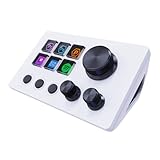
Overview: The ActionRing Streaming Macro Keypad targets content creators with a compact deck featuring six customizable LCD keys, three buttons, and three knobs. Designed for OBS, Twitch, and YouTube workflows, it enables one-touch control of scenes, media, and complex macros across Windows and macOS platforms.
What Makes It Stand Out: The LCD keys support custom images and GIF animations, providing visual feedback that enhances muscle memory during live streams. The “Action Flow” function allows sequencing multiple macros in precise order, surpassing basic single-action triggers. With 60 downloadable icon packs and integrated plugins for weather, calendars, and stopwatches, it doubles as a functional desktop companion beyond streaming.
Value for Money: Positioned as a budget-friendly alternative to premium controllers like the Elgato Stream Deck, the ActionRing offers comparable core functionality at a lower price point. The inclusion of three physical knobs for volume and playback control adds hardware value that some competitors lack, making it attractive for cost-conscious creators.
Strengths and Weaknesses: Pros include extensive customization, visual key feedback, multi-action sequences, cross-platform compatibility, and a rich plugin ecosystem. Cons involve a steeper learning curve for Action Flow programming, potential software stability issues, and weaker brand recognition compared to market leaders. Customer support relies on tutorial videos rather than live assistance.
Bottom Line: The ActionRing delivers impressive versatility for streamers and productivity users seeking affordable macro control. While it requires patience to master, its visual customization and knob controls make it a compelling mid-range option that punches above its weight class.
7. AJAZZ Macro Keypad Stream Controller Deck Gaming Streaming Shortcut Keyboard, 6 Programmable Keys Customizable Visual AI Pad USB Soundboard for YouTube, Desk Office Setup, Laptop, PC, Mac

Overview: The AJAZZ Macro Keypad Stream Controller Deck provides six programmable LCD keys, three knobs, and three toggle switches for streamers and professionals. This USB-powered device simplifies complex workflows through one-click macro execution across Windows and macOS environments.
What Makes It Stand Out: Unique toggle switches offer persistent state control for mute groups or scene toggling, a feature rarely seen in this category. The manufacturer promises 24/7 customer support and free lifetime software updates, demonstrating strong post-purchase commitment. The drag-and-drop configuration interface requires no scripting knowledge, making advanced automation accessible to beginners.
Value for Money: Priced competitively, the AJAZZ unit emphasizes build quality with premium materials and rigorous quality control. The ongoing support and update policy adds long-term value that justifies its cost over cheaper alternatives with limited software maintenance. It effectively bridges the gap between entry-level keypads and professional broadcast controllers.
Strengths and Weaknesses: Strengths include the innovative toggle switches, robust customer support, continuous software improvements, seamless Streamlabs integration, and a comprehensive plugin library. Weaknesses involve potential feature overlap with similar devices, possible software bugs in early firmware versions, and a smaller user community for peer troubleshooting compared to dominant brands.
Bottom Line: For streamers prioritizing reliability and long-term support, the AJAZZ controller is a smart investment. The toggle switches provide genuine workflow advantages, and the company’s support commitment makes it a trustworthy choice for serious content creators.
8. HONKID Computer Keyboard Stand for Desktop,Adjustable Keyboard Riser for Apple Magic Keyboard and Flat-Back Keyboards Only, Ergonomic Office Desk Accessories

Overview: The HONKID Keyboard Stand is an ergonomic riser designed specifically for flat-back keyboards like Apple’s Magic Keyboard. It offers three adjustable angles to promote neutral wrist positioning and reduce strain during extended typing sessions.
What Makes It Stand Out: Micro-suction pad technology provides secure positioning without clamps or adhesives, preserving your desk’s finish. Unlike universal stands that accommodate various keyboard shapes, this tailored design ensures perfect compatibility with slim, flat-bottomed keyboards, eliminating wobble and instability.
Value for Money: This affordably priced accessory delivers ergonomic benefits comparable to replacing your entire keyboard with an ergonomic model. For Magic Keyboard users seeking tilt adjustment, it’s a fraction of the cost of a new keyboard while providing medical-grade positioning options that help prevent repetitive strain injuries.
Strengths and Weaknesses: Pros include rock-solid stability, desk-friendly non-slip micro-suction pads, three practical angle options, durable nylon construction, and scratch-free operation. The major limitation is exclusivity to flat-back keyboards—gaming keyboards with integrated feet or curved bases won’t fit. Some users may find the maximum tilt angle insufficient for aggressive ergonomic needs.
Bottom Line: Magic Keyboard owners will find this stand transformative for comfort and productivity. Its specialized design ensures flawless stability where universal solutions fail. While not versatile enough for all keyboard types, it excels perfectly within its intended niche, making it an essential desk upgrade for Apple users.
9. OnStage On-Stage KSA8585 Keyboard Accessory Tray

Overview: The On-Stage KSA8585 is a specialized accessory tray that inserts into 1-inch round or square tubing on keyboard stands. It provides a platform for small mixers, drum machines, effects pedals, and synth modules within easy reach during performances or recording sessions.
What Makes It Stand Out: The Posi-lok mechanism enables precise, locking angle adjustments, allowing artists to tilt gear for optimal visibility and access. Its universal mounting system works on both single and two-tier keyboard stands, offering flexibility that most fixed-angle trays cannot match.
Value for Money: For musicians and streamers using keyboard stands, this tray eliminates the need for separate equipment stands, saving both money and stage space. The robust construction and included hook-and-loop fasteners provide security for valuable gear, justifying its moderate price through risk reduction and improved workflow efficiency.
Strengths and Weaknesses: Strengths include versatile 1-inch tubing compatibility, adjustable angle positioning, secure fastening system, and dual-tier stand support. Weaknesses are the limited surface area unsuitable for larger controllers, restriction to 1-inch stands (excludes many X-stands), and a utilitarian appearance that prioritizes function over aesthetics. Weight capacity may be insufficient for heavy rack units.
Bottom Line: This tray is indispensable for gigging musicians and studio owners needing compact gear placement solutions. While niche and size-limited, its secure mounting and angle adjustability solve real problems for keyboard-based setups. Consider your stand’s tubing diameter and gear dimensions before purchasing.
10. FEINODI Lightning to HDMI Adapter for iPhone/iPad to TV, Dual USB OTG Adapter with Microphone Input for Live-Streaming, MIDI Keyboard, Mouse, HD TV/Projector/Monitor Compatible (White)

Overview: The FEINODI Lightning Adapter transforms your iPhone or iPad into a versatile workstation with five functions: HDMI output, dual USB ports, 3.5mm microphone input, and pass-through charging. It enables direct connection to displays, peripherals, and audio equipment without wireless latency.
What Makes It Stand Out: Simultaneous charging while using all ports solves the power drain problem common during extended live streams or presentations. The dedicated microphone input allows professional audio capture for platforms like Twitch and YouTube, bypassing the device’s internal mic. With 60-90MB/s transfer speeds, it handles camera imports and MIDI keyboard connections efficiently.
Value for Money: This all-in-one adapter replaces multiple dongles for mobile creators, costing less than buying separate HDMI, USB, and audio adapters. For iOS-based content producers, it provides desktop-class connectivity that rivals more expensive wireless solutions while eliminating battery anxiety.
Strengths and Weaknesses: Pros include true plug-and-play operation, simultaneous charging, high-speed data transfer, live streaming audio support, and broad iOS compatibility. Significant cons are HDCP restrictions blocking Netflix and Amazon Prime, occasional HDMI instability requiring external power, and lack of phone call support through the audio jack. The white color may discolor over time.
Bottom Line: Mobile content creators using iOS devices should consider this adapter essential. It removes technical barriers for live streaming, presentations, and music production on the go. Just verify your streaming apps don’t require HDCP before purchasing, and keep a power bank handy for HDMI stability.
1. Mechanical Switch Customization Kits
Your keyboard switches are the tactile foundation of every interaction. For live streamers, the difference between a generic membrane board and a finely-tuned mechanical setup can mean the difference between a missed cue and a flawless transition. Customization kits allow you to tailor actuation force, tactile feedback, and acoustic signature to your exact performance needs.
Understanding Switch Types for Streaming Performance
Linear switches offer smooth, consistent keystrokes ideal for rapid-fire chat moderation and gaming segments where speed trumps feedback. Tactile switches provide a noticeable bump at the actuation point, perfect for deliberate scene changes and audio adjustments where you need physical confirmation of each command. Clicky switches, while controversial for microphone proximity, can be acoustically treated to deliver satisfying auditory feedback for ASMR-style content or mechanical keyboard enthusiast streams.
In 2026, magnetic hall-effect switches have gained prominence, offering adjustable actuation points via software and unparalleled durability rated for 100+ million keystrokes. These switches enable you to program multiple actions on a single key based on how deeply you press—a game-changer for complex streaming workflows.
Hot-Swappable vs. Soldered PCB Considerations
Hot-swappable keyboards have become the industry standard for serious streamers, allowing switch replacement without soldering equipment. When evaluating hot-swappable PCBs, examine the socket quality—Kailh or Gateron sockets provide superior durability compared to generic alternatives. Consider the layout compatibility; some boards only support 3-pin switches, limiting your options. For 2026, look for PCBs with south-facing LEDs to eliminate interference with Cherry-profile keycaps and ensure consistent backlighting visibility on camera.
Tactile Feedback and Audience Experience
Your switch choice directly impacts your stream’s audio landscape. Super-light 35g switches may cause accidental keypresses that create distracting on-screen errors. Heavy 80g switches can lead to finger fatigue during eight-hour marathon streams. The sweet spot for most performers lies between 45-62g, balancing responsiveness with intentional actuation. Test switches with your specific microphone setup—what sounds satisfying in isolation may create harsh peaks in your audio mix.
2. Programmable Macro Pads and Stream Controllers
Dedicated macro pads transform your keyboard from a typing tool into a specialized broadcasting instrument. These devices offload complex command sequences from your main keyboard, reducing cognitive load and preventing critical errors during high-pressure moments.
Layout Configurations for Platform-Specific Workflows
Twitch performers benefit from 15-32 key configurations that accommodate scene transitions, clip creation, chat moderation, and raid management. YouTube streamers need integration with Super Chat triggers, membership shoutouts, and mid-roll ad controls. Emerging platforms in 2026 require adaptive layouts that support token-based economies and blockchain-verified interactions.
Consider macro pads with rotary encoders—these allow precise volume adjustments, timeline scrubbing, and filter intensity control without discrete button presses. Some advanced models feature OLED screens above each key, displaying dynamic icons that update based on your current scene collection or application focus.
Software Integration with OBS and Next-Gen Broadcasting Tools
Native OBS Studio integration is non-negotiable. Look for macro pads that support websocket connections with bidirectional communication, allowing the pad’s backlighting to reflect your actual stream status (live, recording, paused). In 2026, AI-assisted broadcasting software can automatically reconfigure your macro layout based on viewer engagement metrics, moving high-priority actions to more accessible positions during peak activity.
Avoid devices reliant on closed-source software. Open API support ensures compatibility with future platforms and allows custom scripting for unique performance requirements. Check for profile automatic switching—your macro pad should detect when you switch from your streaming software to a game or DAW and load an appropriate keymap instantly.
Tactile vs. Touchscreen Macro Solutions
Physical buttons provide muscle memory advantages that touchscreen surfaces cannot match. However, hybrid solutions combining physical keys with small LCD screens offer the best of both worlds. For 2026, haptic feedback technology has evolved to simulate button presses on smooth surfaces, but these still lack the reliability of mechanical switches for critical functions. Reserve touchscreen controls for non-essential actions like lighting presets or emoji spam, while assigning mission-critical commands to physical keys with definitive tactile feedback.
3. Ergonomic Wrist Rests and Palm Supports
Marathon streaming sessions demand ergonomic solutions that prevent repetitive strain injuries without compromising performance. A quality wrist rest maintains neutral hand positioning, reducing fatigue that leads to missed hotkeys and decreased reaction times.
Material Science: Memory Foam vs. Gel vs. Wood
High-density memory foam (60-80 kg/m³) provides excellent weight distribution and heat dissipation, crucial for extended use. Gel inserts offer cooling properties but can create pressure points and may leak if punctured. Wooden wrist rests, particularly those crafted from maple or bamboo, provide firm, consistent support and superior durability, though they lack the plush comfort some users prefer.
For 2026, phase-change material (PCM) infused memory foam has emerged, actively regulating temperature by absorbing and releasing heat based on your skin temperature. This technology maintains optimal comfort during both idle chat periods and intense gameplay segments. The surface material matters equally—breathable fabrics like bamboo charcoal fiber prevent sweat buildup, while leatherette offers easy cleaning but traps heat.
Sizing and Compatibility Considerations
Your wrist rest should match your keyboard’s width exactly, with height alignment being critical. The ideal rest positions your wrists 0-5 degrees below keycap level, preventing extension that compresses carpal tunnels. For tenkeyless boards, consider extended rests that provide additional mouse pad area, creating a unified ergonomic surface.
Split keyboard users need independent rests that accommodate tenting and negative tilt adjustments. Measure your desk depth carefully—oversized wrist rests can force your keyboard too far forward, negating ergonomic benefits by causing shoulder protraction.
Hygiene and Maintenance Protocols
Streaming environments accumulate skin oils, snack debris, and dust that degrade wrist rest materials. Look for removable, machine-washable covers with antimicrobial treatments. Some 2026 models feature UV-C sanitizing cycles built into the rest’s base, automatically sterilizing the surface during breaks. Establish a cleaning routine—weekly washing for fabric covers, daily wiping for hard surfaces—to prevent bacterial growth that causes skin irritation and unpleasant odors detectable on sensitive microphones.
4. Professional-Grade Keyboard Mounting Systems
Static keyboards limit your ability to optimize camera angles, green screen positioning, and audience sightlines. Professional mounting systems introduce cinematic flexibility to your streaming command center.
Clamp-on vs. Freestanding Mounting Solutions
Clamp-on mounts preserve desk space and offer exceptional stability, supporting keyboards up to 15 pounds while maintaining rock-solid positioning during aggressive typing. Ensure the clamp mechanism includes protective padding to prevent desk surface damage and accommodates your desk thickness—standard clamps work with 0.5 to 3.5 inches, but 2026’s popular motorized standing desks often feature thicker profiles requiring specialized hardware.
Freestanding mounts provide portability for performers who stream from multiple locations or reconfigure their setup frequently. These bases should feature weighted plates or extendable feet that prevent tipping during intense use. Some advanced models incorporate cable management channels that route power and data lines through the mount’s vertical column, creating a clean aesthetic that enhances production value.
Gimbal and Articulating Arm Technology
Articulating arms with three or more pivot points allow infinite positioning, enabling you to swing your keyboard out of frame for facecam-only segments or position it at optimal angles for hand-cam demonstrations. Look for arms with tension adjustment that can be fine-tuned to your keyboard’s exact weight—too loose, and the board drifts; too tight, and adjustments require excessive force.
For 2026, motorized gimbal mounts have entered the mainstream, offering preset positions you can recall via macro commands. Imagine transitioning from a typing-focused coding stream to a gaming session where your keyboard automatically tilts to a more aggressive angle while your hand-cam adjusts framing simultaneously. These systems require robust power delivery—ensure your mount includes pass-through USB hubs to avoid cable clutter.
Vibration Dampening and Stability Engineering
Microphone stands and desk-mounted boom arms transmit vibrations that travel through your desk and into your keyboard, creating subtle rattles detectable on professional audio setups. Quality mounts incorporate isolation washers and decoupling mechanisms that absorb these vibrations. Check the mounting plate’s construction—solid aluminum plates dampen resonance better than steel, while acrylic plates should be avoided entirely due to their harmonic properties that amplify rather than absorb vibrations.
5. High-Bandwidth USB-C and Thunderbolt Cables
Your keyboard is only as reliable as its connection. In 2026’s high-bitrate streaming environment, where 4K120 capture and multiple camera feeds demand massive data throughput, cable quality directly impacts stream stability.
Data Transfer Requirements for Modern Streaming Setups
A standard keyboard requires minimal bandwidth, but modern streaming keyboards often integrate USB hubs, SD card readers, and even small displays that demand USB 3.2 Gen 2 (10 Gbps) or Thunderbolt 4 (40 Gbps) speeds. Daisy-chaining devices through your keyboard’s pass-through ports creates a single point of failure—if the cable disconnects, you lose your keyboard, webcam, and microphone simultaneously.
For performers using keyboard-integrated audio interfaces or MIDI controllers, Thunderbolt 5 (80 Gbps) support ensures zero-latency performance. Verify cable certification—genuine Thunderbolt cables include active chips that maintain signal integrity over distance, while passive cables degrade rapidly beyond 0.5 meters.
Cable Length and Signal Integrity Trade-offs
Every meter of cable adds capacitance that can introduce microsecond delays—imperceptible for typing but critical for rhythm gaming or live music performance. The optimal length is the shortest that reaches your computer without tension. For setups requiring longer runs, active cables or fiber-optic USB extensions preserve signal integrity without latency penalties.
Coiled cables have become popular for their retro aesthetic and built-in strain relief, but poorly-engineered coils can create electromagnetic interference that affects wireless peripherals. Look for coils with consistent diameter and proper heat treatment that prevents memory effect. In 2026, smart coiled cables incorporate capacitive touch sensors along their length, allowing you to trigger mute functions or scene changes by touching specific coil sections.
Aesthetic Considerations vs. Functional Requirements
While aviator connectors and colorful paracord sleeves enhance visual appeal, they add potential failure points. Each connector introduces resistance and oxidation risk. For mission-critical streaming, prioritize cables with molded strain relief and single-piece construction. If aesthetics are paramount, choose cables with detachable connectors at the device end only, keeping the computer connection fixed and secure.
6. Custom Keycap Sets and Artisan Keycaps
Keycaps influence both your tactile experience and your stream’s visual identity. They represent one of the most cost-effective ways to personalize your setup while improving functional performance.
Profile Types and Their Impact on Streaming Efficiency
OEM and Cherry profiles remain standard for their universal compatibility and moderate height, but SA profile keycaps offer superior finger positioning for performers with larger hands. The increased surface area and sculpted rows reduce mispresses during intense moments. For 2026, low-profile keycaps (like those mimicking laptop keyboards) have gained traction among streamers prioritizing rapid actuation and minimal finger travel.
Consider uniform profiles like DSA or XDA if you frequently reprogram your keyboard layout—their consistent height means any key can occupy any position without affecting ergonomics. This flexibility proves invaluable for performers who create game-specific or software-specific layouts that deviate from standard QWERTY arrangements.
Backlight Compatibility and Legend Visibility
Doubleshot keycaps with translucent legends ensure your backlighting remains visible even under bright studio lights, crucial for maintaining orientation during dimly-lit atmospheric streams. However, many premium keycap sets use dye-sublimated legends that offer superior durability but block backlight transmission entirely.
For 2026, side-printed legends have resurged among professional streamers. These preserve the clean aesthetic of blank keycaps while providing reference points visible to you but not the camera. Some manufacturers now offer UV-reactive legends that glow under specific lighting conditions, invisible to your audience but brilliantly clear from your perspective.
Branding and Collectible Value
Artisan keycaps serve as miniature billboards for your brand. Commissioning custom caps featuring your logo, mascot, or signature colors creates recognizable visual elements that appear in every hand-cam shot. Limited-run artisan caps also function as subscriber rewards or giveaway items, fostering community engagement.
When selecting artisan caps, verify they don’t interfere with neighboring keys—many sculptural designs extend beyond standard 1u dimensions and can impede adjacent switches. Resin casting quality varies dramatically; examine stress test videos to ensure the cap stem won’t crack after repeated removals. In 2026, 3D-printed metal artisan caps offer unprecedented durability and premium feel, though they require switches rated for heavier keycap weights.
7. Advanced RGB Lighting and Diffusion Systems
Lighting transforms your keyboard from a tool into a visual performance element. In 2026’s saturated streaming market, dynamic lighting that reacts to chat, donations, and gameplay creates memorable viewer experiences that drive retention.
Addressable LED Technology and Per-Key Control
Modern keyboards utilize individually addressable RGB LEDs (often WS2812B or SK6812) allowing each key to display independent colors and effects. For streaming, this enables visual feedback systems—keys can flash when you receive a follow, shift colors based on chat sentiment analysis, or display cooldown timers for abilities and macros.
The LED controller’s refresh rate matters more than maximum brightness. A 60Hz refresh rate creates noticeable flicker on camera, especially at lower shutter speeds. Look for controllers supporting 120Hz or higher to ensure smooth transitions that read cleanly on stream. Some 2026 keyboards integrate ambient light sensors that automatically adjust brightness based on your room lighting, preventing blown-out highlights in your camera feed.
Software Synchronization with Stream Alerts
Native integration with StreamElements, Streamlabs, and OBS WebSocket protocols allows your keyboard lighting to become an extension of your alert system. When a subscriber notification appears on screen, corresponding keys can pulse in brand colors, creating a cohesive sensory experience. Advanced setups map donation amounts to specific lighting patterns—$5 might trigger a gentle wave, while $100 generates a stadium-style light show across your entire board.
Evaluate the CPU overhead of lighting software. Poorly optimized drivers can consume 5-10% of your processing power, impacting game performance or encoding quality. In 2026, hardware-level integration offloads lighting calculations to the keyboard’s internal processor, eliminating system resource drain entirely.
Light Pollution Reduction for Camera Capture
Uncontrolled keyboard lighting bleeds onto your face and hands, creating unprofessional color casts and reducing contrast. Diffusion films applied beneath keycaps soften harsh LED points into gentle glows. Some streamers install polarizing filters on hand-cam lenses to block specific light wavelengths, though this requires careful color calibration.
Consider keyboards with north-facing LEDs and shine-through keycaps that direct light upward rather than outward. For custom builds, add foam layers between the PCB and case to absorb internal reflections that cause unwanted glow. In 2026, micro-louver films (similar to privacy screens) restrict light dispersion to narrow viewing angles, ensuring your audience sees the effect while preventing lens flare and color contamination.
8. Acoustic Treatment and Sound Dampening
Your keyboard’s acoustic signature significantly impacts your stream’s audio quality. Uncontrolled clacking creates harsh transients that clip microphones and fatigue listeners, while a well-damped board sounds professional and polished.
O-Ring Mods and Switch Dampening
O-rings installed on keycap stems reduce bottom-out noise by cushioning the impact between cap and switch housing. However, they also reduce key travel and can make typing feel mushy. For 2026, silicone gasket strips applied to the PCB-mounting points have replaced O-rings for many professionals, preserving full travel while eliminating case resonance.
Switch films—thin layers of PTFE or polycarbonate placed between switch housings—reduce wobble and tighten acoustic signature. This micro-modification requires disassembly but yields dramatic improvements in sound consistency. Film thickness matters; 0.125mm films work for most switches, while some newer housings require 0.15mm for proper compression.
Case and Plate Material Acoustics
Your keyboard’s construction material profoundly affects sound. Aluminum plates create a high-pitched “ping” that microphones capture harshly. Brass plates offer deeper tones but can amplify resonance. Polycarbonate and POM plates absorb more vibration, producing a “thockier,” more muted sound profile preferred for streaming.
Case foam density and placement require experimentation. Poron foam (30-50 durometer) placed between PCB and case bottom absorbs low-frequency resonance. For 2026, acoustic engineers have developed frequency-tuned foam panels that target specific harmonic ranges common in mechanical keyboards, creating a balanced sound that remains audible to you but doesn’t dominate your microphone feed.
Microphone Interaction and Noise Gate Optimization
Even a dampened keyboard generates 45-55dB of sound at the source. Your microphone placement and noise gate settings must account for this. Cardioid microphones positioned 6-8 inches from your mouth at a 45-degree angle reject keyboard noise effectively. Set your noise gate’s open threshold 10dB above your keyboard’s average volume to prevent accidental triggering.
Some 2026 keyboards include built-in contact microphones that generate inverse sound waves, actively canceling typing noise similar to ANC headphones. This technology requires precise calibration but can reduce keyboard noise by 20-30dB in post-processing, making it nearly invisible to your audience.
9. Wireless Connectivity Solutions and Latency Optimization
The freedom of wireless keyboards eliminates cable drag and visual clutter, but introduces latency concerns that can destroy performance in timing-critical streaming scenarios. 2026’s wireless standards offer solutions that rival wired connections when properly implemented.
2.4GHz vs. Bluetooth 6.0: The 2026 Standard
Bluetooth 6.0 introduced in late 2025 offers 2Mbps data rates and sub-3ms latency—technically sufficient for streaming but prone to interference from other Bluetooth devices, WiFi 7 networks, and USB 3.2 ports. Dedicated 2.4GHz dongles using proprietary protocols achieve sub-1ms latency and maintain stable connections even in RF-noisy environments.
For streaming, hybrid solutions provide the best reliability. Use 2.4GHz for your primary keyboard functions while maintaining Bluetooth connectivity as a failover. Some 2026 keyboards include automatic channel-hopping technology that scans the 2.4GHz band and switches frequencies when interference is detected, ensuring uninterrupted performance during critical moments.
Polling Rates and Response Time Engineering
Keyboard polling rate—the frequency at which your computer checks for keypresses—directly impacts input lag. Standard gaming keyboards poll at 1000Hz (1ms intervals), but 2026’s high-performance models support 4000Hz and even 8000Hz polling. For streaming, this matters less for typing but becomes crucial when using your keyboard as a MIDI controller or rhythm game input device.
Higher polling rates consume more CPU resources and can conflict with USB controller bandwidth allocation. If you’re running multiple high-bandwidth devices (capture cards, audio interfaces, cameras), verify your motherboard’s USB controller can handle the aggregate polling load. Some streamers reduce keyboard polling to 500Hz during non-gaming segments to free resources for encoding, creating custom profiles that automatically adjust based on the active application.
Failover Systems and Wired Backup Protocols
Wireless connections fail—batteries die, dongles malfunction, interference spikes. Professional streaming setups include instantaneous failover to wired mode. The transition must be seamless; any interruption longer than 100ms creates a visible stutter in your stream.
Look for keyboards that support “wireless charging while wired” functionality, allowing you to keep a USB cable connected for data while charging via Qi pad. In 2026, magnetic pogo-pin connectors enable instant wired connection without fumbling with USB orientation. Test your failover procedure regularly—unplug your dongle mid-stream during a practice session to verify the switch occurs without dropping inputs or causing USB enumeration delays.
10. Protective Cases and Travel Systems
Your keyboard represents a significant investment and a critical tool. Whether traveling to conventions, collaborating in person, or simply storing your board between streams, proper protection prevents damage that could sideline your content creation.
Hard vs. Soft Case Materials for Different Use Cases
Hard-shell cases made from ABS plastic or aluminum provide maximum protection against crushing forces, essential for checked airline luggage. These cases should include foam cutouts tailored to your specific keyboard layout—universal foam allows movement that can damage switches. For 2026, 3D-printed TPU inserts offer custom-fit protection at accessible price points, conforming exactly to your board’s unique profile.
Soft cases prioritize portability and weight, suitable for hand-carrying to local events. High-denier ballistic nylon (1680D) resists tears and abrasions, while water-resistant coatings protect against spills. The best soft cases feature rigid panels sewn into critical areas (top, bottom, corners) that prevent flex without adding significant weight.
Custom Foam Insert Engineering
Quality foam does more than prevent movement—it absorbs shock and distributes impact forces. Multi-layer foam systems use soft foam (10-20 durometer) against your keyboard to prevent scratches, backed by dense foam (50-70 durometer) that maintains structural integrity. The foam should compress approximately 30% when the case closes, ensuring firm contact without stressing the board.
For modified keyboards with artisan keycaps or extended switches, measure your tallest point and add 5mm clearance. Some 2026 cases feature adjustable foam layers you can reconfigure as your keyboard evolves, eliminating the need to purchase new protection after each modification.
TSA and International Travel Considerations
Airport security may require you to power on electronic devices. Ensure your case allows quick access to your keyboard’s power cable or includes a battery pack for wireless models. Document any modifications—custom PCBs and unusual wiring can appear suspicious on X-ray scanners. Carry a printed spec sheet or photos of your build process to expedite inspection.
International performers should research destination country regulations on wireless devices. Some jurisdictions restrict 2.4GHz devices or require type approval certificates. In 2026, the EU’s Radio Equipment Directive includes specific provisions for modified electronics, potentially requiring CE marking even for personal equipment. When in doubt, travel with your keyboard in wired-only mode to avoid regulatory complications.
Integrating Accessories into a Cohesive Streaming Setup
Individual accessories deliver incremental improvements, but synergistic integration creates a professional ecosystem where each component enhances the others. Your keyboard accessories must work seamlessly with your broader production stack.
Power Delivery and USB Hub Architecture
Modern streaming keyboards often include powered USB hubs, but these can introduce ground loops that create audible hum in your audio interface. Use isolated USB hubs with separate power supplies for audio and video equipment, keeping your keyboard on a different power domain. Calculate total power draw—RGB lighting, displays, and passthrough charging can exceed 15W, requiring USB Power Delivery 3.1 support.
For 2026 setups, consider a centralized power distribution unit that provides clean, filtered power to all desk accessories. These units include individual on/off switches for each device, allowing you to power down non-essential accessories during sensitive recording segments to reduce electrical noise.
Software Profile Synchronization
Managing separate software for lighting, macros, mounts, and audio creates configuration chaos. Centralized control platforms like OpenRGB and QMK have evolved to support cross-device profiles. A single “Going Live” button press can adjust your keyboard lighting, raise your mount to optimal position, activate your noise gate profile, and switch your macro pad to streaming mode.
Create backup profiles stored on the devices themselves rather than relying on cloud sync. Internet outages shouldn’t prevent you from accessing your configurations. In 2026, some high-end accessories include NFC authentication, allowing you to load your profiles by tapping your phone—even on borrowed equipment at events.
Future-Proofing Your Accessory Investment
The streaming technology cycle accelerates annually. Choose accessories with firmware update capabilities and open hardware standards. Modular designs that allow component replacement extend lifespan—buying a new switch plate is cheaper than replacing an entire keyboard when standards change.
Consider backward compatibility. USB-C is current, but USB4 v2 and optical connections loom on the horizon. Accessories with replaceable controller PCBs or upgradeable daughterboards protect your investment. In 2026, some manufacturers offer trade-in programs for legacy accessories, providing credit toward next-generation equipment while responsibly recycling old components.
Frequently Asked Questions
How much should I budget for a complete keyboard accessory setup in 2026?
A professional-grade accessory suite typically ranges from $400 to $800, excluding the keyboard itself. Prioritize macro pads ($80-150), quality cables ($30-60 each), and acoustic treatment ($50-100) as foundational investments. Mounting systems and travel cases represent larger one-time purchases ($150-250) that pay dividends in longevity and versatility.
Will these accessories work with my existing keyboard, or do I need to buy a new one?
Most accessories are designed for broad compatibility. Switch customization kits, keycap sets, O-rings, and wrist rests work with any MX-style mechanical keyboard. Macro pads, mounts, and cables are universally compatible. However, advanced lighting integration and hot-swap capabilities require specific keyboard models. Check your keyboard’s specifications before purchasing accessories that interface directly with its PCB or firmware.
How do I prevent my keyboard accessories from looking cluttered on camera?
Implement a unified color scheme across all accessories—monochrome black or white creates a clean, professional appearance. Use cable raceways and under-desk trays to hide power and data lines. Position macro pads and secondary controllers outside your primary camera frame, relying on muscle memory rather than visual confirmation. Many 2026 streamers use a “tech cam” angle that embraces the cyberpunk aesthetic of visible equipment, turning potential clutter into deliberate set design.
Are wireless accessories reliable enough for professional streaming?
Yes, with caveats. Use 2.4GHz wireless for mission-critical functions and maintain wired backups for failover. Keep wireless dongles on USB 2.0 ports to avoid interference from USB 3.2’s 5GHz signaling. Replace batteries on a schedule rather than waiting for low-power warnings. In 2026, professional streamers typically use wireless keyboards and mice but keep macro pads and audio interfaces wired to reduce latency variables.
What acoustic treatment should I apply first for keyboard noise reduction?
Start with case foam modification—it’s inexpensive and yields immediate results. Add o-rings or switch films if you use clicky switches. Upgrade to a desk mat with acoustic damping properties. Only after treating the keyboard itself should you adjust microphone placement and noise gates. This sequence addresses noise at the source rather than masking it, preserving audio quality while reducing unwanted sound.
How often should I replace or upgrade keyboard accessories?
Mechanical accessories like switches, keycaps, and mounts last 5-10 years with proper care. Electronic accessories like macro pads and wireless dongles follow a 3-5 year upgrade cycle as connection standards evolve. Cables should be inspected quarterly for wear and replaced annually if subjected to frequent movement. Software-dependent accessories require evaluation whenever you update your primary streaming platform or operating system.
Can keyboard accessories improve my streaming performance metrics?
Indirectly, yes. Ergonomic accessories reduce fatigue, enabling longer, more energetic streams. Macro pads decrease reaction time for alerts and scene changes, improving production quality. Aesthetic customization strengthens brand identity, increasing recognition and subscriber conversion. While accessories won’t magically grow your audience, they remove friction from your workflow, allowing you to focus on content rather than technical limitations.
What accessories are essential for mobile or IRL streaming?
Prioritize a rugged travel case, wireless connectivity with redundant pairing options, and a compact macro pad for essential functions. Power banks with USB Power Delivery support become critical—calculate your keyboard’s power draw and carry 2-3x capacity for all-day events. For 2026 IRL streamers, low-profile mechanical keyboards with built-in LTE failover ensure connectivity even when WiFi drops.
How do I balance aesthetics with functionality when choosing accessories?
Establish functional requirements first—latency, compatibility, durability. Within those parameters, select aesthetic options. A beautiful accessory that fails during a charity stream is worthless. Many 2026 manufacturers offer customization services, allowing you to specify functional parameters (switch type, mounting pattern) and aesthetic finishes (colorway, engraving) separately. This modular approach ensures you never compromise performance for appearance.
Will investing in premium accessories make a noticeable difference to my viewers?
Viewers notice professionalism, not individual components. A quiet, reliable keyboard with responsive macros creates seamless production value that audiences perceive as “high quality” without identifying why. Hand-cam streams benefit most directly—custom keycaps and clean lighting provide visual interest. For audio-focused content like podcasting or music, acoustic treatment delivers immediate, noticeable improvement. Focus on accessories that solve specific problems in your workflow rather than chasing incremental upgrades for their own sake.
See Also
- 10 Essential Keyboard Accessories for DIY Repairs in 2026
- 10 Essential Keyboard Accessories for Church Musicians in 2026
- 10 Essential Keyboard Accessories for Studio Recording in 2026
- 10 Expert-Recommended Keyboard Accessories to Prevent Ground Loop Hum in 2026
- 10 Keyboard Stands with Laptop Shelf for Ableton Performers in 2026