Table of Contents
Walking into a venue with a pedalboard the size of a coffee table and three different amps in tow isn’t just impractical for most cover band guitarists—it’s financially and logistically impossible. Yet, the modern cover band landscape demands an almost superhuman ability to teleport between the chiming cleans of The Police, the saturated roar of Metallica, and the glassy twang of Keith Urban, often within the same set. This is the tightrope every working cover band guitarist walks: authenticity versus feasibility.
Modeling guitar amplifiers have emerged as the Swiss Army knife solution, but they’re not the magic bullet many manufacturers would have you believe. The difference between a guitarist who merely survives a gig with a modeler and one who absolutely owns every song lies not in the gear itself, but in understanding how to wield it like a precision instrument. This guide dives deep into the technology, features, and real-world strategies that separate the pros from the frustrated, ensuring your next modeling amp becomes the ultimate secret weapon in your musical arsenal.
Top 10 Modeling Guitar Amplifiers
Detailed Product Reviews
1. Fender Mustang LT25 Guitar Amp, 25-Watt Combo Amp, with 2-Year Warranty, 30 Preset Effects with USB Audio Interface for Recording

Overview: The Fender Mustang LT25 represents the gold standard for entry-level digital modeling amplifiers. This 25-watt combo delivers authentic Fender tone through its custom 8-inch speaker, packaged in a bedroom-friendly footprint. Designed specifically for beginners and home players, it combines decades of amp-building heritage with modern USB connectivity for direct recording.
What Makes It Stand Out: The LT25’s 1.8-inch color display sets it apart from competitors, making preset navigation intuitive for novices. Thirty factory-loaded presets cover everything from pristine cleans to high-gain metal, eliminating tone-hunting frustration. The integrated USB audio interface is a game-changer at this price point, allowing seamless DAW recording without additional hardware. Fender’s two-year warranty provides peace of mind rarely matched in the budget category.
Value for Money: Priced competitively against other entry-level modelers, the LT25 justifies every dollar through brand reliability and feature set. Comparable amps from lesser-known brands may offer similar wattage, but lack Fender’s proven build quality and comprehensive warranty. The USB recording capability alone saves $50-100 on external interfaces.
Strengths and Weaknesses: Strengths include authentic Fender voicings, user-friendly interface, robust construction, and excellent recording integration. Weaknesses involve the 8-inch speaker’s limited low-end response and 25-watt power restricting clean headroom. The preset count, while generous, can’t match app-enabled competitors’ infinite expandability.
Bottom Line: For beginners seeking a future-proof practice amp with professional recording capabilities, the Mustang LT25 is an unbeatable choice that grows with your skills.
2. Line 6 Spider V 20 MKII

Overview: The Line 6 Spider V 20 MKII packs decades of modeling expertise into a compact practice amp. This 20-watt combo targets modern players who value flexibility over tradition, offering a streamlined hardware interface backed by powerful app integration. Its redesigned classic speaker mode aims to capture the feel of traditional amps while maintaining digital versatility.
What Makes It Stand Out: The free Spider V Remote app unlocks over 200 amps and effects, transforming this modest hardware into a tone powerhouse. Sixteen onboard presets with three simultaneous effects provide immediate gratification, while the tap-tempo function and built-in tuner add practical performance tools. The classic speaker mode addresses previous criticisms of digital harshness, delivering warmer response.
Value for Money: The MKII sits in the budget-friendly segment, but its true value depends on smartphone integration. Without the app, it’s a basic 16-preset amp. With it, you’re accessing flagship-level tones for a fraction of the cost. Competitors like the Fender LT25 offer more out-of-box presets, but can’t match this expandable ecosystem.
Strengths and Weaknesses: Strengths include massive app-driven tone library, compact footprint, gig-ready features like tap-tempo, and improved speaker modeling. Weaknesses are the small preset count without app dependency, plastic construction feels less durable than Fender, and the 20-watt power section lacks clean headroom for pedals.
Bottom Line: Tech-savvy players who embrace app connectivity will find the Spider V 20 MKII an incredibly versatile practice tool that punches far above its weight class.
3. Fender Champion II 25 Guitar Amp, 25 Watts, with 2-Year Warranty, Features 12 Built-In Effects Models

Overview: The Fender Champion II 25 strips away digital complexity to focus on pure plug-and-play satisfaction. This analog-inspired 25-watt combo emphasizes Fender’s legendary clean tones while offering twelve essential effects for flavor. It’s a back-to-basics amplifier for players who prefer twisting knobs over menu diving, delivering straightforward performance without firmware updates or app dependencies.
What Makes It Stand Out: The Champion II’s single-channel design forces players to develop their dynamics rather than relying on preset switching. Its effects models, while limited to twelve, cover the fundamentals: reverb, delay, chorus, tremolo, and Vibratone. The amp voicings provide multiple distortion types without digital menu complexity. Fender’s two-year warranty and robust construction ensure longevity.
Value for Money: This amp competes directly with entry-level modelers but targets a different player. You’re trading preset quantity for tonal simplicity and analog-like response. For purists, this is value. For feature-seekers, it feels limited. The build quality exceeds price-point expectations, making it a reliable long-term choice.
Strengths and Weaknesses: Strengths include authentic Fender clean tone, intuitive operation, durable chassis, and no learning curve. Weaknesses involve no USB connectivity for recording, limited preset memory, fewer effects than digital competitors, and the 8-inch speaker’s inherent size constraints.
Bottom Line: If you value tone over technology and want an amp that sounds great immediately without scrolling, the Champion II 25 is your no-fuss solution.
4. Flatsons FBA-10 Guitar Amp, 10W Mini Electric Guitar Amplifier with Clean/Drive Channel, 6H Working, USB-C Rechargeable, 3.5mm Headphone/AUX Jack, Wireless Portable Amp for Indoor Practice, Traveling

Overview: The Flatsons FBA-10 redefines portability in guitar amplification. This battery-powered 10-watt mini amp delivers true analog circuitry in a package smaller than a lunchbox. Designed for nomadic musicians, it provides six hours of cordless playing time while maintaining credible tone. The vintage-inspired two-tone grille adds aesthetic charm to its practical engineering.
What Makes It Stand Out: Pure analog technology at this size is rare, avoiding digital artifacts for natural tone. Dual clean/drive modes with gain and tone controls offer surprising versatility. Bluetooth 5.3 connectivity streams backing tracks wirelessly, while the USB-C rechargeable battery modernizes the portable amp concept. The headphone jack enables silent practice anywhere.
Value for Money: This premium-priced mini amp targets a specific niche: players needing true portability. You’re paying for battery technology and wireless convenience, not wattage. Compared to mains-powered practice amps, it seems expensive. Compared to other battery amps, it’s competitively priced with superior features like Bluetooth and analog tone.
Strengths and Weaknesses: Strengths include exceptional portability, genuine analog sound, wireless audio streaming, long battery life, and silent practice capability. Weaknesses involve only 10 watts limiting headroom, unknown brand reputation, basic two-channel operation, and plastic construction concerns for road durability.
Bottom Line: For traveling players, apartment dwellers, or buskers prioritizing portability over power, the FBA-10 delivers credible tone wherever inspiration strikes.
5. Fender Mustang LT50 Guitar Amp, 50 Watts, with 2-Year Warranty 30 Preset Effects with USB Audio Interface for Recording, 20Dx19.5Wx11.5H Inches, Black
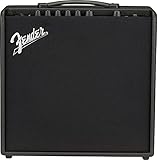
Overview: The Fender Mustang LT50 takes the beloved LT25 formula and injects it with serious power. This 50-watt beast maintains the same user-friendly interface and 30-preset architecture while adding significant clean headroom for rehearsals and small gigs. The larger cabinet improves low-end response, making it a legitimate practice-to-performance solution.
What Makes It Stand Out: Fifty watts through an upgraded speaker array provides gig-worthy volume without sacrificing bedroom usability. The identical preset system to the LT25 ensures seamless upgrading, while the USB audio interface remains studio-ready. The substantial cabinet dimensions project authority missing from smaller combos. Fender’s two-year warranty covers this workhorse thoroughly.
Value for Money: The price jump from the LT25 is justified purely by power and projection. You’re getting double the wattage and improved cabinet design for a modest increase. For players outgrowing 25-watt limitations, this avoids the cost of a completely new amp. It competes favorably with 50-watt modelers from other brands.
Strengths and Weaknesses: Strengths include ample clean headroom, gig-capable volume, familiar LT25 interface, robust recording features, and Fender reliability. Weaknesses involve increased weight and size reducing portability, still limited to one speaker, and no footswitch included for preset changes.
Bottom Line: The LT50 is the perfect step-up amp for serious students and gigging musicians who need Fender tone with real-world power.
6. Positive Grid Spark GO 5W Ultra-Portable Smart Guitar Amp, Headphone Amp & Bluetooth Speaker with Smart App for Electric Guitar, Acoustic or Bass

Overview:
The Positive Grid Spark GO redefines portable guitar amplification through computational audio processing. This 5-watt smart amp packs 33 amp models and 43 effects into a pocket-sized enclosure, doubling as a Bluetooth speaker and headphone amp. Its USB-C rechargeable battery delivers eight hours of playtime, making it ideal for travel, silent practice, or casual jamming anywhere inspiration strikes.
What Makes It Stand Out:
The Spark GO’s intelligent features set it apart. Auto Chords analyzes songs in real-time, displaying chord progressions as you play along, while Smart Jam functions as an AI bandmate that adapts to your style. Access to 50,000+ tones via ToneCloud provides infinite sonic possibilities, and the companion app transforms your smartphone into a command center for deep tone editing.
Value for Money:
At its price point, the Spark GO competes directly with entry-level modeling amps but adds smartphone integration and premium features typically found in higher-end units. The versatility of functioning as an amp, interface, Bluetooth speaker, and practice tool justifies every dollar, eliminating the need for multiple devices.
Strengths and Weaknesses:
Strengths include exceptional portability, innovative practice features, extensive tone library, and solid battery life. The primary weakness is the inherent limitation of a small speaker—while computational audio helps, it can’t match larger amps for fullness at volume. App dependency may frustrate traditionalists.
Bottom Line:
Perfect for tech-savvy guitarists seeking maximum versatility in minimal space. The Spark GO excels as a travel companion and practice tool, though serious performers will want it as a secondary amp rather than primary rig.
7. Fender Mustang LT40S Guitar Amplifier, with 2-Year Warranty

Overview:
The Fender Mustang LT40S brings serious horsepower to desktop amplification with 40 watts of stereo power in a compact footprint. Designed specifically for home practice and jamming, it delivers 20 amp models and 25 effects through Fender’s renowned modeling architecture. Thirty well-crafted presets cover genres from pristine jazz cleans to high-gain metal, all accessible via intuitive controls.
What Makes It Stand Out:
That 40-watt stereo output distinguishes it from typical 10-15 watt practice amps, providing genuine headroom and immersive sound that fills a room without requiring external speakers. Fender’s two-year warranty demonstrates manufacturer confidence rarely matched in this category, while the desktop format keeps all controls within easy reach for seamless tweaking.
Value for Money:
Competing amps offer similar features at lower wattage for comparable prices. The LT40S justifies its cost through superior power handling, stereo imaging, and Fender’s legacy support network. You’re paying for reliability and volume capability that cheaper alternatives can’t match, plus the peace of mind of comprehensive warranty coverage.
Strengths and Weaknesses:
Strengths include robust power output, stereo soundstage, user-friendly interface, and dependable construction. However, its larger size reduces portability compared to micro-amps, and the effect selection, while quality, numbers fewer than some budget modelers. The lack of battery power limits placement flexibility.
Bottom Line:
An excellent choice for home-bound players wanting room-filling sound without studio monitors. The Mustang LT40S bridges the gap between practice amp and serious monitoring solution, making it ideal for developing musicians.
8. SONICAKE 10W BT Guitar Amplifier, Multi-effect Digital Modeling Speakers with APP, Portable Desktop All-in-one Guitar Amp with 80 Effects 100 Preset for Bedroom Practice, OTG AMPCUBE QAM-20

Overview:
The SONICAKE AMPCUBE QAM-20 packs remarkable versatility into a 1.4-kilogram chassis, offering 80 effects and 100 presets at an accessible price point. This 10-watt portable amp combines Bluetooth 5.0 connectivity, USB recording capability, and MIDI support, targeting bedroom producers and mobile musicians. Its 3-inch full-range speaker delivers surprising clarity for its size.
What Makes It Stand Out:
The sheer number of included effects dwarfs most competitors, while dual power options (built-in battery or DC 9V) provide unmatched flexibility. OTG support enables direct digital recording to mobile devices, and the integrated tuner adds practical value. This represents one of the most feature-dense packages in the budget category.
Value for Money:
Exceptional. No other amp delivers this many effects, connectivity options, and portability at a similar price. While premium brands charge more for fewer features, SONICAKE prioritizes functionality over brand prestige, making professional tools accessible to beginners without compromising core tone-shaping capabilities.
Strengths and Weaknesses:
Strengths include incredible effect variety, lightweight design, multiple power sources, and comprehensive connectivity. Weaknesses involve build quality questions typical of budget brands, a smaller speaker that limits low-end response, and a less intuitive interface than established competitors. Long-term durability remains unproven.
Bottom Line:
A powerhouse for budget-conscious players and experimental beginners. The AMPCUBE QAM-20 offers unparalleled feature density, though discerning musicians may prefer proven brands for primary use. Perfect as a secondary travel amp or entry point into digital modeling.
9. Yamaha THR5 10-Watt Desktop Guitar Combo Amp

Overview:
Yamaha’s THR5 represents a paradigm shift in desktop amplification, merging the company’s AV division expertise with Virtual Circuitry Modeling technology. This 10-watt combo delivers five meticulously crafted amp models and studio-grade effects in a stylish, ultra-portable enclosure. Running on AC or battery power, it produces true hi-fi stereo sound that transcends typical practice amp limitations.
What Makes It Stand Out:
The THR5’s signature achievement is its stereo speaker system tuned for audiophile-quality playback, functioning equally well as a music streaming speaker. Yamaha’s VCM technology captures nuanced tube amp behavior, while the industrial design—resembling premium consumer electronics—looks at home in modern living spaces rather than garages.
Value for Money:
Positioned as a premium practice solution, it costs more than basic modelers but delivers superior audio fidelity and build quality. The dual functionality as a hi-fi speaker and guitar amp provides tangible value, eliminating the need for separate audio systems in small spaces and justifying the investment for serious hobbyists.
Strengths and Weaknesses:
Strengths include exceptional sound quality, elegant design, reliable battery operation, and Yamaha’s engineering pedigree. The limited five amp models may feel restrictive compared to effect-heavy competitors, and the absence of app control seems dated. The premium price might deter casual beginners seeking maximum features per dollar.
Bottom Line:
Ideal for tone purists and apartment dwellers prioritizing sound quality over feature quantity. The THR5 excels as a lifestyle practice amp that doubles as premium audio furniture, best suited for serious hobbyists with discerning ears.
10. Marshall Amps Guitar Combo Amplifier (M-MG10G-U)

Overview:
The Marshall MG10G embraces analog simplicity in an era of digital complexity. This 10-watt solid-state combo delivers classic Marshall tone through a single 6.5-inch speaker, featuring two channels (clean and overdrive) with straightforward gain, volume, and tone controls. Without modeling or effects, it focuses purely on core amplifier performance and immediate plug-and-play satisfaction.
What Makes It Stand Out:
In a market saturated with feature-laden modelers, the MG10G’s minimalist approach is refreshing. The iconic Marshall branding carries significant weight, and the analog circuitry provides immediate response without menu diving. Its no-frills design ensures reliability—there’s simply less to malfunction, making it a dependable workhorse for straightforward practice.
Value for Money:
Among the most affordable ways to own a genuine Marshall amp. While lacking modern amenities, it delivers authentic brand tone and build quality that budget digital amps can’t replicate. For players wanting simplicity over versatility, it represents honest value without subscription services or app dependencies.
Strengths and Weaknesses:
Strengths include authentic Marshall voicing, bulletproof construction, intuitive operation, and genuine analog feel. Weaknesses are significant: no effects, no headphone out, no auxiliary input, and limited tonal flexibility. It won’t suffice for players needing variety or silent practice options, and lacks connectivity for modern learning tools.
Bottom Line:
Perfect for beginners craving that classic Marshall roar or traditionalists disillusioned with digital options. The MG10G serves as an excellent starter amp or backup, but modern players requiring connectivity and versatility should look elsewhere. Pure, simple, and unapologetically Marshall.
Why Modeling Amps Are Game-Changers for Cover Bands
The Versatility Factor
The modern cover band guitarist is essentially a musical chameleon, required to shift colors not between gigs, but between songs. Modeling technology compresses what would be $50,000 worth of vintage and modern amplifiers into a single 30-pound package. But here’s what the spec sheets don’t tell you: raw variety means nothing without musical authenticity. The best modeling platforms don’t just emulate circuits—they capture the response of those circuits under your fingers. When you dig into a modeled Plexi, you should feel the same midrange bloom and compression that makes the original legendary. This tactile authenticity is what allows you to confidently approach everything from SRV’s Texas blues to Tool’s progressive metal without sounding like you’re using a cheap imitation.
Cost and Space Efficiency
Let’s talk real numbers. A professional cover band playing four 45-minute sets might need access to 30-40 distinct tones. Replicating that with physical amps, cabinets, and effects would require a trailer, a roadie, and a divorce attorney. Modeling amps eliminate the gear avalanche while preserving your marriage and your back. But the real savings aren’t just monetary—they’re mental. Instead of tap-dancing across six pedals and adjusting amp settings between songs, a properly programmed modeler lets you switch entire rigs with one foot press. This efficiency translates directly to better stage presence and fewer moments of awkward silence while you dial in the next sound.
Understanding the Core Technology
Digital Signal Processing Demystified
At the heart of every modeling amp lies a DSP chip that performs millions of calculations per second. Think of it as a hyper-fast translator converting your guitar’s analog signal into digital information, applying complex mathematical models of tube circuits, then converting it back to analog sound. The processing power determines everything from touch sensitivity to how gracefully the amp handles complex chords versus single-note lines. Lesser units might feel “stiff” because their DSP can’t calculate harmonic overtones fast enough, while premium architecture reproduces the intermodulation distortion that makes power chords sound thick and single notes sing. For cover bands, this matters because you’re not just playing one style—you need that responsiveness to feel consistent whether you’re chicken-pickin’ country or palm-muting metal.
Impulse Responses and Cabinet Simulation
Impulse responses (IRs) are the secret sauce that separates “amp-in-a-box” tones from truly speaker-moving sound. An IR is essentially a sonic photograph of a specific microphone, placed at a specific spot, on a specific speaker cabinet, in a specific room. When you load an IR into a modeler, you’re not just getting a generic “4x12 sound”—you’re getting the exact frequency response of a 1968 basketweave cab with a 57 off-axis and a 121 ribbon blended in. For cover bands, this means you can match the recorded tone of a song, not just the amp used to create it. The original “Back in Black” wasn’t just a Marshall—it was a Marshall through certain speakers, mic’d a certain way. IRs let you nail that recorded sound, which is what audiences actually recognize.
The Learning Curve Reality
Here’s the uncomfortable truth: modeling amps have a steeper learning curve than traditional amps. With a tube amp, you have three knobs and a proven formula. With a modeler, you have hundreds of parameters that can interact in unexpected ways. The pros approach this systematically: they learn one amp model at a time, master its quirks, then move to the next. They understand that “gain” on a modeler might control multiple stages of virtual preamp tubes, and that the “master volume” might affect power amp sag differently depending on the model. Budget at least 20-30 hours of dedicated practice time to get comfortable before your first gig. This isn’t a plug-and-play solution—it’s a professional instrument that demands professional-level commitment.
Essential Features That Matter Most
Amp Model Authenticity and Variety
Not all models are created equal. The best modelers use circuit-level modeling, which means they’ve literally traced every resistor and capacitor in the original amp and recreated its behavior in code. Lesser units use simpler “snapshot” modeling that captures a tone at one setting but falls apart when you adjust knobs. For cover band work, you need models that respond authentically across their entire control range. That means the “bass” knob on a modeled Fender should interact with the “treble” knob like the real thing, creating that famous mid-scoop when both are cranked. Look for units that offer not just quantity of models, but depth of modeling—amps that feel alive under your fingers at any setting.
Built-In Effects Quality
The effects in your modeler can be either a blessing or a curse. Premium units use the same algorithms found in studio-grade rack processors, while budget options might include digital artifacts that kill your tone. The key is effects order and flexibility. Can you place a compressor before the amp like a traditional pedalboard? Can you run stereo delays after the cabinet simulation? For cover bands, you need effects that can be tempo-synced globally, so when the drummer speeds up slightly during “Don’t Stop Believin’,” your delay stays locked without manual adjustment. Also crucial is spillover—when you switch presets, your delay trails should naturally decay, not cut off abruptly like a bad edit.
Footswitch Control and Preset Management
Your footswitch is your command center. The difference between a smooth gig and a train wreck often comes down to preset organization. Pros use a “setlist-first” approach: they program their presets in exact song order, with spillover enabled, and include multiple scenes within each preset for different song sections. For example, “Hotel California” might have Scene 1 for the intro arpeggios, Scene 2 for the verse crunch, and Scene 3 for the dual-harmony outro solo—all accessible without changing presets. Look for footswitches with clear, bright displays that show preset names, not just numbers. When you’re on a dark stage and need to jump from “Sweet Child O’ Mine” to “Uptown Funk,” you don’t want to remember that Preset 34-B is your funk tone.
Power and Output Configurations
Wattage Requirements for Different Venues
Power ratings on modeling amps are misleading because they don’t account for headroom—the clean volume before digital clipping occurs. A 50-watt modeler might be plenty for a 500-capacity room when running direct to PA, but inadequate if you’re using its internal power amp to drive a real cabinet. The secret is understanding how you’ll use the power. For most cover bands, the ideal setup is a modeler with a modest power section (30-50 watts) for stage monitoring, while sending a direct signal to the front-of-house. This gives you consistent tone no matter how loud the stage gets, while providing enough volume for self-monitoring. If you’re running without PA support, you’ll need 100+ watts and a quality FRFR (Full Range, Flat Response) cabinet to project properly.
Direct Output and Silent Recording Options
The DI (Direct Injection) output is your lifeline to consistent gigs. A proper DI sends a post-cabinet, mic’d amp signal to the sound engineer, meaning they get exactly what you hear on stage. But not all DI outputs are equal. The best include ground lift switches to eliminate hum, level controls to match different mixing consoles, and XLR outputs for professional connectivity. For silent practice and recording, look for USB audio interface capability. This lets you record directly into your DAW with the same tones you use live, perfect for creating reference tracks for band practice or demoing new songs without waking the neighbors.
Tone Crafting for Multiple Genres
Matching Classic Rock Tones
Classic rock is all about “brown sound”—that perfect blend of midrange grind and top-end clarity. When dialing in Plexi-style models for AC/DC or Zeppelin, resist the urge to crank the gain. The magic happens when you set gain around 5-6, then use your guitar’s volume knob to clean up. This is where modeling shines: you can save a preset with the amp’s gain at 6, then program an expression pedal to control your guitar’s volume virtually, giving you seamless clean-to-dirty transitions without touching your axe. For Van Halen-style brown sound, pay attention to the virtual “variac” controls some modelers offer—lowering the voltage to the amp model creates that compressed, singing quality that defines the era.
Nailing High-Gain Modern Sounds
Modern metal and hard rock require tight low-end and articulate pick attack. The mistake most guitarists make is using too much gain, which turns palm-muted riffs into mush. With modelers, you can achieve clarity by using two noise gates in series: one before the amp to kill single-coil hum, and one after to tighten the decay. Also crucial is the cabinet choice—modern metal often uses oversized 4x12s with V30 speakers, but blending that with a smoother-sounding cab (like a G12-65) in parallel can give you the aggression without the harshness. For bands covering everything from Tool to Slipknot, program your presets with different virtual mic placements—close-mic’d for tight rhythms, room mic for ambient leads.
Authentic Clean and Crunch Tones
Clean tones separate the pros from the amateurs in cover band world. A modeled Fender Twin should have the same glassy highs and piano-like lows as the real thing. The trick is in the virtual “bright cap” settings and understanding that on many Fender models, the volume knob interacts with the tone stack differently than on Marshalls. For country and funk, you need clean tones that stay pristine when you dig in hard. This means setting your input gain structure correctly—many modelers have a global input pad that prevents your single coils from overloading the front end. For edge-of-breakup crunch (think Keith Richards), use low-wattage amp models and crank the master volume while keeping preamp gain low. This creates power tube saturation that responds to dynamics, something many modelers now replicate beautifully.
Live Performance Optimization
Stage Volume vs. House Mix Balance
The eternal battle: hearing yourself on stage versus letting the PA do its job. Modeling amps give you the ultimate advantage here because you can run your stage volume completely independently of your front-of-house tone. The pro move is to use a personal monitor (FRFR speaker or in-ear mix) at a moderate volume, while sending a fully processed signal to the board. This eliminates the volume wars with the drummer and lets the sound engineer craft a balanced mix for the room. If you must use a traditional cabinet on stage, use the modeler’s effects return to bypass its preamp, turning it into a simple power amp and speaker. This gives you the tactile feel of a real cab while maintaining the modeler’s tone integrity.
Quick Soundcheck Strategies
Cover bands often get 15 minutes to soundcheck an entire rig. Pros program a “soundcheck preset” that cycles through their most demanding tones with a single footswitch press. This might include a clean arpeggio phrase, a chunky rhythm riff, and a sustaining lead line, each lasting 8 bars. They also bring a pre-recorded DI track of their guitar to soundcheck, so the engineer can dial in the PA while they set up their stage gear. Another crucial tip: always have a “failsafe” preset that’s just a straight, unprocessed clean tone. If your modeler glitches mid-gig, this preset can save the night, giving you a usable sound while you troubleshoot.
Monitoring Solutions On Stage
Hearing yourself accurately is non-negotiable. FRFR (Full Range, Flat Response) monitors have become the standard for modeler users because they reproduce what the audience hears without coloring the tone. Unlike traditional guitar cabs, which have a midrange hump, FRFR speakers give you the same frequency response as the PA, so there are no surprises when you walk out front. For in-ear monitor users, the game-changer is sending a stereo signal with cabinet simulation on one side and a dry amp signal on the other. This gives you the punch of the amp in your ears while retaining the spatial depth of the effects.
Integration with Your Existing Setup
Using Traditional Pedals with Modelers
Purists often ask: “Can I still use my favorite overdrive?” The answer is yes, but with strategy. Placing a real Tube Screamer before a modeler can add that analog midrange push that some digital models lack. The key is impedance matching—run your pedals into the modeler’s “return” jack (which expects line level) rather than the guitar input (which expects instrument level), or use a buffer pedal to maintain signal integrity. Many pros keep one or two “character” pedals (like a Klon or Fuzz Face) before their modeler for tones that digital still can’t quite nail, then use the modeler for everything else. This hybrid approach gives you the best of both worlds.
MIDI Control and Automation
For bands using backing tracks or click tracks, MIDI integration is a game-changer. You can program your modeler to change presets automatically when the drummer starts a song, or sync your delay times to the BPM of the track. This requires a MIDI controller or interface, but the payoff is seamless transitions that feel like magic to the audience. Some advanced users even send MIDI from their modeler to control lighting changes or trigger samples, turning their guitar rig into the band’s central nervous system. The key is starting simple—maybe just automate your lead boost for solos—then expanding as you get comfortable.
Connecting to Mixing Consoles
The interface between your modeler and the PA is critical. Always use balanced XLR outputs when possible to eliminate noise over long cable runs. Bring your own direct box (DI) as backup, even if the modeler has built-in DI. Set your output level to “mic level” rather than “line level” unless the sound engineer specifically requests otherwise—most live consoles expect mic level and you’ll overload their preamps otherwise. Pro tip: create a “board feed” preset that’s slightly darker than your stage sound. PA systems often sound harsh in the 2-4kHz range, so rolling off some high end before it hits the console gives the engineer a better starting point.
Avoiding Common Beginner Mistakes
Overcoming Option Overload
The number one killer of modeling amp success is paralysis by analysis. With 200 amp models and 1000 presets, it’s tempting to scroll endlessly instead of playing. The antidote is the “10-tone rule”: limit yourself to 10 core tones that cover 90% of your setlist. Master those completely before exploring exotic models. Organize them by genre, not by amp type. “Classic Rock Rhythm” is more useful than “Plexi #3.” Another pro trick: disable the factory presets entirely. Start with a blank slate and build your tones from scratch. This forces you to learn the unit’s architecture and creates a personalized library that makes sense to you, not the manufacturer.
The “Set and Forget” Mindset
Your tones should evolve with your band. The preset that worked perfectly in your garage will sound completely different when you’re competing with a loud drummer and PA. Pros revisit their presets after every third gig, making subtle adjustments based on room acoustics and band mix. They also document their settings—not just the amp model, but the specific IR, effect parameters, and output levels. This “tone journal” becomes invaluable when you need to recreate a sound months later or troubleshoot why a preset suddenly sounds wrong. Remember: a modeling amp is a living instrument, not a static appliance.
Firmware Updates and Maintenance
Manufacturers regularly release firmware updates that can completely transform your amp’s capabilities. The Fractal Audio Axe-Fx III, for instance, has had updates that added entirely new amp models and improved the feel of existing ones. But updates can also brick your unit or erase presets if done incorrectly. Always back up your presets before updating, and wait at least two weeks after a new firmware release to let early adopters find the bugs. Join user forums and Facebook groups for your specific model—these communities often discover tricks and fixes months before official documentation appears.
Future-Proofing Your Investment
Community Support and User Presets
The longevity of a modeling amp often depends more on its user community than the manufacturer. Brands with active forums, YouTube channels, and preset-sharing platforms effectively extend your unit’s capabilities exponentially. You can download professionally programmed tones for specific songs, learn advanced routing tricks, and get troubleshooting help at 2 AM before a gig. When evaluating a modeler, search “[Brand Name] user group” on Facebook and see how many active members there are. A thriving community means the platform will stay relevant and supported long after the warranty expires.
Software Ecosystem Compatibility
Your amp doesn’t exist in isolation—it needs to play nice with your recording software, MIDI controllers, and even your phone. The best modelers offer robust computer editors that let you program presets on a big screen instead of squinting at a tiny LCD. They integrate with DAWs as audio interfaces, allowing you to re-amp recorded tracks through different amp models after the fact. Some even offer iOS/Android apps for on-the-fly adjustments during soundcheck. Look for units with active development—if the software hasn’t been updated in two years, the platform is likely dead. For cover bands, the ability to quickly edit presets on a tablet between sets is worth its weight in gold.
Frequently Asked Questions
What’s the minimum wattage I need for gigging with a modeling amp?
For venues under 300 people where you’re running direct to PA, 30-50 watts is plenty for stage monitoring. The wattage primarily affects your on-stage volume, not the house mix. If you’re not using PA support, aim for 100+ watts paired with an efficient FRFR cabinet to project clean tones without digital clipping.
Can modeling amps really replace all my pedals?
Yes, but with caveats. High-end modelers replicate 95% of pedals flawlessly, especially time-based effects like delay and reverb. However, certain analog circuits—particularly germanium fuzzes and specific overdrives—have nonlinear behaviors that some players still prefer in physical form. Most pros use a hybrid approach: keep 1-2 “magic” pedals and let the modeler handle everything else.
How do I prevent my modeler from sounding harsh through the PA?
The harshness usually comes from frequencies above 5kHz that sound great on stage but pierce through a PA. Create a “PA output” preset that includes a gentle low-pass filter around 6-8kHz, or use a darker IR for your direct signal. Always communicate with your sound engineer and provide them with a signal that’s slightly darker than what you want in the house mix.
Is it better to use the modeler’s built-in effects or external pedals?
Built-in effects win for convenience and consistency. They’re perfectly level-matched to your amp models and switch noiselessly between presets. External pedals introduce variables like power supply noise and impedance mismatches. However, if you have a pedal with unique character (like a Klon or a specific delay), placing it before the modeler can add that magic while still benefiting from the modeler’s routing flexibility.
How many presets do I actually need for a cover band?
Most professional cover bands thrive with 12-20 core presets, each containing multiple scenes. You don’t need a separate preset for every song—you need versatile tones that can be adapted. For example, a “Medium Crunch” preset can cover everything from Tom Petty to Bryan Adams with minor tweaks to your guitar’s volume knob.
What’s the difference between FRFR and traditional guitar cabinets for modelers?
Traditional guitar cabinets color your tone with their own frequency response, which defeats the purpose of accurate modeling. FRFR (Full Range, Flat Response) speakers reproduce exactly what the modeler outputs, including cabinet simulation. This means your stage tone matches your house tone perfectly. If you must use a guitar cab, disable the cabinet simulation in your modeler and use the power amp section only.
How often should I update my modeler’s firmware?
Check for updates quarterly, but only install if the release notes address issues you’re experiencing or add features you need. Always wait 2-3 weeks after release to let the community identify bugs. Never update the day before a gig, and always back up your presets first. A stable, older firmware beats a buggy new version every time.
Can I use a modeling amp for both electric and acoustic guitar?
Absolutely, and this is where modelers shine for cover bands. Most units include acoustic guitar models and direct-input presets that bypass amp simulation entirely, sending a clean, EQ’d signal to the PA. You can program presets that automatically switch your signal path when you plug in your acoustic, complete with compression and reverb tailored for acoustic tone.
Why does my modeler sound great at home but thin live?
Two reasons: volume and context. At low volumes, your ears perceive more bass and treble (Fletcher-Munson curve). At gig volume, you need to boost mids and cut extreme highs. Also, at home you’re not competing with bass and drums. Live, you need more midrange cut and less low-end rumble to sit in the mix. Create separate “home” and “live” versions of each preset, boosting mids 2-3dB for live use.
How long does it take to really master a modeling amp?
Plan on 20-30 hours of dedicated programming and practice before your first gig, and another 3-6 months of tweaking after live use. The interface becomes intuitive, but understanding how to craft musical tones takes time. Most users plateau after basic programming; the ones who push through to advanced parameter editing (like adjusting virtual tube bias or transformer sag) unlock tones that rival studio recordings. The journey is the destination—embrace the learning process.
See Also
- The 10 Ultimate Modeling Guitar Amplifiers for Cover Bands in 2026
- 10 Best Value Combo Guitar Amplifiers for Cover Bands in 2026
- 10 Affordable Head Guitar Amplifiers for Emerging Bands in 2026
- 10 Modeling Guitar Amplifiers with Fender-style Clean for Surf Rock in 2026
- 10 Revolutionary Modeling Guitar Amplifiers with App Control in 2026