Table of Contents
The landscape of electronic dance music production is evolving faster than ever, and by 2026, your MIDI controller won’t just be a peripheral—it’ll be the central nervous system of your creative workflow. Whether you’re crafting thunderous future house drops, intricate techno sequences, or experimental bass music soundscapes, the right controller transforms abstract ideas into tangible sonic reality. But with manufacturers pushing boundaries in haptic feedback, AI-assisted mapping, and deep hardware integration, making an informed choice requires more than comparing pad counts and price tags.
This comprehensive guide dismantles the marketing hype and gives you a producer’s framework for evaluating MIDI controllers specifically through the lens of EDM production. We’ll explore the critical features that separate professional-grade tools from bedroom toys, examine how emerging technologies are reshaping performance possibilities, and help you match controller capabilities to your unique production style—ensuring your 2026 investment still feels cutting-edge in 2030.
Top 10 Midi Controllers For Edm
Detailed Product Reviews
1. Akai Professional MPK Mini MK3 25 Key USB MIDI Keyboard Controller With 8 Backlit Drum Pads, 8 Knobs, Music Production Software and Native Instruments Sound Package (NKS Integration)

Overview: The MPK Mini MK3 is Akai’s definitive entry-level MIDI controller, packing remarkable functionality into a backpack-friendly footprint. This third-generation model features 25 velocity-sensitive mini keys, eight MPC-style drum pads, eight assignable knobs, and deep software integration. USB-powered and plug-and-play compatible with all major DAWs, it serves as a complete mobile production studio for beat makers and composers who need professional features without the bulk.
What Makes It Stand Out: The 4-way thumbstick for pitch and modulation control replaces traditional wheels, offering expressive diagonals in a space-saving design. The built-in arpeggiator boasts adjustable resolution, range, and modes, transforming simple chord progressions into complex melodic sequences. Native Kontrol Standard (NKS) integration provides unprecedented access to Native Instruments’ ecosystem, letting users browse and control Komplete libraries directly from the hardware. The included choice of three Komplete 15 Select bundles (Beats, Band, or Electronic) adds $200+ in software value.
Value for Money: At its typical $119-129 price point, the MPK Mini MK3 demolishes competitors like the Arturia Minilab and Novation Launchkey Mini. The NKS bundle alone justifies the cost, while the MPC pads’ legendary responsiveness rivals Akai’s flagship hardware. For beginners, this single purchase eliminates months of plugin hunting. Even seasoned producers benefit from its reliable portability and tight integration.
Strengths and Weaknesses: Strengths include industry-leading pad sensitivity, robust construction that survives travel, instant DAW mapping, and an arpeggiator that inspires creativity. The software bundle is genuinely useful rather than bloatware. Weaknesses are the inevitable compromise of mini keys for players with large hands, only eight knobs limiting simultaneous parameter control, and plastic construction that feels less premium than metal alternatives. The OLED screen, while clear, is tiny for complex editing.
Bottom Line: The MPK Mini MK3 remains the gold standard for portable MIDI controllers. Its thoughtful feature set and unbeatable software bundle make it essential for mobile producers and the perfect starting point for bedroom beat makers.
2. Akai Professional MPK Mini MK3 25 Key USB MIDI Keyboard Controller With 8 Backlit Drum Pads, 8 Knobs, Music Production Software and Native Instruments Sound Package (NKS Integration), Black
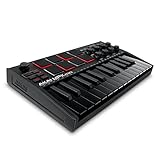
Overview: This black variant of Akai’s best-selling MPK Mini MK3 delivers identical functionality to the standard model in a sleek, all-black finish. The 25-key USB MIDI controller combines a velocity-sensitive keyboard, eight backlit MPC drum pads, and eight assignable knobs in a compact, travel-ready package. USB-powered operation and comprehensive DAW compatibility make it an instant studio upgrade for producers prioritizing portability without sacrificing professional features.
What Makes It Stand Out: The stealth black aesthetic appeals to producers wanting understated studio gear that blends into low-light environments. Internally, it shares the same innovative 4-way thumbstick for pitch/modulation, offering superior expressiveness to traditional wheels. The built-in arpeggiator features adjustable resolution and modes, while NKS integration provides direct hardware control over Native Instruments’ presets. Users can select one of three Komplete 15 Select bundles (Beats, Band, or Electronic), effectively customizing the software package to their genre.
Value for Money: Priced identically to other colorways at $119-129, the black version offers the same exceptional value proposition. The included NKS bundle represents substantial software savings, while the MPC-quality pads outperform competitors in this price bracket. Compared to purchasing a basic controller and software separately, buyers save approximately $180. The color option costs nothing extra, making it purely an aesthetic choice.
Strengths and Weaknesses: Strengths include legendary MPC pad responsiveness, robust build quality that withstands gigging, seamless DAW integration, and a software bundle that genuinely enhances workflow. The black finish resists visible wear better than lighter colors. Weaknesses mirror the standard model: mini keys challenge players accustomed to full-size keyboards, the eight-knob layout requires frequent bank switching for complex projects, and the all-plastic chassis lacks the heft of premium controllers. The small OLED display demands menu-diving for advanced settings.
Bottom Line: The black MPK Mini MK3 is functionally identical to its siblings but offers a professional, understated appearance. It’s the same unbeatable value for mobile producers and beginners, just in a more stage-friendly colorway.
3. Akai Professional LPD8 - USB MIDI Controller with 8 Responsive RGB MPC Drum Pads for Mac and PC, 8 Assignable Knobs and Music Production Software

Overview: The LPD8 strips the MIDI controller to its essential beat-making core: eight RGB-backlit MPC drum pads and eight Q-Link knobs in a sub-13-inch footprint. This pad-focused controller ditches keys entirely, targeting producers who trigger samples, program drums, and manipulate effects rather than play melodic parts. USB-powered and class-compliant, it integrates seamlessly with any DAW, offering genuine MPC workflow for laptop producers who need maximum portability with zero compromise on pad quality.
What Makes It Stand Out: The RGB pads provide visual feedback that matches clip colors in Ableton Live and other DAWs, a feature rare in sub-$100 controllers. Four onboard preset slots store custom mappings, instantly recalling configurations for different plugins or performances without software. The LPD8 inherits the same pad technology from Akai’s legendary MPC series, delivering studio-grade sensitivity and aftertouch response that competitors can’t match at this size. Its slim profile literally fits in a laptop sleeve.
Value for Money: Typically priced at $69-79, the LPD8 undercuts pad controllers like the Novation Launchpad Mini while offering superior pad quality. The included software bundle, while smaller than the MPK Mini’s, still provides production-ready tools. For pad-centric producers, it eliminates the cost and bulk of unnecessary keys. The build quality exceeds expectations, with robust construction that belies its featherweight design.
Strengths and Weaknesses: Strengths include genuine MPC pad feel, ultra-portable design, RGB visual feedback, instant DAW compatibility, and four hardware presets for performance flexibility. The knobs offer smooth, precise control. Weaknesses are the lack of keys limiting melodic input, just eight knobs requiring frequent mapping changes, and no arpeggiator or advanced sequencing features. The plastic construction feels durable but lightweight, which some users perceive as less premium.
Bottom Line: The LPD8 is the definitive pad controller for producers who prioritize drum programming and sample triggering above all else. Its MPC heritage and RGB feedback make it unbeatable for beat makers seeking maximum portability.
4. Akai Professional MPK Mini MK3 25 Key USB MIDI Keyboard Controller With 8 Backlit Drum Pads, 8 Knobs, Music Production Software and Native Instruments Sound Package (NKS Integration), Grey

Overview: This grey edition of the MPK Mini MK3 offers the same comprehensive feature set as other color variants in a contemporary light-grey finish. The 25-key controller integrates a velocity-sensitive mini keyboard, eight MPC-style drum pads, and eight assignable knobs into a portable USB-powered package. Designed for mobile producers and bedroom beat makers, it provides professional-grade control over virtual instruments, DAW parameters, and Native Instruments’ ecosystem through certified NKS integration.
What Makes It Stand Out: The grey finish provides a modern aesthetic alternative to traditional black studio gear, resisting fingerprints and dust better than darker colors. The controller features the same innovative 4-way thumbstick for simultaneous pitch and modulation control, a built-in arpeggiator with comprehensive parameter adjustment, and exclusive NKS support. Users can select one of three Komplete 15 Select bundles (Beats, Band, or Electronic), tailoring the software package to their production style without additional cost.
Value for Money: Matching the $119-129 price of other MPK Mini MK3 variants, the grey model delivers identical value. The NKS bundle alone represents a significant software investment, while the MPC-quality pads and robust feature set compete with controllers costing twice as much. For producers wanting a lighter-colored studio aesthetic without sacrificing functionality, it provides the same cost-effective entry point into professional music production.
Strengths and Weaknesses: Strengths include the same legendary MPC pad responsiveness, durable construction suitable for travel, seamless DAW integration, and a software bundle that genuinely enhances the production experience. The grey finish offers a fresh visual alternative. Weaknesses remain consistent across all variants: mini keys require adjustment for pianists, the eight-knob count necessitates bank switching for complex mixes, and the plastic chassis lacks the solidity of premium metal controllers. The small display requires menu navigation for deep editing.
Bottom Line: The grey MPK Mini MK3 is a cosmetic variant of the industry-standard portable controller. It delivers identical performance and value, simply offering a lighter aesthetic for producers who want their gear to stand out visually while maintaining professional capability.
5. Akai Professional MIDImix - USB MIDI Controller Mixer with Assignable Faders and Master Fader, 24 Knobs and 16 Buttons, 1 to 1 Mapping With Ableton Live

Overview: The MIDImix is a purpose-built DAW control surface that replicates a traditional mixing console in a compact, portable format. Featuring eight channel faders, a master fader, 24 assignable knobs, and 16 buttons arranged in two banks, it provides hands-on control over volume, EQ, sends, and transport functions. Designed specifically for Ableton Live integration with instant 1-to-1 mapping, it transforms laptop producers’ workflow by eliminating mouse-heavy mixing sessions.
What Makes It Stand Out: The single-button DAW mapping is revolutionary for Ableton users, instantly assigning all controls without manual MIDI mapping. Each channel strip includes three knobs (typically EQ and sends) and dedicated mute, solo, and arm buttons, mirroring a professional studio console. The master fader provides genuine hardware control over main output, a rarity in compact controllers. At under two pounds, it delivers mixing-console functionality that fits in a backpack, making it ideal for live performers who need tactile control over Ableton sessions.
Value for Money: Priced around $99-109, the MIDImix offers exceptional value for Ableton-centric producers. Competing products like the Novation Launch Control XL cost more while offering similar functionality. The included Ableton Live Lite license adds value, though the real benefit is the time saved through instant mapping. For producers spending hours mixing with a mouse, it pays for itself in workflow efficiency within weeks.
Strengths and Weaknesses: Strengths include flawless Ableton integration, comprehensive mixing controls, robust faders that feel surprisingly premium, and a logical layout that mirrors professional consoles. The build quality exceeds expectations for the price. Weaknesses are the Ableton-exclusive mapping (other DAWs require manual setup), non-motorized faders that don’t reflect automation, lack of keys or pads for melodic input, and no display for parameter feedback. The plastic construction is durable but lightweight.
Bottom Line: The MIDImix is the ultimate mixing controller for Ableton Live users. If your workflow centers on session mixing and you want hardware control without complexity, this is the most efficient and cost-effective solution available.
6. Btuty BT MIDI Foot Controller Wireless MIDI Controller Rechargeable 4 Buttons Pedal APP Control Chocolate Rechargeable Midi Controller

Overview: The Btuty BT MIDI Foot Controller delivers wireless command over your digital setup in a rugged, compact package built for mobile musicians. This four-switch Bluetooth pedal interfaces with smartphones, tablets, and computers, letting guitarists, vocalists, and producers trigger loops, change patches, or control DAW functions hands-free during performance or recording.
What Makes It Stand Out: The dedicated CubeSuite app transforms your phone into a command center for deep customization without cable clutter. Its bright display provides critical visual feedback mid-performance—a rarity in this price tier. The 300mAh rechargeable battery offers an impressive 12 hours of operation, outlasting many rehearsals and gigs. Cross-platform compatibility ensures seamless integration whether you’re on iOS, Android, or Windows.
Value for Money: Competing foot controllers often cost twice as much while requiring proprietary cables or disposable batteries. The Btuty unit combines wireless freedom, app-driven flexibility, and rechargeable convenience at an accessible price point that undercuts major brands like IK Multimedia or Keith McMillen for basic switching needs.
Strengths and Weaknesses: Strengths include true wireless operation, excellent battery life, intuitive app configuration, and clear visual feedback. The lightweight aluminum chassis withstands regular travel. Weaknesses are the limited four-button layout, which may constrain complex setups, and complete reliance on the app for advanced programming. Bluetooth latency, while minimal, might concern studio purists.
Bottom Line: Perfect for performers needing simple, reliable wireless control without breaking the bank. Guitarists using amp simulators or loop artists will find exceptional value, though power users requiring extensive footswitch arrays should look elsewhere.
7. Wireless Midi Controller Mixer, Bluetooth Semi Weighted Professional dynamic keybed 8 Knobs and Music Production,Software Included (Black Mixer)

Overview: This hybrid controller merges a semi-weighted keyboard with eight rotary encoders in a sleek, battery-powered unit designed for untethered music creation. Its wireless architecture liberates producers from studio desks, enabling composition anywhere inspiration strikes.
What Makes It Stand Out: The semi-weighted keybed provides superior tactile response rarely found in portable controllers, while soft-backlit silicone buttons operate silently for late-night sessions. Sixteen-hour battery endurance leads its class, and one-click DAW mapping eliminates tedious MIDI learning curves. Eight customizable knobs offer precise parameter control, and each fader bank includes indicator lights for instant visual reference.
Value for Money: Traditional controllers with weighted keys command premium prices, while this unit delivers comparable feel plus wireless capability at a mid-range price. The inclusion of production software and cross-platform compatibility adds significant value, positioning it as a budget-friendly alternative to Akai or Novation’s entry-level offerings.
Strengths and Weaknesses: Strengths include exceptional battery life, professional key feel, silent operation, and seamless DAW integration. The sturdy build quality inspires confidence. Weaknesses involve potential Bluetooth interference in crowded venues, limited key count for two-handed playing, and no aftertouch functionality. The compact knob spacing may frustrate users with larger hands.
Bottom Line: An outstanding choice for mobile producers prioritizing key feel and wireless freedom. The impressive battery life and silent buttons make it ideal for travel and shared spaces, though stage performers should verify Bluetooth stability in their specific environment.
8. Donner Mini MIDI Keyboard, N-25 25 Key MIDI Controller for Beginner with Velocity-Sensitive Mini Keys&Light-up Rocker&Music Production Software, Small Controlador MIDI with 40 Teaching Courses

Overview: The Donner N-25 targets entry-level producers with a compact 25-key controller that prioritizes simplicity and education. Its velocity-sensitive mini keys and integrated pitch-bend rocker provide essential expressive tools, while the included software bundle and 40 interactive lessons accelerate the learning curve for complete novices.
What Makes It Stand Out: The comprehensive tutorial system distinguishes this from competitors, offering structured progression from basic concepts to arrangement techniques. Light-up buttons create engaging visual feedback that reinforces learning, and four user-programmable banks expand its modest control set. Plug-and-play USB-MIDI connectivity works across Mac, PC, and mobile devices without driver headaches.
Value for Money: Budget controllers often skimp on educational content, but Donner includes $100+ worth of teaching courses and production software. This positions the N-25 as both instrument and instructor, delivering exceptional value for beginners who would otherwise pay for separate lessons or subscriptions.
Strengths and Weaknesses: Strengths include the robust lesson library, straightforward layout, reliable plug-and-play operation, and fun light-up interface. The compact size travels effortlessly. Weaknesses are the mini keys’ limited playability for experienced pianists, lack of rotary controls, and absence of wireless connectivity. The single modulation method may feel restrictive over time.
Bottom Line: An unbeatable starter package for aspiring producers seeking guidance. The educational focus and included software remove barriers to entry, though advancing musicians will quickly outgrow its basic feature set.
9. M-VAVE MIDI Controller Drum Pad Wireless Bluetooth MIDI Keyboard 16 Strike Pad Velocity Sensitive, Note Repeat, Full Level Buttons RGB Backlight Portable with Wired USB-C Built-in Battery

Overview: The M-VAVE SMC-PAD POCKET packs professional drum programming into a 4.1-inch square chassis. Sixteen velocity-sensitive RGB pads with aftertouch deliver responsive percussion control, while wireless Bluetooth and USB-C connectivity provide flexible integration with DAWs across all platforms.
What Makes It Stand Out: Its pocket-sized form factor makes it the most portable pad controller available, yet it doesn’t sacrifice pro features like Note Repeat and Full Level functions. Customizable RGB backlighting enhances workflow visualization, and one-click mapping for major DAWs eliminates setup friction. The 8-hour battery supports extended mobile sessions.
Value for Money: Competing pad controllers from Akai or Native Instruments cost significantly more and lack wireless capability. M-VAVE delivers comparable pad quality, professional features, and dual connectivity at a fraction of the price, making it accessible to bedroom producers and mobile creators.
Strengths and Weaknesses: Strengths include extreme portability, responsive pads with aftertouch, wireless freedom, and instant DAW integration. The compact size is genuinely pocket-friendly. Weaknesses involve the tiny footprint, which may cause accidental pad hits during vigorous playing, and Bluetooth latency that could affect tight rhythmic programming. The eight-hour battery lags behind some competitors.
Bottom Line: Ideal for beatmakers prioritizing portability and wireless convenience over expansive control surfaces. It excels as a secondary controller for sketching ideas on the go, though primary producers may prefer larger pad arrays for complex performances.
10. Vangoa 25 Keys Midi Keyboard Controller, Mini Portable Beat Maker Machine with Backlit Drum Pads, 8 Knoks, 8 RGB Beating Pad for Music Production, Velocity Sensitive, LED Display, Arpeggiator, Black

Overview: The Vangoa 25-key controller balances portability with performance features, targeting beginners who want room to grow. It combines mini keys, eight RGB drum pads, and eight endless encoders in a compact black chassis, with smart chord and scale functions that simplify music theory for novices.
What Makes It Stand Out: The arpeggiator and scale modes actively assist composition rather than just sending MIDI data, making this an educational tool disguised as a controller. Mute RGB pads allow late-night practice without disturbing others, while gravity-sensitive keys respond to pressure for nuanced dynamics. Exclusive DAW integration streamlines workflow across major platforms.
Value for Money: Most entry-level controllers force choices between keys or pads, but Vangoa includes both plus rotary controls at a competitive price point. The feature set rivals more expensive Akai MPK Mini competitors, delivering exceptional bang-for-buck for producers wanting comprehensive control without complexity.
Strengths and Weaknesses: Strengths include the versatile control combination, helpful smart functions, quiet operation, and robust DAW compatibility. The LED display provides clear feedback. Weaknesses are the mini key size, which limits expressive playing, and the plastic construction that may not endure heavy touring. The eight knobs lack detents for precise value recall.
Bottom Line: A feature-packed starter controller that grows with your skills. The combination of keys, pads, and knobs suits versatile producers, while smart functions build musical knowledge. Perfect for home studios and mobile setups, though gigging musicians should consider durability.
Understanding the Role of MIDI Controllers in Modern EDM Production
Gone are the days when MIDI controllers simply triggered samples and played virtual instruments. In contemporary EDM workflows, they’ve become holistic command centers that manage everything from clip launching and effect automation to hardware synth sequencing and live performance lighting. The modern producer needs tactile control over dozens of parameters simultaneously—filter sweeps, sidechain curves, macro variations, and scene transitions—all while maintaining the creative flow that defines electronic music’s spontaneous energy.
The Evolution from Studio Tool to Performance Instrument
The line between studio production and live performance has blurred irreversibly. Today’s controllers must excel in both domains, offering studio-precision editing capabilities alongside road-ready durability and intuitive stage layouts. This dual-purpose demand means evaluating build quality, latency stability, and visual feedback with equal scrutiny. A controller that works beautifully in your DAW but can’t handle the rigors of a 2 AM festival set is only doing half its job. Conversely, a performance beast that lacks deep DAW integration will slow down your studio sessions when inspiration strikes.
Key Differentiators: What Separates EDM Controllers from Other Genres
While jazz producers might prioritize weighted piano actions and orchestral composers need extensive key ranges, EDM producers face a distinct set of demands. Your controller must become an extension of your rhythmic intuition and sound design experimentation. This means pad sensitivity for finger-drumming complex hi-hat patterns, encoder density for simultaneously manipulating multiple effect parameters, and the ability to toggle between different control layers without breaking your creative trance.
Real-Time Parameter Manipulation and Macro Control
EDM lives and dies by automation—those precise filter openings, pitch risers, and dynamic drops that define the genre. Your controller should offer deep macro control capabilities, allowing you to map multiple parameters across various plugins and hardware to single encoders or faders. Look for devices that support high-resolution MIDI (14-bit CC) for buttery-smooth parameter sweeps that avoid the “stepping” artifacts common in budget controllers. The ability to create custom control pages for different sections of your arrangement (build, drop, break, intro) can mean the difference between a static loop and a compelling journey.
Pad vs. Keyboard: Choosing Your Primary Control Surface
This fundamental decision shapes your entire interaction with music creation. There’s no universally correct answer—only the one that aligns with your creative instincts. Many producers eventually own both, but your primary controller should match how you conceptualize musical ideas. Do you think in rhythmic patterns and sample slices, or do melodies and chord progressions come first?
When Pad-Based Controllers Drive Your Workflow
If your productions start with finger-drummed beats, chopped vocal chops, and step-sequenced basslines, a pad controller might be your soul instrument. The best pad controllers for EDM offer more than just 16 squares—they provide velocity and pressure sensitivity that captures the nuance of your touch, RGB feedback that displays clip status and key information, and intelligent note repeat functions that make programming rapid-fire hi-hats and trap rolls effortless. For producers heavily invested in clip-launching workflows, pad controllers with dedicated scene navigation and stop buttons become indispensable performance tools.
When Keyboard Controllers Offer Greater Musical Versatility
Don’t dismiss keyboard controllers as “just for piano players.” Modern EDM keyboard controllers combine piano keys with extensive pad sections, encoder banks, and fader strips, offering the best of both worlds. If your productions lean toward melodic house, trance, or any subgenre where harmonic complexity matters, having proper keys with aftertouch becomes crucial for expressive lead lines and evolving pads. Many keyboard controllers now feature scale modes, chord generators, and arpeggiators that transform even modest keyboard skills into complex musical parts—perfect for producers who understand theory but lack classical training.
The 8 Critical Features Every EDM Producer Should Evaluate
Spec sheets tell a fraction of the story. Here’s what to actually test when choosing your next controller.
Not all pads are created equal. Premium controllers use rubberized silicone pads with carefully calibrated force curves that respond consistently across the entire surface. Test for “hot spots”—areas that trigger unexpectedly louder than others. For EDM, you need pads that can handle 200+ BPM finger drumming without missed triggers or double-firing. Examine the pad travel distance; too shallow feels unresponsive, too deep slows down rapid patterns. Durability matters too—those pads will take thousands of hits. Look for controllers with individually replaceable pad modules rather than integrated surfaces that require complete replacement if one pad fails.
Aftertouch—applying pressure after the initial hit—opens expressive possibilities: filter sweeps on sustained pads, vibrato on leads, or effect morphing on basslines. Channel aftertouch affects all notes equally, while polyphonic aftertouch (now increasingly common) lets you modulate each note independently. For EDM, polyphonic aftertouch is a game-changer for complex chord progressions where each voice evolves differently. However, it requires both controller and software support, so verify your DAW and primary synth plugins are MPE-compatible before prioritizing this feature.
MPE extends polyphonic aftertouch with per-note pitch bend and timbral control, essentially giving you acoustic-instrument-level expression in electronic form. While still emerging in 2026, MPE is becoming essential for forward-thinking bass music and experimental techno. Evaluate controllers based on their MPE zone configuration flexibility—can you split the surface into MPE and non-MPE regions? How easily can you toggle MPE on/off for different tracks? The best controllers treat MPE not as a gimmick but as a fully integrated workflow element.
EDM production demands hands-on control of dozens of parameters. A controller with 8 encoders might seem sufficient until you’re trying to simultaneously control filter cutoff, resonance, LFO rate, distortion amount, reverb mix, and sidechain depth. High-end controllers offer 16+ encoders with multiple banks, but raw count means nothing without intelligent mapping systems. Look for encoders with LED rings or displays showing current values, infinite rotation with customizable acceleration curves, and the ability to “catch” values when switching between parameter sets. Some advanced controllers offer “encoder paging” that automatically switches encoder assignments based on which plugin window is focused in your DAW.
Generic MIDI mapping is so 2020. In 2026, deep DAW integration means your controller automatically maps to your mixer, native devices, and even third-party plugins with manufacturer-certified scripts. This goes beyond simple transport control—you want visual feedback on your controller’s display showing parameter names, values, and even waveforms. Test how the controller handles DAW-specific features: Can it display your session’s clip colors? Does it offer native control over your DAW’s built-in sampler or drum rack? The best integrations feel like the controller was designed specifically for your software, eliminating the setup friction that kills creative momentum.
The hardware renaissance isn’t slowing down, and your controller should serve as the bridge between your DAW and Eurorack/modular systems. Dedicated CV/Gate outputs let you sequence analog gear with the same precision as virtual instruments. Evaluate the voltage range (ideally 0-10V for pitch, 0-5V for gates), the number of independent channels, and whether the controller can generate its own clock or must slave to your DAW. For techno producers using hybrid setups, this feature alone can justify a higher price tag.
That plastic controller might feel fine in your bedroom, but can it survive a cross-country tour? Professional controllers use metal chassis, reinforced USB connections, and recessed controls that won’t snap off in transit. Check the fader caps—are they secured with screws or just friction-fit? Do the encoders have metal shafts or plastic? Weight matters too; a heavier controller stays put on stage when you’re hammering pads. Look for units with Kensington lock slots and optional flight case availability. The warranty terms reveal manufacturer confidence—three years suggests professional-grade construction.
A generous software bundle can offset a higher purchase price, but evaluate the included tools critically. Does the controller come with a full DAW license or just a lite version? Are the included synths and effects actually useful for EDM, or generic acoustic instrument libraries you’ll never touch? More importantly, consider the manufacturer’s track record for firmware updates. A controller that receives regular feature updates three years post-launch delivers far more value than one abandoned after six months. Check user forums for firmware update frequency and responsiveness to bug reports.
Size Matters: Portability vs. Studio Command Centers
Your living situation and performance schedule should heavily influence controller dimensions. Compact 25-key controllers with 16 pads fit in a backpack for hotel room production sessions and airplane tray tables. However, they require constant bank-switching that can interrupt flow. Full-size 61-key controllers with extensive control surfaces become permanent studio fixtures, offering immediate access to everything but requiring dedicated desk space and a flight case for transport.
The sweet spot for many EDM producers is the “medium format”—49 keys with 32+ pads and 16 encoders. This size remains portable enough for occasional gigs while providing sufficient controls for complex studio sessions. Consider your primary use case: if you perform weekly, prioritize portability and durability. If you’re mainly studio-based, maximize control density. Some producers solve this with a modular approach: a small portable controller for travel and a large flagship unit for the studio, syncing projects via cloud storage.
Budget Tiers: What to Expect at Each Price Point
MIDI controller pricing in 2026 reflects a mature market with clear quality demarcations. Understanding these tiers prevents both overspending on unnecessary features and underspending on critical durability.
Entry-Level ($100-$250): Expect plastic construction, basic velocity sensitivity without aftertouch, and generic MIDI mapping. These controllers work for beginners but lack the precision and durability for professional EDM production. Pad sensitivity is often inconsistent, and encoder resolution typically limited to 7-bit MIDI. Software bundles include lite DAW versions and basic synth plugins.
Mid-Range ($250-$600): This is where serious EDM production begins. You’ll find metal faceplates, channel aftertouch, RGB pads with reasonable sensitivity, and manufacturer-certified DAW integration scripts. Encoders may include LED feedback, and CV/Gate outputs often appear. Build quality supports occasional gigging, and software bundles include more substantial tools.
Professional ($600-$1200): Premium materials, polyphonic aftertouch, MPE support, high-resolution encoders, and deep DAW integration. These controllers feel like instruments, not accessories. Multiple CV/Gate channels, standalone operation modes, and extensive customization software are standard. The included software often includes flagship synths and effects worth hundreds of dollars alone.
Flagship ($1200+): No-compromise controllers designed for professionals who earn their living with them. Every component is replaceable, firmware updates add major features years after purchase, and the integration is so deep it feels native. These often include multiple control protocols (MIDI 2.0, OSC, proprietary formats) and can function as the central hub of complex hybrid setups.
The Hidden Costs: Cables, Stands, and Customization Accessories
The sticker price never tells the full story. Factor in these essential additions when budgeting. Quality USB-C cables with proper shielding cost $20-40 each—buy several. A sturdy controller stand for live performance runs $50-150, while a studio desk mount might be $100-200. Don’t forget a padded gig bag or flight case ($80-300) if you plan to travel.
Many producers customize their controllers with colored overlays for visual grouping of functions ($30-60) or third-party magnetic encoder caps for better grip ($20-40). If your controller supports optional expansion modules (additional pad banks, fader wings), price those out upfront—they’re often cheaper when bundled with the initial purchase. Power supplies are another hidden cost; while many controllers are USB-powered, some require dedicated adapters for standalone operation, adding $30-50.
Workflow Integration: Matching Controllers to Your Production Style
Your controller should amplify your natural creative process, not force you to adapt to its limitations. Identify your primary workflow archetype to narrow your options effectively.
The Loop-Based Beat Maker
If you build tracks by layering loops and one-shots, prioritize controllers with excellent clip launching, scene navigation, and real-time time-stretching control. You need immediate access to mute/solo for multiple tracks, the ability to arm recording on the fly, and intuitive browser integration for auditioning samples without touching your mouse. Pad-based controllers with deep DAW integration excel here, especially those that can display clip names and colors directly on the pads.
The Live Performance Artist
Performing EDM live demands rock-solid timing, visual feedback in dark venues, and the ability to recover gracefully from mistakes. Look for controllers with redundant connection options (USB plus MIDI DIN), bright displays visible from a distance, and programmable “panic” buttons that reset all parameters to safe values. The ability to create setlist-specific controller configurations that load automatically is invaluable. Durability is non-negotiable—every control will be hammered repeatedly under pressure.
The Sound Design Architect
If you spend hours crafting evolving patches and complex effect chains, your controller must offer deep parameter access and modulation routing. Prioritize high encoder counts, MPE support, and the ability to create custom control pages for specific synths. You’ll benefit from controllers that can store multiple presets for different instruments and switch between them instantly. Consider units with built-in arpeggiators and sequencers that can modulate parameters independently of your DAW, opening creative possibilities beyond static automation lanes.
Connectivity Standards: USB-C, Bluetooth MIDI, and Low-Latency Wireless
By 2026, USB-C has become the universal standard, but not all USB-C implementations are equal. Verify the controller supports USB 3.0 speeds for lower latency and higher data throughput—critical when streaming MPE data from dozens of simultaneous touches. Some controllers offer USB-C Power Delivery, allowing them to charge connected devices like your iPad or even power a small hardware synth.
Bluetooth MIDI has matured significantly, with latency now comparable to wired connections (3-5ms) on premium controllers. This freedom is transformative for live performance, letting you control visuals or secondary systems wirelessly. However, always check for wired backup options—wireless can fail, and a dead controller mid-set is a nightmare. Some cutting-edge controllers now feature ultra-wideband (UWB) wireless for even lower latency and higher data rates, though this remains premium-tier technology.
The Rise of AI-Assisted Mapping and Smart Controllers
Artificial intelligence is revolutionizing how controllers adapt to your workflow. Smart controllers now analyze your playing style and automatically suggest parameter mappings based on genre conventions. Play a lot of staccato basslines? The controller might suggest mapping aftertouch to filter envelope decay. Frequently use reverb swells? It could auto-assign a fader to your go-to reverb’s wet/dry.
These systems learn from community data too, suggesting mappings that successful producers use for specific synths. The key is maintainable control—you should always be able to override AI suggestions and lock in manual mappings. The best implementations treat AI as a creative assistant, not an autopilot. Test how easily you can disable AI features; some producers find them more distracting than helpful. Privacy-conscious users should verify if AI processing happens locally or requires cloud connectivity.
Community and Ecosystem: Why Manufacturer Support Extends Beyond Warranty
A controller is only as good as its ecosystem. Active user communities create custom mapping scripts, share performance templates, and troubleshoot issues faster than official support channels. Before purchasing, search for active forums, Discord servers, or Reddit communities dedicated to the manufacturer. Check how responsive the company is to feature requests—do they implement user suggestions in firmware updates?
Manufacturers with strong educational ecosystems (video tutorials, livestreams with artists, detailed documentation) accelerate your mastery of the controller. Some host annual “producer challenges” or partner with sample pack companies, creating opportunities to learn and network. A vibrant third-party accessory market (custom overlays, protective cases, expansion modules) indicates a product’s longevity. Dead ecosystems mean you’re on your own when problems arise.
Testing Before Buying: Hands-On Evaluation Strategies
Spec sheets and YouTube demos can’t replicate the feel of a controller under your fingers. Here’s how to properly evaluate before committing.
Visit a retailer and spend at least 30 minutes with the controller connected to your own laptop running your DAW. Test pad sensitivity by finger-drumming at various velocities—does it capture ghost notes and subtle accents? Try the encoders—do they have satisfying detents or smooth rotation? Check display visibility from different angles and lighting conditions.
Rent before you buy if possible. Many pro audio shops offer weekend rentals for 10% of the purchase price. A three-day intensive session will reveal workflow friction points that a store demo misses. Can you complete an entire track without touching your mouse? Does it integrate seamlessly with your favorite synth plugins?
Attend trade shows and manufacturer events where you can see prototypes and talk directly with product designers. They’ll reveal upcoming firmware features and ecosystem plans that influence long-term value. User meetups at these events provide unfiltered feedback from working producers.
If buying online is your only option, purchase from retailers with 30-day return policies and treat that period as an extended trial. Keep all packaging and document any issues immediately.
Frequently Asked Questions
Q1: Do I need MPE support if I mainly produce house and techno?
While traditional house and techno don’t require MPE, the genre is evolving. MPE excels for expressive basslines where each note bends independently and for evolving pads that breathe organically. Even if you don’t use it today, MPE-ready controllers future-proof your setup as more EDM artists adopt these techniques for unique sound design.
Q2: How many pads do I actually need for EDM production?
It depends on your workflow. 16 pads suffice for basic drum programming, but 32-64 pads become invaluable for clip launching and multi-sample instruments. Many producers pair a 16-pad portable controller with a larger studio unit, using the small one for programming and the big one for arrangement and performance.
Q3: Can one controller really work for both studio and live performance?
Yes, but compromises exist. Studio controllers prioritize control density, while live units emphasize durability and visual feedback. The best hybrid controllers offer “performance modes” that simplify the interface for stage use while retaining full studio functionality. However, many professionals eventually own separate units optimized for each environment.
Q4: Is wireless MIDI reliable enough for live EDM performance?
Modern Bluetooth MIDI with adaptive frequency hopping is remarkably stable, but always have a wired backup. For critical performances, use wireless for secondary functions (lighting control, secondary synths) while keeping your primary audio triggers wired. Some touring artists use wireless for freedom of movement but keep a wired controller on standby, ready to plug in within seconds.
Q5: What’s the realistic lifespan of a professional MIDI controller?
With proper care, a flagship controller lasts 5-10 years. The key is firmware support—manufacturers who regularly update devices extend functional lifespan indefinitely. Mechanical components like faders and pads may need replacement after heavy use, so choose controllers with user-serviceable parts. Budget controllers typically show wear within 2-3 years of daily use.
Q6: How important is standalone operation (without a computer)?
Increasingly important. Standalone mode lets you sequence hardware synths, generate MIDI clock, and even host USB devices without a computer. This is crucial for hardware-heavy techno setups and for producers who want to jam away from the studio. Even if you primarily use a DAW, standalone capability provides a valuable backup workflow.
Q7: Should I prioritize controller features or software bundle value?
The controller itself matters more long-term. Software bundles lose value as you acquire preferred tools, but a well-designed controller shapes your daily workflow for years. That said, a bundle including a full DAW license or flagship synth can offset costs significantly. Calculate the bundle’s value based only on tools you’d actually purchase separately.
Q8: What’s the deal with MIDI 2.0, and do I need it in 2026?
MIDI 2.0 offers higher resolution, bidirectional communication, and automatic device configuration. While adoption is growing, most EDM production still relies on MIDI 1.0. However, buying a MIDI 2.0-ready controller future-proofs your setup as DAWs and plugins increasingly support the standard. The backward compatibility means there’s no downside to having MIDI 2.0 capability.
Q9: How do I test pad sensitivity effectively in a store?
Bring headphones and your own samples. Program a simple drum pattern with ghost notes, flams, and velocity-sensitive elements. Play it repeatedly at different intensities. A good pad captures subtle variations without double-triggering. Also test the pad’s “throw”—how far it depresses—and whether the surface remains comfortable after 15+ minutes of continuous playing. Ask to test a floor model that’s already broken in; new pads often feel stiffer than they will after a week of use.
Q10: Are modular/expanding controllers worth the investment?
Modular systems excel for producers with evolving needs. Starting with a core unit and adding pad banks or fader wings as your setup grows spreads costs over time. However, ensure the connection system is robust (not proprietary and fragile) and that expansion modules remain available. Some manufacturers discontinue modules quickly, leaving early adopters with incomplete systems. Check third-party module support and community development activity before committing to a modular ecosystem.
See Also
- How to Choose 10 Best MIDI Controllers for Finger Drumming in 2026
- 10 Must-Have MIDI Controllers for EDM Beat Makers in 2026
- Solving USB-C Power Issues with Mobile MIDI Controllers on iPad Pro
- 10 USB-C MIDI Controllers for Modern Producers in 2026
- Stop Cable Clutter: 10 MIDI Controllers with Bus Power for Bedroom Producers in 2026