Table of Contents
Finger drumming has evolved from a niche production trick into a legitimate performance art form, and 2026 marks a watershed moment for the technology powering it. Today’s MIDI controllers aren’t just triggering samples—they’re translating human micro-timing, velocity variations, and expressive gestures into digital performances that rival acoustic drumming in nuance and feel. Whether you’re programming intricate hip-hop grooves, triggering electronic drum kits in a live rock show, or performing polyrhythmic jazz patterns in a bedroom studio, the right controller becomes a natural extension of your musical instincts.
But here’s the challenge: not all pad controllers are built for the unique demands of finger drumming. A device that works brilliantly for launching clips or triggering one-shot effects might completely fail when you need ghost notes, flams, and rapid-fire 32nd-note rolls. The difference lies in a complex interplay of pad materials, sensor technology, firmware sophistication, and ergonomic design that most spec sheets barely hint at. This guide cuts through the marketing noise to reveal what actually matters when choosing your percussive partner.
Top 10 Midi Controllers For Finger Drumming
Detailed Product Reviews
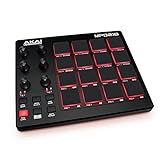
1. Akai Professional MPD218 - USB MIDI Controller with 16 MPC Drum Pads, 6 Assignable Knobs, Note Repeat and Full Level Buttons and Production Software
Overview:
The Akai Professional MPD218 delivers the classic MPC workflow in a compact, USB-powered package. With 16 thick, velocity-sensitive pads and expansion capabilities, it’s designed for producers who want authentic drum programming feel without the bulk of a full MPC. The unit includes essential production software, making it a self-contained beat-making solution for studio and mobile setups.
What Makes It Stand Out:
The MPD218’s three pad banks expand your control to 48 assignable pads, while three knob banks provide 18 total parameters for deep DAW integration. The inclusion of MPC Note Repeat and Full Level buttons brings professional performance features typically found on higher-end gear. Akai bundles Ableton Live Lite and Drum Synth 500, giving you immediate sonic possibilities.
Value for Money:
Priced in the mid-range for pad controllers, the MPD218 justifies its cost through authentic MPC pad feel and robust software bundle. While cheaper alternatives exist, none match Akai’s legacy pad responsiveness. It competes favorably with the MPD226 at a lower price point, sacrificing only a few knobs and faders most mobile producers won’t miss.
Strengths and Weaknesses:
Strengths: Genuine MPC pad feel; extensive bank expansion; excellent software inclusion; USB-powered portability; straightforward plug-and-play operation.
Weaknesses: No RGB pad lighting; knobs require bank switching for full access; limited onboard customization; plastic construction feels less premium than flagship models.
Bottom Line:
The MPD218 is ideal for hip-hop and electronic producers seeking authentic MPC pad response in a portable format. If you prioritize pad feel over flashy features, this controller delivers professional results without breaking the bank.
2. Akai Professional LPD8 - USB MIDI Controller with 8 Responsive RGB MPC Drum Pads for Mac and PC, 8 Assignable Knobs and Music Production Software

Overview:
The LPD8 packs Akai’s legendary MPC pad quality into an ultra-portable footprint. Measuring just 13 inches wide, this slim controller offers eight RGB-backlit pads and eight Q-Link knobs for tactile control over your DAW. Four onboard preset slots let you switch between mappings instantly, making it a versatile companion for laptop producers and performers.
What Makes It Stand Out:
RGB pad lighting provides visual feedback for clips and velocity layers, a feature often missing in this price tier. The four programmable presets store complete control maps, eliminating tedious reconfiguration when switching projects. Its rugged build quality mirrors standalone MPCs, while the slim profile slides effortlessly into any laptop bag.
Value for Money:
As one of the most affordable professional pad controllers available, the LPD8 delivers exceptional value. You’re getting genuine Akai pad sensitivity and build quality at a budget price point. Competing products from lesser brands may offer more pads but can’t match Akai’s response accuracy or software integration reliability.
Strengths and Weaknesses:
Strengths: Compact and durable; RGB pads aid workflow; instant preset recall; genuine MPC feel; plug-and-play compatibility; excellent price-to-performance ratio.
Weaknesses: Only eight pads limit complex finger-drumming; no aftertouch; limited onboard controls; requires computer editor for deep customization.
Bottom Line:
Perfect for beginners and mobile producers who need reliable pad control without bulk. The LPD8 excels as a secondary controller or primary device for minimalist setups where portability trumps pad count.
3. Donner MIDI Controller Pad Beat Maker Machine, Portable Drum Machine with 16 Beat Pads,Note Repeat and Music Production Software, Mini USB MIDI Controller with 40 Courses, STARRYPAD MINI

Overview:
The Donner STARRYPAD MINI redefines portability in MIDI controllers. At just 4.53 x 5.71 inches, this pocket-sized powerhouse features 16 RGB velocity-sensitive pads with polyphonic aftertouch. Wireless MIDI capability and a 10-hour rechargeable battery liberate producers from cables, while included production courses guide beginners through music creation fundamentals.
What Makes It Stand Out:
True wireless MIDI operation sets this apart from competitors, enabling cable-free creation with iOS and Android devices. Polyphonic aftertouch on pads this size is unprecedented at this price point. The 40 included courses transform the device into a learning platform, not just a controller. USB-C connectivity ensures modern device compatibility.
Value for Money:
Priced competitively against entry-level controllers, the STARRYPAD MINI offers features found in premium gear. Wireless capability alone justifies the cost for mobile producers. While Donner lacks Akai’s legacy, they deliver innovative features that larger brands reserve for flagship models.
Strengths and Weaknesses:
Strengths: Ultimate portability; wireless and USB-C connectivity; polyphonic aftertouch; RGB pads; excellent battery life; educational content included; quiet silicone pads.
Weaknesses: Extremely small size may cause cramped playing; brand lacks pro-studio credibility; software integration less polished; no physical knobs for parameter control.
Bottom Line:
The STARRYPAD MINI suits producers prioritizing portability and modern connectivity over traditional layout. It’s perfect for travel, iPad production, and beginners wanting guided learning alongside professional features.
4. Novation Launchpad Mini [MK3] — Portable MIDI 64-Pad, USB Grid Controller for Ableton Live and Logic Pro Performances
![Novation Launchpad Mini [MK3] — Portable MIDI 64-Pad, USB Grid Controller for Ableton Live and Logic Pro Performances](https://m.media-amazon.com/images/I/41Gb7Rv81jL._SL160_.jpg)
Overview:
The Launchpad Mini MK3 is Novation’s most compact 64-pad grid controller, engineered specifically for Ableton Live integration. Its vibrant RGB pads mirror your session view, providing visual clip status feedback for seamless performances. The slim, bus-powered design makes it an essential tool for electronic musicians who need comprehensive session control in a travel-friendly package.
What Makes It Stand Out:
Deep Ableton Live integration goes beyond basic MIDI mapping, offering native clip launching, stop/solo/mute controls, and scene triggering. Three Custom Modes via Novation Components let you design complex MIDI mappings for any software. The 64-pad grid enables melodic sequencing and drum programming simultaneously, while the interactive onboarding gets beginners productive within minutes.
Value for Money:
Positioned as a premium grid controller, it commands a higher price than basic pad controllers but delivers specialized functionality. For Ableton users, it replaces multiple devices, offering Launchpad Pro features in a smaller, more affordable package. Non-Ableton users may find better value in generic pad controllers.
Strengths and Weaknesses:
Strengths: Unmatched Ableton Live integration; 64 RGB pads; compact and bus-powered; Custom Modes for versatility; excellent build quality; comprehensive software bundle.
Weaknesses: Limited use outside Ableton Live; no knobs or faders; learning curve for advanced features; higher price per pad than alternatives.
Bottom Line:
Essential for Ableton Live producers and performers who want tight integration and clip-based workflow. If you work primarily in Ableton, this is the best compact controller available. Others should consider more DAW-agnostic options.
5. AlphaTheta SLAB MIDI Controller — Unlock Serato Studio (Full Version), Multi‑Function Dial & Focus Control, 16 Velocity Pads With Aftertouch, Touch Strip Performance; Works with Serato DJ Pro

Overview:
The AlphaTheta SLAB is a purpose-built controller for the Serato ecosystem, unlocking the full version of Serato Studio upon connection. It features 16 large velocity-sensitive pads with aftertouch, a multifunction dial for browsing and editing, and an expressive RGB touch strip. Designed for producers and DJs already invested in Serato, it bridges the gap between DJ performance and studio production.
What Makes It Stand Out:
Hardware-unlocked Serato Studio provides immediate access to professional production tools without subscription costs. The Focus Control automatically maps plugin parameters, eliminating manual MIDI mapping. Large 29×29 mm pads capture nuanced finger-drumming, while the Stems Sample Deck lets you extract and manipulate audio elements in real-time. Touch strip control adds performance flair.
Value for Money:
Premium pricing is offset by the included Serato Studio license (worth $199). For Serato DJ Pro users, this creates a unified workflow across performance and production. The specialized feature set justifies the cost for target users but represents poor value for those using other DAWs.
Strengths and Weaknesses:
Strengths: Unlocks full Serato Studio; seamless Serato integration; large pads with aftertouch; intelligent Focus Control; stems manipulation; robust build quality.
Weaknesses: Niche Serato-only focus; premium price; limited appeal outside DJ/producer crossover market; fewer pads than grid controllers.
Bottom Line:
The ultimate controller for Serato DJ Pro users transitioning into production. If you live in the Serato ecosystem, the SLAB is invaluable. Others should look at more versatile, DAW-agnostic controllers that don’t lock you into a single platform.
6. Yamaha Finger Drum Pad – Portable Electronic Drum Pad with Built-In Sounds, Speaker, USB MIDI, and Battery Power for On-the-Go Music Making FGDP-50

Overview: The Yamaha FGDP-50 redefines portable finger drumming with its ergonomic 18-pad layout and built-in sound engine. This self-contained unit lets you create beats anywhere without a computer, making it ideal for mobile producers and live performers who demand Yamaha’s legendary reliability in a compact form factor.
What Makes It Stand Out: The FGDP-50’s velocity-sensitive pads with aftertouch provide exceptional expressive control rarely found in portable units. Its built-in speaker and rechargeable battery enable true standalone operation, while the Rec’n’Share app seamlessly captures performances. The 48 factory kits plus 50 user slots offer extensive sonic flexibility, and the 8 RGB assignable pads add performance flair.
Value for Money: Positioned at a premium price point, the FGDP-50 justifies its cost through professional build quality and true portability. Unlike controllers requiring external software, this all-in-one solution eliminates additional hardware needs. While more expensive than basic controllers, it’s comparable to other standalone drum machines but with superior ergonomics for finger drummers.
Strengths and Weaknesses: Strengths include exceptional pad response with aftertouch, built-in speaker, battery power, Yamaha’s durable construction, and intuitive layout. Weaknesses are the premium price tag, limited internal sound editing compared to full workstations, and the small speaker’s compromised bass response for critical listening.
Bottom Line: The FGDP-50 is a premium choice for serious finger drummers prioritizing portability and standalone capability. If you need pro-level expression on the go and value Yamaha’s reliability, this investment delivers. For studio-only users, cheaper controllers may suffice.
7. PreSonus ATOM Production & Performance Midi Pad Controller with Studio One Artist and Ableton Live Lite Recording Software

Overview: The PreSonus ATOM bridges hardware and software production with deep DAW integration. This 16-pad controller targets producers who want tactile control over Studio One or Ableton, bundling premium software that accelerates workflow and expands creative possibilities without breaking the bank.
What Makes It Stand Out: ATOM’s tight Studio One Artist integration is unparalleled, turning the controller into a hardware extension of the DAW. The 16 full-size, RGB pads offer superior playability over mini alternatives, while eight pad banks provide 128 total triggers. The included Studio Magic Plug-In Suite, valued at over $1000, transforms this into a complete production ecosystem.
Value for Money: Exceptional value. The software bundle alone exceeds the hardware cost, making ATOM essentially free for producers needing those tools. Competing controllers offer similar pads but can’t match this software package. It’s a strategic investment for Studio One users, though less valuable if you don’t use the bundled DAWs.
Strengths and Weaknesses: Strengths include full-size velocity/pressure-sensitive pads, extensive software bundle, customizable response curves, and robust build quality. Weaknesses are reliance on computer power, no standalone sounds, limited appeal for non-Studio One/Ableton users, and fewer pads than some competitors in the price range.
Bottom Line: The ATOM is a no-brainer for Studio One users and excellent value for Ableton producers. If you need a software-centric workflow with premium plugins included, this is unbeatable. Hardware-only producers should look elsewhere.
8. Akai Professional MPK Mini IV USB-C MIDI Keyboard Controller for Beginners and Producers - MPC Drum Pads, 360° Knobs, Pitch and Mod Wheels, Production Software, Native Instruments Sound Package, Black

Overview: Akai’s MPK Mini IV continues the legacy of the world’s most popular mini MIDI controller, packing 25 keys, 8 MPC pads, and 8 endless knobs into a backpack-friendly unit. This fourth generation adds a full-color screen and expanded software bundle, cementing its status as the go-to controller for emerging producers.
What Makes It Stand Out: The iconic MPC pads deliver legendary Akai drum feel in a portable package. The 360° knobs with a full-color screen enable deep parameter control without mouse dependency. The 1000+ included sounds from AIR, Moog, and Native Instruments provide immediate creative ammunition. USB-C connectivity and pre-mapped DAW support ensure instant workflow.
Value for Money: Outstanding value. Competitors offer similar features, but none match the MPK Mini’s software depth and pad heritage at this price. The included instruments alone justify the cost, making it essentially a free controller when factoring software value. It’s the benchmark for entry-level controllers.
Strengths and Weaknesses: Strengths include authentic MPC pads, comprehensive software bundle, compact portability, full-color screen, and universal DAW compatibility. Weaknesses are mini keys that deter traditional pianists, only eight pads for complex performances, no battery power, and plastic construction that feels less premium than some rivals.
Bottom Line: The MPK Mini IV remains the best starter controller for beat makers. If you prioritize pads, portability, and software over full-size keys, this is your best bet. Traditional keyboardists should consider larger alternatives.
9. Akai Professional MPK Mini IV USB-C MIDI Keyboard Controller for Beginners and Producers - MPC Drum Pads, 360° Knobs, Pitch and Mod Wheels, Production Software, Native Instruments Sound Package, Grey

Overview: Functionally identical to its black counterpart, the grey MPK Mini IV offers the same comprehensive beat-making toolkit in a lighter aesthetic. This fourth-generation controller combines 25 mini keys, 8 MPC pads, and extensive software into a portable package, appealing to producers who prefer a more understated studio appearance.
What Makes It Stand Out: Beyond the signature MPC pads and 360° knobs, the grey finish provides a fresh alternative that may better match certain studio decors. The same full-color screen, 1000+ sound library, and pre-mapped DAW integration remain core strengths. The color choice is purely aesthetic, offering identical performance to the black model.
Value for Money: Identical value proposition to the black version—exceptional. The software bundle’s worth far exceeds the hardware cost. The grey variant sometimes sees slight price fluctuations, making it worth checking both colors for the best deal. Either way, you’re getting market-leading value.
Strengths and Weaknesses: Strengths mirror the black model: legendary MPC pads, robust software, portability, and screen feedback. The grey finish may show less dust and fingerprints than black, but could reveal scratches more visibly. All functional weaknesses remain: mini keys, eight-pad limitation, USB-only power, and plastic build.
Bottom Line: Choose based on color preference alone. The grey MPK Mini IV delivers the same outstanding beat-making experience as the black version. If you prefer its aesthetic, buy with confidence—it’s still the top choice for portable production.
10. M-VAVE MIDI Controller Drum Pad Wireless Bluetooth MIDI Keyboard 16 Strike Pad Velocity Sensitive, Note Repeat, Full Level Buttons RGB Backlight Portable with Wired USB-C Built-in Battery

Overview: The M-VAVE SMC-PAD POCKET challenges portability limits with a 4.1-inch square design housing 16 RGB pads. This wireless Bluetooth MIDI controller targets mobile producers who prioritize freedom over brand recognition, offering features like note repeat and velocity sensitivity at a budget-friendly price point.
What Makes It Stand Out: Extreme portability combined with wireless Bluetooth operation sets this apart. The 16 pads exceed many competitors in this size class, while customizable RGB backlighting adds visual flair. Eight-hour battery life enables all-day creation without cables. One-click DAW mapping for major software removes setup friction.
Value for Money: Exceptional budget value. It undercuts premium brands significantly while delivering core features like wireless connectivity and 16 pads. The unknown brand name is the trade-off, but the feature set rivals controllers costing twice as much. Perfect for beginners or as a secondary mobile controller.
Strengths and Weaknesses: Strengths include unbeatable portability, wireless freedom, 16 velocity-sensitive pads, long battery life, and aggressive pricing. Weaknesses involve uncertain long-term durability, smaller pads that may hinder complex performances, potentially less refined velocity response than premium brands, and minimal brand support history.
Bottom Line: The M-VAVE is a compelling budget option for ultra-portable beat making. If wireless freedom and compact size trump brand prestige, this delivers surprising capability. Serious performers should verify build quality first, but mobile hobbyists will love the freedom and value.
Why Finger Drumming Requires Specialized Controllers
Traditional MIDI keyboards and generic pad controllers might seem sufficient for basic beat programming, but finger drumming demands a fundamentally different approach to hardware design. The physics of striking a pad with your fingertip versus pressing a piano key or tapping a generic trigger creates entirely different requirements for sensor calibration, pad rebound, and data transmission speed. Manufacturers who understand this distinction engineer their controllers with dedicated percussion modes, optimized velocity curves, and pad surfaces that respond consistently to the lightest ghost notes and heaviest accents alike.
The performance gap becomes obvious when you attempt techniques like press rolls, drags, or subtle swing manipulation. A controller designed for finger drumming captures the micro-variations in your touch that give beats their human feel, while a generic device often quantizes your performance into robotic, lifeless triggers. This isn’t about snobbery—it’s about whether your hardware supports or sabotages your musical expression.
The Anatomy of a Responsive Drum Pad
Beneath every responsive pad lies a sophisticated stack of materials and sensors working in harmony. The top layer—the playing surface—needs to balance tactile feedback with durability. Modern controllers in 2026 typically use specialized silicone compounds or proprietary rubber formulations that provide just enough rebound without feeling bouncy or dead. This surface sits atop a pressure-sensitive sensor, most commonly a capacitive or piezoelectric system, which converts mechanical energy into electrical signals.
What separates premium pads from budget alternatives is the density and placement of these sensors. High-end controllers often feature multi-zone sensors that can detect not just velocity but also the precise location of your strike across the pad’s surface. This spatial awareness enables advanced features like positional crossfading between samples or realistic cymbal choke gestures. The firmware then processes these raw signals through carefully tuned algorithms that preserve the nuance of your performance while filtering out unwanted noise or double-triggers.
Key Features That Separate Good from Great
When evaluating controllers for finger drumming, several non-negotiable features distinguish professional-grade tools from beginner toys. Pad sensitivity tops this list, but it’s a multifaceted concept that encompasses more than just how hard you need to hit. True sensitivity means consistent response across the entire velocity range, from the faintest 10-velocity ghost note to a full 127-velocity slam, without requiring you to adjust your playing technique.
Equally critical is the controller’s scan rate—the speed at which the hardware polls the pads for new data. In 2026, leading controllers boast scan rates of 10kHz or higher, ensuring that even the fastest drum rolls are captured without dropping notes or introducing timing jitter. This technical specification rarely appears on consumer-facing marketing materials, but it’s the primary reason why some controllers feel “tight” while others feel sluggish and unresponsive.
Pad Sensitivity and Velocity Curves Explained
Velocity curves determine how your physical strike intensity translates to MIDI velocity values, and they’re crucial for finger drumming dynamics. Most controllers offer multiple curve presets—linear, exponential, logarithmic, and specialized drum curves—but the real magic happens when you can customize these curves pad-by-pad. A snare drum might benefit from an aggressive exponential curve that rewards hard accents, while hi-hats often feel more natural with a gentler logarithmic curve that preserves subtle shadings.
Advanced controllers take this further with per-pad sensitivity adjustments and even adaptive learning algorithms that analyze your playing style over time. These smart systems can compensate for inconsistencies in your technique or physical limitations, effectively making the controller more responsive to your specific touch. This personalization transforms a good controller into an instrument that feels like it was custom-built for your hands.
Pad Size, Layout, and Spacing Considerations
The 4x4 grid has become the de facto standard for pad controllers, but finger drummers should question whether this layout truly serves their needs. Pad diameter typically ranges from 1.5 inches on compact travel controllers to 2.5 inches on full-size performance units. Larger pads offer more target area for complex techniques but require wider hand spreads that can fatigue smaller hands during extended sessions. The sweet spot for most adult hands in 2026 sits around 1.8 to 2.2 inches, providing ample surface without excessive reach.
Pad spacing—the gap between adjacent pads—affects both playing accuracy and comfort. Too little space leads to accidental triggers; too much creates inefficient movement patterns. Premium controllers optimize this spacing based on ergonomic research, typically positioning pads 3-4mm apart with beveled edges that guide your fingers to the center of each target. Some innovative designs even feature slightly concave playing surfaces that cradle your fingertip and prevent slippage during rapid-fire sequences.
Build Quality: From Bedroom to Stage
A controller’s construction determines not just its lifespan but also its performance consistency. Plastic chassis might suffice for studio-only use, but they flex under vigorous playing, subtly altering pad response and introducing crosstalk where striking one pad inadvertently triggers its neighbors. Metal top plates—aluminum or steel—provide the rigid foundation necessary for predictable, repeatable performance.
The internal construction matters equally. Look for controllers with reinforced PCB mounting that prevents the circuit board from flexing during heavy use. Premium units feature isolated pad assemblies where each pad is mechanically decoupled from its neighbors, virtually eliminating crosstalk. In 2026, many professional controllers also include field-replaceable pad modules, allowing you to swap out worn pads without sending the entire unit for repair—a crucial consideration for touring musicians.
Understanding MIDI Specifications for Percussive Performance
Modern finger drumming transcends traditional MIDI 1.0 limitations, though backward compatibility remains essential. MIDI 2.0’s enhanced resolution—32-bit velocity values instead of 7-bit—captures subtle performance nuances that were previously lost to quantization. When paired with compatible software, these controllers can transmit per-note pitch bend and expression data, enabling realistic cymbal swells and tuned percussion articulations.
However, the MIDI protocol is only as good as its implementation. A controller’s internal processing pipeline must maintain high-resolution data throughout, from sensor to USB output. Some budget controllers advertise MIDI 2.0 compatibility but downsample internally due to processor limitations, effectively negating the benefits. Verify that the controller’s specifications mention “full 32-bit resolution throughout the signal path” rather than just “MIDI 2.0 ready.”
Aftertouch and Polyphonic Expression
Channel aftertouch—pressure applied after the initial strike—adds a dimension of expression to sustained sounds like cymbals, toms, or synth stabs. Polyphonic aftertouch takes this further by applying pressure independently to each note, though this feature remains rare and requires both controller and software support. For finger drumming, even basic channel aftertouch enables performance techniques like pressing into a crash cymbal pad to create a crescendo or leaning into a tom for pitch bend effects.
MIDI Polyphonic Expression (MPE) extends these capabilities across multiple dimensions of touch. While primarily associated with continuous controllers like the ROLI Seaboard, some forward-thinking pad controllers in 2026 implement MPE-like behavior for percussion, allowing you to slide your finger across a pad to manipulate parameters like filter cutoff or sample start point. This transforms static drum hits into evolving, expressive gestures.
Software Integration: The Invisible Half of the Equation
The finest hardware controller performs poorly if its software integration is an afterthought. Modern finger drumming workflows demand tight coupling between controller and DAW, with features like automatic mapping, visual feedback, and bi-directional communication. When you load a drum kit in your software, a well-integrated controller should automatically reconfigure its pad colors, sensitivity curves, and even LED animations to match the loaded sounds.
Look for controllers with dedicated VST/AU plugins that bridge hardware and software, providing deep editing capabilities without requiring separate configuration applications. These plugins often include pad calibration tools, velocity curve editors, and macro assignment interfaces that sync automatically with your DAW projects. In 2026, cloud-based preset management has become standard, letting you sync your custom configurations across multiple devices and share them with collaborators instantly.
Budget Tiers: What to Expect at Every Price Point
The finger drumming controller market in 2026 spans from sub-$100 entry points to professional instruments exceeding $1,500, with distinct feature sets defining each tier. Understanding these boundaries helps set realistic expectations and prevents costly upgrades six months down the line. The price you pay directly correlates with sensor quality, build materials, processing power, and software ecosystem integration—though diminishing returns kick in sharply above the $800 mark for most users.
Entry-Level Controllers: Learning Without Limits
Budget controllers under $250 have matured dramatically, offering features that were premium-only just five years ago. At this tier, expect genuine velocity sensitivity (though perhaps with less consistency), basic aftertouch, and at least 16 pads. The compromises appear in build quality—plastic construction, non-replaceable pads, and simpler sensor arrays. However, many include surprisingly robust software bundles with cut-down versions of professional drum VSTs and DAW integration plugins.
The key insight for beginners: these controllers are fully capable of professional results. The limitations are primarily in durability and advanced expressive features, not basic functionality. A talented drummer can deliver chart-worthy performances on a $150 controller; the hardware simply won’t survive years of heavy touring or provide the subtle expression needed for certain genres. For bedroom producers and students, this tier offers incredible value and a perfect learning platform.
Professional Grade: When Performance Demands Precision
Crossing the $600 threshold unlocks a different class of controller built for reliability under pressure. These units feature metal chassis, isolated pad assemblies, and scan rates fast enough to capture every nuance of virtuosic technique. The real differentiator, however, is consistency—professional controllers deliver identical response whether you’re in a climate-controlled studio or a sweltering outdoor festival stage.
Premium controllers also justify their cost through workflow acceleration. Features like OLED displays above each pad, customizable LED color coding, and deep DAW integration save precious seconds during intense sessions. For touring musicians, the ability to create and recall complex setups instantly, without laptop intervention, transforms these controllers from mere input devices into standalone instruments. The investment pays dividends not in better sound quality, but in reliability, speed, and creative focus.
Ergonomics and Playing Technique
Your controller choice must complement your physical playing style and body mechanics. Hand size, finger length, and preferred grip all influence which pad layout feels natural. Some drummers favor a flat playing surface that allows palms to rest on the controller face, providing stability for intricate patterns. Others prefer angled or raised pads that encourage a more percussive, rebound-focused technique similar to acoustic drumming.
Consider the controller’s overall height and angle relative to your seating position. A unit that sits too low forces wrist flexion that leads to fatigue and potential injury over time. Many professional controllers include adjustable feet or are designed to integrate with standard drum hardware mounts, allowing you to position them at the same height as a snare drum or practice pad. This ergonomic alignment is crucial for translating acoustic drumming muscle memory to the digital domain.
Hand Positioning and Pad Layout Psychology
The psychological aspect of pad layout significantly impacts performance confidence. Traditional 4x4 grids map naturally to the standard drum kit layout—kick, snare, hats in the bottom row, toms and cymbals above—but this isn’t the only valid approach. Some controllers offer offset grid patterns that reduce hand collisions during complex patterns, while others provide a single row of eight large pads optimized for linear hand movements.
Customizable pad grouping and color coding help build mental models that accelerate learning. Assigning all cymbals to blue pads, drums to red, and percussion to green creates visual landmarks that reduce cognitive load during improvisation. Advanced controllers allow you to save these layouts as “performance pages,” instantly switching between different kit configurations or even entirely different instruments mid-song.
Connectivity in the Modern Studio Ecosystem
The modern production environment demands flexible connectivity that bridges legacy hardware and cutting-edge protocols. USB-C has become the universal standard for data and power, but the implementation quality varies enormously. Look for controllers that support USB 3.2 or higher data rates, ensuring that high-velocity rolls and MPE data streams don’t bottleneck. Power delivery specifications matter too—bus-powered operation is convenient, but some high-end controllers require external power to maintain full LED brightness and processing speed.
Bluetooth MIDI has finally matured into a performance-ready option in 2026, with latency reliably below 3ms on quality controllers. This wireless freedom transforms live performance, allowing you to step away from your laptop or position the controller anywhere on stage. However, verify that the Bluetooth implementation includes automatic reconnection and battery status reporting—features that prevent mid-gig disasters.
USB-C, Bluetooth MIDI, and Legacy Support
While embracing new standards, ensure your controller maintains compatibility with older gear. 5-pin DIN MIDI ports remain essential for syncing with hardware drum machines, samplers, and modular systems. Some controllers even function as MIDI hosts, allowing you to connect additional controllers or footswitches without a computer intermediary.
The most versatile units include multiple USB ports, functioning as both a device (connecting to your computer) and a host (connecting to other controllers). This hub capability reduces cable clutter and enables complex setups like chaining a small travel controller to a larger studio unit, using the latter’s superior pads for primary drums while the former handles auxiliary triggers and transport controls.
Advanced Features Worth the Investment
Beyond basic pad triggering, certain advanced features fundamentally expand your creative palette. Built-in arpeggiators and step sequencers, when designed specifically for percussion, become powerful composition tools. Imagine programming a complex hi-hat pattern by holding a pad and letting the sequencer handle the subdivisions while you focus on accenting specific steps with pressure variations.
Pad splitting and layering capabilities let you trigger multiple samples from a single pad based on strike position or velocity zones. Strike the edge of a snare pad for a rimshot, the center for a standard hit, and press into the pad for a buzz roll. These techniques transform 16 physical pads into a virtually unlimited expressive instrument, though they demand practice to master.
Built-in Sequencers and Standalone Capability
Controllers with integrated sequencers and sample storage offer the ultimate performance freedom—computer-free operation. Load your drum kits directly into the controller’s memory, sequence patterns on the fly, and perform entirely standalone. This capability isn’t just for live shows; it changes your creative process, encouraging experimentation without the distraction of a computer screen.
The best implementations include non-volatile memory that retains your patterns and samples even when powered off, plus easy transfer via USB mass storage or SD cards. Look for controllers that can sync to external clock sources and generate their own master clock, making them the central hub of both studio and stage setups.
Making Your Final Decision: A Buyer’s Framework
Choosing your ideal finger drumming controller requires balancing objective specifications against subjective feel. Start by defining your primary use case: studio production, live performance, or both. Studio-focused users can prioritize features like deep software integration and advanced editing capabilities, while live performers need bulletproof reliability, instant setup recall, and excellent visibility under stage lighting.
Next, audit your current and planned workflow. Do you rely heavily on a specific DAW? Choose a controller with native integration. Are you building a hybrid acoustic-electronic kit? Prioritize multiple trigger inputs and robust MIDI implementation. Planning to travel? Compact size and bus-powered operation become critical.
Finally, whenever possible, test controllers with your own hands. Spec sheets can’t capture the intangible connection between musician and instrument. Pay attention to how your fingers naturally fall on the pads, whether the controller encourages or fights your technique, and whether the build quality inspires confidence. The right controller disappears in your hands, leaving only the music.
Frequently Asked Questions
What makes a MIDI controller specifically good for finger drumming versus general pad triggering?
Finger drumming controllers prioritize ultra-fast scan rates (10kHz+), consistent low-velocity response for ghost notes, minimal crosstalk between pads, and ergonomic layouts optimized for rapid hand movements. General pad controllers often focus on clip launching and basic triggering, sacrificing the nuanced sensitivity that finger drumming demands.
How many pads do I realistically need for comprehensive finger drumming?
Sixteen pads represent the practical minimum for a full drum kit layout, allowing kick, snare, three toms, hi-hat variations, cymbals, and percussion. However, many advanced techniques benefit from 32 or 64 pads through layering and splitting, which expands your palette without requiring more physical space.
Is MIDI 2.0 support essential for finger drumming in 2026?
While not strictly essential, MIDI 2.0’s 32-bit velocity resolution and per-note expression significantly enhance subtlety in ghost notes, rolls, and dynamic shadings. Most professional controllers now support it, and major DAWs have integrated MIDI 2.0 drum instruments, making it a worthwhile future-proofing feature.
Can I achieve professional results with a budget controller under $200?
Absolutely. Budget controllers now include genuine velocity sensitivity and adequate scan rates for professional-quality performances. The primary compromises are build durability, advanced features like aftertouch, and long-term reliability under heavy use—not basic sound quality or responsiveness.
What’s the ideal pad size for finger drumming?
Pads between 1.8 and 2.2 inches in diameter offer the best balance for most adult hands, providing sufficient target area without excessive reach. Larger pads benefit players with bigger hands or those transitioning from acoustic drums, while smaller pads suit compact travel setups.
How important is aftertouch for finger drumming techniques?
Channel aftertouch is moderately important for expressive techniques like cymbal swells, tom pitch bends, and sustained percussion textures. Polyphonic aftertouch remains niche but offers advanced control for experimental performances. Most finger drummers find channel aftertouch useful but not essential.
Should I choose a controller with built-in sounds and sequencing?
Standalone capability liberates you from computer dependency, invaluable for live performance and focused composition sessions. However, if you exclusively work in a DAW with extensive virtual instruments, internal sounds may add unnecessary cost and complexity.
What’s the significance of scan rate in practical terms?
Scan rate determines how frequently the controller checks pad status. Rates below 5kHz can miss or mis-time rapid 32nd-note rolls and flams. Professional controllers at 10kHz+ ensure every strike is captured with precise timing, crucial for genres demanding extreme speed and accuracy.
How do I prevent crosstalk when playing aggressively?
Choose controllers with isolated pad assemblies and metal chassis that prevent mechanical vibration transfer. Software calibration tools can filter crosstalk, but physical isolation is superior. Premium controllers also include per-pad crosstalk thresholds you can adjust in firmware.
Are wireless Bluetooth MIDI controllers reliable enough for live finger drumming?
In 2026, yes—provided you select a quality controller with sub-3ms latency and robust connection management. Ensure it includes automatic reconnection, battery status reporting, and the option for wired USB backup. Test thoroughly in your specific performance environment before relying on it exclusively.
See Also
- How to Choose 10 Best MIDI Controllers for Finger Drumming in 2026
- We Tested 30 MIDI Controllers—These 10 Have the Best Pad Layout for Finger Drumming in 2026
- Solving USB-C Power Issues with Mobile MIDI Controllers on iPad Pro
- 10 USB-C MIDI Controllers for Modern Producers in 2026
- Stop Cable Clutter: 10 MIDI Controllers with Bus Power for Bedroom Producers in 2026