Table of Contents
Diving into DJing in 2026 feels like stepping onto a moving train—technology evolves at breakneck speed, but the fundamentals remain timeless. If you’re a beginner hunting for your first controller, that $500 price point isn’t just a budget constraint; it’s a strategic sweet spot where manufacturers pack surprising professional features into entry-level gear. You’re not buying a toy—you’re investing in a tool that can genuinely launch your journey from bedroom practice to your first gig.
But here’s the truth most guides won’t tell you: the “best” controller doesn’t exist in a vacuum. It depends on your hands, your musical style, your laptop, and even your future goals. This guide cuts through the marketing noise to focus on what actually matters when you’re starting out. We’ll explore the features that separate controllers you’ll outgrow in three months from ones that’ll grow with you for years, all while keeping your wallet happy.
Top 10 dj controllers beginners
Detailed Product Reviews
1. Pioneer DJ DDJ-FLX4 2-deck Rekordbox and Serato DJ Controller - Graphite

Overview: The Pioneer DJ DDJ-FLX4 is the modern gateway into professional DJing, offering seamless compatibility across PCs, Macs, iOS, and Android devices. This 2-deck controller ships with Serato DJ Lite, enabling immediate mixing without additional software purchases. Its graphite finish and professional layout mirror club-standard gear, making it ideal for aspiring DJs who want to learn on equipment that translates to real-world venues.
What Makes It Stand Out: Multi-device compatibility is the killer feature—mix on your laptop, then transition to a tablet or phone without missing a beat. The streaming service integration is comprehensive, supporting TIDAL, Beatport Streaming, Beatsource, and SoundCloud Go+, giving you access to millions of tracks instantly. The portable design doesn’t sacrifice the professional Pioneer layout, preserving the learning curve for future CDJ users.
Value for Money: Positioned at the entry-level price point, the DDJ-FLX4 justifies its cost through Pioneer DJ’s legendary build quality and ecosystem integration. Unlike budget alternatives, this controller includes professional-grade faders, responsive jog wheels, and software that scales with your skills. The inclusion of both Rekordbox and Serato compatibility effectively provides two controllers in one.
Strengths and Weaknesses:
- Strengths: Unmatched device compatibility; professional Pioneer layout; robust streaming integration; includes Serato DJ Lite; excellent build quality for the price; future-proof software options
- Weaknesses: Limited to two channels; no standalone mixer capability; advanced users will outgrow features quickly; slightly pricier than some competitors
Bottom Line: Perfect for serious beginners who want a controller that grows with them. If you’re committed to learning DJing properly and value brand reliability, the DDJ-FLX4 is the smartest long-term investment in its class.
2. Hercules DJControl Inpulse 200 MK2 — Ideal DJ Controller for Learning to Mix — Software and Tutorials Included, Black

Overview: The Hercules DJControl Inpulse 200 MK2 targets absolute beginners with an educational approach to DJing. This black controller integrates Beatmatch Guide lights that visually demonstrate tempo and beat alignment, effectively replacing hours of frustrating trial and error. Bundled with Serato DJ Lite and DJUCED software, plus professional tutorial videos, it creates a structured learning path from first mix to confident performance.
What Makes It Stand Out: The STEMS feature allows creative isolation of vocals, instruments, and drums, a pro-level tool rarely seen at this price point. The built-in light guides provide real-time visual feedback, making beatmatching intuitive for novices. Hercules’ partnership with DJ Academy delivers expert video tutorials directly relevant to the hardware, creating a cohesive educational ecosystem that competitors lack.
Value for Money: This controller punches above its weight class, offering innovative learning tools and STEMS functionality typically reserved for premium gear. The dual software inclusion (Serato DJ Lite and DJUCED) provides flexibility, while the tutorial content adds significant educational value. For self-taught DJs, this package saves money on lessons while accelerating skill development.
Strengths and Weaknesses:
- Strengths: Revolutionary Beatmatch Guide lights; included STEMS feature; comprehensive tutorial content; dual software compatibility; intuitive for absolute beginners; competitive pricing
- Weaknesses: Plastic construction feels less premium; smaller jog wheels limit performance feel; brand lacks Pioneer’s industry clout; limited resale value
Bottom Line: Ideal for newcomers who need hand-holding through the learning process. If you want to teach yourself DJing with interactive guidance and modern features, this is the most supportive controller available.
3. Pioneer DJ AlphaTheta DDJ-FLX2 Compact 2-Channel DJ Controller

Overview: The Pioneer DJ AlphaTheta DDJ-FLX2 represents the most compact entry in Pioneer’s controller lineup, designed for DJs who prioritize mobility without sacrificing brand quality. This 2-channel controller works seamlessly with smartphones, tablets, and computers while maintaining the intuitive workflow Pioneer users expect. The Smart CFX and Smart Fader functions simplify complex transitions, making professional-sounding mixes accessible to beginners.
What Makes It Stand Out: The intelligent automation features are game-changers for novices—Smart CFX applies coordinated effects while Smart Fader executes smooth transitions automatically. This compact unit delivers direct audio output to speakers and headphones simultaneously, eliminating the need for external sound cards. Its cross-platform compatibility ensures you can practice or perform from virtually any device in your arsenal.
Value for Money: As a Pioneer product, you’re paying a slight premium for brand reliability and ecosystem integration. However, the FLX2 justifies this through robust build quality, future-proof software support, and features that genuinely simplify the learning curve. For mobile DJs and space-conscious users, the compact footprint delivers maximum functionality per square inch.
Strengths and Weaknesses:
- Strengths: Pioneer’s trusted build quality; innovative Smart features; true multi-device compatibility; integrated audio interface; portable without feeling toy-like
- Weaknesses: Extremely compact size may feel cramped for large hands; limited physical controls compared to larger controllers; higher price than similarly specced competitors; no standalone operation
Bottom Line: Best suited for mobile DJs and apartment dwellers who need Pioneer reliability in a tiny package. If desk space is at a premium but you refuse to compromise on brand quality, the DDJ-FLX2 delivers.
4. Numark DJ2GO2 Touch Compact DJ Controller with 2 Decks, Mixer, Audio Interface and Serato Lite

Overview: The Numark DJ2GO2 Touch is the ultimate portable DJ solution, packing a complete 2-deck controller into a footprint smaller than most laptops. This ultra-compact unit includes Serato DJ Lite and offers MIDI mapping for other software, making it a versatile backup or primary controller for space-constrained DJs. Despite its size, it features touch-capacitive jog wheels, a crossfader, pitch controls, and four performance pads per deck.
What Makes It Stand Out: No other controller matches this portability-to-feature ratio. The touch-sensitive jog wheels provide scratch-capable performance in a device that fits in a backpack pocket. Streaming integration is unmatched, supporting Apple Music, TIDAL, Spotify, SoundCloud, Beatport Link, and Beatsource Link—more services than most competitors combined. The built-in audio interface eliminates extra gear for headphone cueing and main output.
Value for Money: This is the most affordable way to access Serato DJ Lite with a hardware controller. For traveling DJs, it serves as an unbeatable backup system at a fraction of the cost of primary gear. The comprehensive streaming support means you don’t need a large music library to start mixing, reducing overall entry costs significantly.
Strengths and Weaknesses:
- Strengths: Unparalleled portability; touch-capacitive jog wheels; extensive streaming service support; included audio interface; incredibly affordable; ideal backup controller
- Weaknesses: Minuscule jog wheels challenge precision; cramped layout limits performance; plastic construction feels fragile; not suitable as a primary controller for serious use
Bottom Line: The perfect travel companion or backup controller. If you need DJ capability in the smallest possible package or want an inexpensive way to practice on the road, this is your best option.
5. Hercules DJControl Starlight | Pocket USB DJ Controller with Serato DJ Lite, Touch-Sensitive Jog Wheels, Built-in Sound Card and Built-in Light Show

Overview: The Hercules DJControl Starlight is a pocket-sized DJ controller that proves serious features can exist in diminutive packages. This USB-powered device includes Serato DJ Lite and features built-in RGB lighting effects that sync to your mix, adding visual flair to performances. Despite its tiny footprint, it packs touch-sensitive jog wheels, a built-in sound card, and essential controls including bass/filter, hot cues, loops, FX, and a sampler.
What Makes It Stand Out: The integrated light show sets it apart from all competitors, transforming any space into a mini-club environment. The built-in sound card provides both headphone and speaker outputs without requiring additional hardware. Its truly pocketable size makes it the most portable DJ solution available, while pressure-sensitive jog wheels maintain a level of performance capability unexpected at this scale.
Value for Money: This is the absolute lowest-cost entry point into hardware DJing with a reputable brand. The included light show feature eliminates the need for separate visual equipment, adding value for bedroom DJs and small gatherings. For beginners unsure about committing to the hobby, it provides full Serato DJ Lite functionality with minimal financial risk.
Strengths and Weaknesses:
- Strengths: Smallest form factor available; built-in light show; integrated audio interface; touch-sensitive jog wheels; unbeatable price; includes Serato DJ Lite
- Weaknesses: Extremely limited physical controls; tiny jog wheels hinder advanced techniques; plastic build feels toy-like; not suitable for professional gigs; light show may feel gimmicky to serious DJs
Bottom Line: An excellent stocking stuffer for curious beginners or a fun backup controller. If you want the cheapest way to experiment with DJing or need something that literally fits in your pocket, the Starlight delivers surprising capability.
6. Numark Party Mix II DJ Controller with Lights, 2 Decks, Mixer, Audio Interface and Serato Lite

Overview: The Numark Party Mix II is an entry-level DJ controller designed for beginners who want a complete, plug-and-play experience. It integrates seamlessly with Serato Lite and features built-in LED lighting effects that sync with your mix, making it ideal for aspiring DJs who want visual impact alongside functionality.
What Makes It Stand Out: The integrated LED light show sets this controller apart from other entry-level options, creating an instant party atmosphere without additional equipment. The comprehensive feature set includes touch-sensitive jog wheels, performance pads with four FX modes, and streaming service integration, offering remarkable capability for its price point.
Value for Money: At its sub-$150 price point, the Party Mix II delivers exceptional value. It includes a built-in audio interface, lighting system, and full Serato Lite compatibility—features often requiring separate purchases. While professional DJs will eventually outgrow it, beginners get a complete system without significant upfront investment.
Strengths and Weaknesses: Strengths include the engaging light show, straightforward setup, extensive streaming service support, and compact footprint. Weaknesses are the basic 2-band EQ (versus 3-band on pro models), smaller jog wheels that limit scratching precision, and plastic construction that feels less durable than premium alternatives.
Bottom Line: Perfect for beginners prioritizing fun and visual appeal, the Party Mix II offers an accessible entry into DJing. If you’re serious about long-term skill development, consider investing in a controller with more robust build quality and professional features, but for casual use and learning fundamentals, it’s an excellent choice.
7. Numark Mixtrack Pro FX Serato DJ Controller with 2 Decks, Mixer, Effects Paddles and Audio Interface

Overview: The Numark Mixtrack Pro FX represents a significant step up from entry-level controllers, offering aspiring DJs professional-grade features in an accessible package. With full Serato Lite integration and substantial jog wheels, this controller bridges the gap between beginner equipment and club-standard gear for serious skill development.
What Makes It Stand Out: The 6-inch capacitive-touch jog wheels provide authentic turntable feel for precise scratching and beatmatching, while the dual FX paddles offer six quick-launch effects that elevate creative possibilities. The 3-band EQ and dedicated filter knobs per channel deliver mixing control typically found in more expensive controllers.
Value for Money: Positioned in the $200-$250 range, the Mixtrack Pro FX delivers professional features without breaking the bank. The 24-bit audio interface, robust build quality, and comprehensive control set rival controllers costing significantly more, making it a smart investment for committed beginners planning long-term DJ growth.
Strengths and Weaknesses: Strengths include the large, responsive jog wheels, intuitive FX paddles, eight performance pads per deck, and superior audio quality. The main weakness is the inclusion of Serato Lite rather than Pro, requiring eventual software upgrade. The microphone input quality is also adequate but not exceptional for professional use.
Bottom Line: For dedicated beginners ready to invest in skill development, the Mixtrack Pro FX offers the best feature-to-price ratio in its class. The professional layout and responsive controls provide a solid foundation for advancing to club-standard equipment, making it the ideal choice for serious aspiring DJs.
8. Hercules DJControl Mix – Bluetooth Wireless DJ Controller for Smartphones (iOS and Android) – dJay app – 2 Decks, White

Overview: The Hercules DJControl Mix breaks conventional DJ controller design by offering Bluetooth wireless connectivity for iOS and Android devices. This ultra-compact, mobile-focused controller transforms your smartphone into a capable DJ setup, prioritizing portability and convenience over professional features for casual mixing anywhere.
What Makes It Stand Out: True wireless operation sets this controller apart, eliminating cable clutter and enabling impromptu DJ sessions from your phone. Its pocket-sized design and integration with Algoriddim’s djay app make it uniquely suited for travel, small gatherings, or practicing techniques without lugging traditional equipment.
Value for Money: Typically priced under $100, the DJControl Mix offers reasonable value for smartphone DJs seeking basic mixing capabilities. However, its limited feature set and small form factor mean you’re paying primarily for portability rather than professional functionality, making it a niche purchase rather than a primary controller.
Strengths and Weaknesses: Strengths include exceptional portability, wireless convenience, simple setup, and affordability. Significant weaknesses are the tiny jog wheels that hinder precise control, lack of audio interface requiring separate sound routing, limited performance pads, and complete dependence on mobile apps with their inherent latency and stability issues.
Bottom Line: The DJControl Mix serves a specific niche: ultra-portable, casual DJing from mobile devices. It’s not suitable for serious skill development or performances, but as a secondary practice tool or travel companion for hobbyists, its wireless convenience justifies the modest investment. Serious beginners should choose a traditional USB controller instead.
9. Hercules DJLearning Kit MK II including the DJ Inpulse 200 MK II controller, HD45 headphones and DJ Monitor 32 speakers

Overview: The Hercules DJLearning Kit MK II provides a complete beginner DJ setup in one box, including the Inpulse 200 MK2 controller, HD45 headphones, and DJMonitor 32 speakers. This all-in-one solution eliminates guesswork for newcomers by bundling essential gear with integrated learning features.
What Makes It Stand Out: The comprehensive package ensures component compatibility while the Beatmatch Guide system provides visual tempo and beat alignment assistance, accelerating the learning curve. Bundling headphones and speakers creates immediate out-of-the-box functionality that standalone controllers cannot match for absolute beginners.
Value for Money: Priced around $250-$300 for the complete kit, it offers solid value compared to purchasing components separately. While individual pieces are entry-level quality, the educational features and guaranteed compatibility provide peace of mind worth the premium for those overwhelmed by building a setup piecemeal.
Strengths and Weaknesses: Strengths include the complete package, helpful learning guides, software versatility with both Serato Lite and DJUCED, and immediate usability. Weaknesses are the basic headphone and speaker quality that enthusiasts will quickly outgrow, smaller jog wheels, and limited scalability compared to investing in separate, upgradeable components.
Bottom Line: This kit excels for absolute beginners wanting everything needed to start immediately. The educational features provide structured learning, but committed DJs will soon need upgrades. If you’re testing DJing interest without researching individual components, it’s ideal. However, building a custom setup offers better long-term value for serious learners.
10. Hercules DJControl Inpulse 200 MK2 – Compact DJ Controller with LED Light Guides, Enhanced Features, and Compatibility with DJUCED & SERATO Software
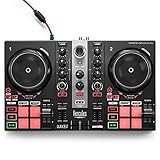
Overview: The Hercules DJControl Inpulse 200 MK2 is a refined entry-level controller emphasizing education through innovative light guides and software integration. Compatible with both Serato DJ Lite and DJUCED, it targets beginners seeking structured learning paths while maintaining creative flexibility for mix experimentation.
What Makes It Stand Out: The Beatmatch Guide’s integrated tempo and beat alignment lights provide real-time visual feedback, revolutionizing how novices learn beatmatching fundamentals. The STEMS feature enables track element isolation for creative mixing, while DJ Academy video integration offers professional tutorials directly within the workflow.
Value for Money: Positioned competitively around $150-$180, the Inpulse 200 MK2 justifies its price through educational features unavailable in similarly priced controllers. While hardware specs remain entry-level, the learning ecosystem adds significant value for beginners prioritizing skill development over professional-grade build quality.
Strengths and Weaknesses: Strengths include revolutionary learning tools, dual software compatibility, streaming service integration, and compact design. Weaknesses are the smaller jog wheels limiting advanced scratching, plastic construction, and the need to upgrade to Serato Pro for full functionality. The light guides, while helpful, may create dependency that delays development of traditional listening skills.
Bottom Line: For beginners who value structured learning and immediate feedback, the Inpulse 200 MK2 is unmatched. It accelerates fundamental skill acquisition while remaining capable enough for early performances. However, if you prefer self-directed learning or plan rapid advancement, a more robust controller like the Mixtrack Pro FX offers better long-term value.
Why $500 Is the Sweet Spot for Beginner DJ Controllers
That $500 threshold represents a fascinating inflection point in the DJ equipment market. Manufacturers know this is where serious hobbyists commit, so they strategically position controllers with just enough pro-level DNA to keep you engaged without overwhelming you. You’re accessing metal jog wheels instead of plastic, dedicated effects controls instead of menu diving, and audio interfaces that won’t make your mixes sound like they’re broadcasting through a tin can. In 2026, inflation has pushed some entry-level gear north of $300, making the sub-$500 category the new “serious beginner” zone where you skip the absolute basics and land directly on feature-rich equipment.
Understanding DJ Controller Basics: What You’re Actually Buying
A DJ controller is essentially a sophisticated remote control for software, but that description undersells its importance. You’re purchasing a tactile interface that translates muscle memory into digital commands, a built-in audio interface that determines your sound quality, and a physical constraint that shapes your learning style. Think of it less as a peripheral and more as an instrument—your hands will develop around its layout, and your brain will wire itself to its workflow.
The Core Components Every Controller Shares
Every controller, regardless of price, shares a fundamental architecture: two decks (or more) for track playback, a mixer section for blending, and some form of transport control. The magic happens in the implementation. Those decks might feature capacitive jog wheels that detect touch like a smartphone screen, or mechanical wheels with adjustable torque mimicking vinyl. The mixer might offer three-band EQs that surgically carve frequencies, or simplistic two-band controls that teach you restraint. Understanding these core components helps you evaluate whether a controller matches your learning style.
Software Integration: The Hidden Cost Factor
Here’s where your $500 budget gets tricky. That price tag covers the hardware, but the software license can be a hidden variable. Some controllers include full versions of professional software like Serato DJ Pro or Rekordbox DJ—easily a $100-150 value—while others ship with “lite” versions requiring paid upgrades to unlock key features. In 2026, subscription models have become more aggressive, with some manufacturers offering hardware-locked licenses that expire after a trial period. Always verify exactly what software version is included and what limitations exist before clicking purchase.
Key Features That Actually Matter for Beginners
Not all features deserve equal weight when you’re starting out. Flashy RGB pads and touchscreen displays might grab attention, but it’s the fundamentals that determine your daily practice experience. Focus on jog wheel quality, fader smoothness, and button tactility—these are the interfaces you’ll touch thousands of times per session. A controller that feels responsive and reliable will keep you practicing longer than one with gimmicks you’ll outgrow.
Jog Wheels: Size, Tension, and Feel
Jog wheels are your primary tactile connection to the music, and their feel dramatically impacts your learning curve. Size matters—a 5-inch wheel gives you precision for scratching and pitch bending, while smaller wheels feel cramped and imprecise. Tension adjustment is crucial; you want resistance that mimics vinyl without fighting your touch. Capacitive vs. mechanical is another debate: capacitive wheels offer modern features like multi-touch gestures but can feel slippery, while mechanical wheels provide satisfying tactile feedback that builds muscle memory faster.
Mixer Section: Channel Strips and EQ Controls
The mixer section is where you’ll spend most of your time blending tracks, so its layout needs to feel intuitive. Look for three-band EQs (low, mid, high) with full kill capabilities—this teaches proper frequency management rather than relying on filter knobs alone. Channel faders should travel smoothly without wobble, and the crossfader curve should be adjustable even at this price point. In 2026, many sub-$500 controllers now include dedicated filter knobs per channel, a feature that was premium-only just a few years ago.
Performance Pads: Hot Cues, Loops, and Samples
Those colorful rubber pads aren’t just for show—they’re your gateway to creative expression. Eight pads per deck has become standard, handling hot cues, loops, sample triggering, and effects. Pad sensitivity matters more than quantity; you want velocity-sensitive pads that respond to how hard you press, not just on/off buttons. The pad modes should be instantly accessible without menu diving—dedicated buttons for each mode keep you in the creative flow instead of hunting through shift-key combinations.
Build Quality vs. Portability: Finding Your Balance
The eternal trade-off: metal chassis feel indestructible but weigh down your backpack, while plastic bodies travel light but creak under aggressive use. In 2026, advanced polymers have narrowed this gap—some sub-$500 controllers use reinforced composites that rival metal durability at half the weight. Consider your real-world use: will this live in your bedroom studio, or are you planning to haul it to friends’ houses and eventual gigs? A controller that never leaves your desk can afford to be hefty; one that travels needs protective design elements like recessed knobs and a low profile.
Software Ecosystems: Choosing Your Digital Foundation
Your controller choice essentially locks you into a software ecosystem for the foreseeable future. Switching later means rebuilding your music library, relearning workflows, and potentially repurchasing expensive software. Each platform has a distinct philosophy that shapes your DJing style, so this decision deserves as much thought as the hardware itself.
Rekordbox DJ: Pioneer DJ’s Integrated World
Rekordbox DJ has evolved from preparation tool to full performance platform, and its tight integration with Pioneer hardware creates a seamless experience. The software excels at library management, with intelligent playlists and cloud sync that keeps your tracks organized across devices. For beginners, its “Export Mode” lets you practice on laptop speakers before committing to a full setup. The downside? It’s designed to funnel you toward Pioneer CDJs eventually, which can feel limiting if you explore other formats later.
Serato DJ Lite/Pro: The Industry Standard
Serato remains the lingua franca of hip-hop and open-format DJs, with rock-solid stability and unparalleled DVS (digital vinyl system) support. The Lite version included with most entry-level controllers is surprisingly capable, though you’ll hit walls with limited cue points and no recording. Upgrading to Pro unlocks a vast ecosystem of expansion packs and third-party integrations. Serato’s interface is less flashy than competitors but rewards mastery with professional-grade reliability that scales from bedroom to festival stage.
Traktor Pro: For the Experimental Beginner
Native Instruments’ Traktor Pro appeals to the technically curious, offering modular effects chains and advanced MIDI mapping that turns your controller into a blank canvas. While its learning curve steeper, it rewards experimentation with capabilities other software can’t match. The included “Stem” file support lets you isolate vocals, drums, and instruments in compatible tracks—a creative superpower for the adventurous beginner. Just know you’re choosing the road less traveled, which means fewer tutorial resources and a smaller community.
Audio Interfaces: The Unsung Hero of Your Setup
Buried inside your controller is an audio interface that determines everything your audience hears. At minimum, you need separate master and headphone outputs with independent volume control. Look for RCA master outs for connecting to home speakers and 1/4-inch booth outs for future monitor speakers. The interface’s signal-to-noise ratio should exceed 100dB—anything lower introduces hiss that cheapens your sound. In 2026, 24-bit/96kHz support is standard even in this price range, but verify the specs; some controllers still ship with dated 16-bit interfaces that limit your headroom.
Connectivity Options: Planning for Future Expansion
That USB port connects to your laptop, but what about everything else? Consider your expansion path. Do you want to add turntables later? You’ll need phono/line inputs with proper grounding. Planning to incorporate drum machines or synths? Look for Aux inputs and MIDI out ports. Even if you’re starting minimal, having RCA inputs lets you connect a phone for emergency backup tracks. In 2026, USB-C has become ubiquitous—ensure your controller includes a USB-C cable or adapter, as older USB-A ports are disappearing from modern laptops.
Learning Curve Considerations: Features That Grow With You
The best beginner controllers include advanced features hidden behind simple interfaces. Look for controllers with “shift” functions that unlock secondary capabilities without cluttering the surface. Effects sections should offer both one-knob simplicity for starters and parameter control for deeper exploration. Loop controls that work both manually and automatically teach timing while providing instant gratification. These layered interfaces let you start simple but reveal complexity as your skills develop, preventing the “outgrowing” problem that plagues basic controllers.
Used vs. New: Navigating the Pre-Owned Market in 2026
The used market in 2026 is flooded with controllers from the 2022-2024 boom, but buyer beware. Jog wheels develop dead zones, faders collect dust that causes scratchiness, and USB ports loosen from constant plugging. If you go used, prioritize controllers from smokers-free studios and verify the software license is transferable—many manufacturers now tie licenses to original owners. A used $500 controller might sell for $250, but factor in potential repair costs and the lack of warranty. New controllers in 2026 often include extended warranties and software bundles that offset the price difference.
Common Beginner Mistakes When Choosing a Controller
First-timers consistently prioritize the wrong features. They obsess over pad colors instead of fader quality, or choose controllers with built-in screens that divert attention from learning proper beatmatching by ear. Another classic mistake is buying based on a favorite DJ’s endorsement without considering that pro uses a $3000 setup with features you’ll never touch. Perhaps the biggest error is ignoring software compatibility—purchasing a controller that locks you into software that doesn’t support your music library format or streaming service of choice.
Setting Up Your First DJ Space: Beyond the Controller
Your controller is just one piece of a functional practice environment. Position it at elbow height on a stable surface—kitchen tables work, but wobble kills precision. Your laptop needs to be visible but not obstructive; a stand that elevates it above the controller keeps your neck straight during long sessions. Acoustic treatment matters more than you’d think: a few foam panels behind your speakers prevent reflective interference that trains your ears incorrectly. In 2026, many beginners skip speakers entirely, mixing on studio headphones, but this develops bad habits around room acoustics that haunt you at your first gig.
Essential Accessories That Complete Your Setup
Budget an extra $100-150 beyond the controller itself. A quality pair of closed-back headphones with swiveling ear cups (for one-ear monitoring) is non-negotiable—look for models with detachable cables since that’s the first point of failure. A protective case or decksaver prevents dust and spills from destroying delicate faders. USB cables are not created equal; a shielded cable with ferrite beads prevents laptop noise from bleeding into your audio. Finally, a portable external SSD for your music library ensures you can practice anywhere without filling your laptop’s drive with massive WAV files.
Frequently Asked Questions
1. Can I really learn professional DJing on a sub-$500 controller, or will I need to upgrade immediately?
Absolutely. Modern sub-$500 controllers include the same core functionality that professionals used a decade ago. The difference isn’t capability but workflow speed and durability. You can learn beatmatching, phrasing, EQ mixing, and performance techniques that translate directly to club gear. Many touring DJs keep a budget controller as a backup precisely because they can execute full sets on them.
2. How important is the included software versus the hardware itself?
The software defines your long-term experience more than the hardware. A great controller with limited software forces an expensive upgrade later, while decent hardware with pro software grows with you. Prioritize bundles that include full, non-expiring licenses of major platforms like Serato DJ Pro or Rekordbox DJ. The hardware is temporary; your software library and workflow habits last years.
3. Should I choose a controller with two decks or four decks for learning?
Start with two decks. Four-deck controllers cram controls into a small footprint, making everything feel cramped and overwhelming. Mastering two-track mixing builds the foundation—phrasing, EQ, and transition timing. Once you can seamlessly blend two tracks for an hour, adding decks three and four becomes a natural expansion rather than a distraction from fundamentals.
4. What’s the deal with streaming service integration in 2026? Is it reliable?
Streaming integration has matured significantly, with Beatport Streaming, SoundCloud Go+, and Tidal offering offline locker features that cache tracks locally. However, relying solely on streaming is risky—WiFi fails, services lose licensing, and audio quality varies. Use streaming for discovery and practice, but build a core library of purchased files for performances. Most sub-$500 controllers now include streaming controls, but verify your preferred service is supported.
5. How do I know if a controller’s jog wheels are good quality without testing it first?
Check the specifications for “mechanical jog wheels” or “adjustable torque” rather than just “capacitive touch.” Read user reviews focusing on scratch DJs, who are brutally honest about jog precision. Look for controllers weighing over 5 pounds—heft usually indicates metal platters versus lightweight plastic. Finally, search YouTube for “controller name + scratching” to see real-world performance.
6. Is it better to buy last year’s $500 controller or this year’s $300 model?
Last year’s premium model almost always wins. Manufacturers rarely revolutionize entry-level controllers annually; they add minor features and refresh branding. A previous-generation $500 controller on clearance offers superior build quality, better software bundles, and proven reliability. Just ensure it’s still supported with software updates—avoid anything discontinued more than two years ago.
7. Do I need a controller with a built-in audio interface, or can I use my laptop’s headphone jack?
Built-in audio interface is mandatory. Laptop headphone jacks lack the separate cue/master outputs you need for DJing. Without a dedicated interface, you can’t preview tracks in headphones before playing them to your audience. This isn’t just a convenience—it’s fundamental to the craft. Every controller in the sub-$500 category includes an interface; if you’re considering one that doesn’t, it’s not a DJ controller.
8. What’s the lifespan of a beginner DJ controller with regular use?
With daily practice, expect 3-5 years before mechanical components show wear. Faders and crossfaders are consumables—you can replace them on better models for $20-40. Jog wheel sensors and USB ports are the real failure points. Controllers with modular designs (screws instead of glue, replaceable parts) last significantly longer. Treat it well—cover when not in use, transport in a case—and it’ll outlive its warranty.
9. How much should I budget beyond the controller for a complete setup?
Plan for $150-250 in essentials: $80-120 for decent headphones, $30-50 for a protective case, $40-60 for a laptop stand, and $20-40 for cables and a mouse. Optional but recommended: powered USB hub ($25) to prevent laptop power issues, and studio monitors ($150-300) for proper sound representation. You can start with just headphones, but you’ll develop better mixing habits with proper speakers.
10. Will learning on a cheap controller hurt my chances of playing on club gear later?
Not at all—if you learn proper technique. The danger isn’t the controller’s price but relying on sync buttons and visual waveforms instead of training your ears. Practice beatmatching manually, use your ears to EQ instead of watching meters, and occasionally turn off your laptop screen. The skills are universal; only the interface changes. Many club DJs started on budget gear and transitioned seamlessly because they mastered fundamentals, not button sequences.
See Also
- Top 10 Best DJ Controllers for Beginners Scratching in 2026
- Top 10 Best DJ Controllers for Beginners in 2026
- 10 DJ Controllers with Slip Mode for Seamless Transitions in 2026
- The 10 Ultimate Best DJ Controllers for Scratching and Juggling in 2026
- We Tested 40 DJ Controllers—10 Best for Battery-Powered Busking in 2026