Table of Contents
Gone are the days when DJing required lugging a flight case full of vinyl and a heavy mixer to every gig. In 2026, the iPad in your backpack has more processing power than entire studios had a decade ago, and the right controller transforms it into a legitimate performance powerhouse. But here’s the reality: not all DJ controllers play nice with iOS, and the market is flooded with gear that promises mobile mixing magic but delivers connectivity headaches and feature bloat that overwhelms newcomers.
If you’re just starting your journey into digital DJing, choosing a controller that seamlessly integrates with your iPad while giving you room to grow is critical. This guide cuts through the marketing noise and focuses on what actually matters—compatibility, workflow, and features that build real skills rather than bad habits. Whether you’re planning beach parties, bedroom practice sessions, or small venue gigs, understanding these core principles will save you money and frustration.
Top 10 Dj Controllers For Ipad
Detailed Product Reviews
1. Hercules DJControl Mix Ultra – Mobile DJ Controller for Smartphones (iOS/Android)

Overview:
The Hercules DJControl Mix Ultra represents the pinnacle of mobile DJ controllers, designed specifically for smartphone DJs who demand true wireless freedom. This battery-powered unit liberates you from cables entirely, offering a complete mixing experience in a remarkably compact footprint that transforms any location into a potential gig space.
What Makes It Stand Out:
The built-in 10-hour battery is a game-changer, eliminating external power sources during extended sessions. Bluetooth Low Energy connectivity ensures reliable wireless pairing with minimal latency, while the 31.5 x 17.4 cm size makes it genuinely backpack-friendly. The protective cover doubling as a smartphone mount demonstrates thoughtful design, keeping your setup streamlined and protected without additional accessories.
Value for Money:
Positioned as a premium mobile solution, the Mix Ultra justifies its price through genuine portability and feature completeness. While more expensive than basic USB controllers, it eliminates the need for power banks or cables, making it cost-effective for mobile performers who value freedom over everything else.
Strengths and Weaknesses:
Strengths: True wireless operation with long battery life; ultra-portable design; integrated smartphone mount; comprehensive control set with performance pads; Bluetooth LE reliability.
Weaknesses: Smaller form factor may feel cramped for complex routines; Bluetooth latency concerns for purists; smartphone-only focus limits upgrade path; premium pricing for entry-level brand.
Bottom Line:
The DJControl Mix Ultra is ideal for mobile DJs, content creators, and beginners prioritizing portability. If you want to DJ anywhere without compromise, this is your best wireless option, though traditionalists may prefer wired reliability.
2. Hercules DJControl Mix – Bluetooth Wireless DJ Controller for Smartphones (iOS and Android) – dJay app – 2 Decks, White

Overview:
The Hercules DJControl Mix offers an accessible entry point into smartphone DJing, delivering core functionality in a clean, wireless package. This white, Bluetooth-enabled controller strips away complexity to focus on the fundamentals of two-deck mixing for iOS and Android devices, making it perfect for absolute beginners.
What Makes It Stand Out:
Its simplicity is its strength—paired with the djay app by Algoriddim, it provides an intuitive learning curve. The two jog wheels, global crossfader, and eight control pads cover essential mixing techniques without overwhelming new users. The wireless connectivity keeps your setup clean and portable, while the dedicated headphone volume control adds basic monitoring capability often missing at this price.
Value for Money:
As one of the most affordable DJ controllers available, it removes financial barriers to entry. The djay software integration adds value, though you’ll need to subscribe for full features. It’s a smart starter investment costing less than a single professional DJ lesson, perfect for testing interest before committing to professional gear.
Strengths and Weaknesses:
Strengths: Extremely affordable; wireless Bluetooth connectivity; simple, beginner-friendly layout; djay app compatibility; compact design; dedicated headphone control.
Weaknesses: Lacks built-in battery (draws power from device); fewer features than the Mix Ultra; no included sound card; limited to smartphone/tablet use; build quality reflects price point.
Bottom Line:
Perfect for curious beginners testing DJing waters. If you own a smartphone and want to learn basics without breaking the bank, this delivers surprising capability, though serious learners will outgrow it within months.
3. Hercules DJControl Starlight | Pocket USB DJ Controller with Serato DJ Lite, Touch-Sensitive Jog Wheels, Built-in Sound Card and Built-in Light Show

Overview:
The Hercules DJControl Starlight packs a complete DJ experience into a pocket-sized USB controller that weighs mere ounces. Despite its diminutive stature, it includes Serato DJ Lite, touch-sensitive jog wheels, and a built-in light show that transforms any space into a mini rave, making it the most fun entry-level controller available.
What Makes It Stand Out:
The integrated RGB light show that syncs to your mix is a unique party trick distinguishing it from sterile black boxes. The built-in sound card enables proper headphone cueing without additional hardware—a critical feature often missing at this price point. Its true pocketability means you can carry a full DJ setup in your jacket, ready for impromptu sessions anywhere.
Value for Money:
This is arguably the best value entry-level Serato controller. The included software alone is worth half the cost, and the addition of a sound card and lighting effects creates a package that punches well above its weight class. It’s perfect for budget-conscious beginners who want industry-standard software without the typical price barrier.
Strengths and Weaknesses:
Strengths: Ultra-portable pocket size; built-in sound card; included Serato DJ Lite; fun synchronized light show; touch-sensitive jog wheels; incredibly affordable.
Weaknesses: USB connection limits mobility; tiny jog wheels challenge precise scratching; plastic construction feels toy-like; limited pad functions; no standalone operation.
Bottom Line:
The Starlight is a fantastic gateway into DJing. It’s ideal for bedroom practice, small gatherings, and aspiring DJs who want Serato experience on a shoestring budget. Don’t let the size fool you—it’s a legitimate learning tool with serious software credentials.
4. Pioneer DJ DDJ-FLX4 2-deck Rekordbox and Serato DJ Controller - Graphite

Overview:
The Pioneer DJ DDJ-FLX4 represents the gold standard for entry-level DJ controllers, offering a professional-grade experience across multiple platforms. This 2-deck controller works seamlessly with PC, Mac, iOS, and Android devices while supporting both Rekordbox and Serato DJ Lite, making it the most versatile option for serious beginners.
What Makes It Stand Out:
Pioneer’s pedigree ensures build quality and layout that mirrors professional club gear, making skills transferable to CDJs. The streaming service integration—TIDAL, Beatport, Beatsource, and SoundCloud Go+—provides unlimited music access, eliminating the need for massive music libraries. Its cross-platform compatibility future-proofs your investment across devices and software ecosystems.
Value for Money:
While pricier than Hercules options, the DDJ-FLX4 delivers professional features that justify the cost. The robust construction, brand reputation, and comprehensive software bundle make it a long-term investment rather than a disposable starter unit. It’s cheaper than two professional DJ lessons while providing club-standard equipment from day one.
Strengths and Weaknesses:
Strengths: Professional Pioneer build quality; multi-device compatibility; streaming service support; included Serato DJ Lite and Rekordbox; full-size jog wheels; robust performance pads; professional layout.
Weaknesses: Larger and heavier than ultra-portable options; requires laptop for full feature set; higher price point for beginners; may overwhelm absolute newcomers with options.
Bottom Line:
The DDJ-FLX4 is the smartest choice for serious beginners committed to learning DJing properly. If you want club-standard equipment with room to grow, this is worth every penny. It’s a controller you’ll keep even as you upgrade your skills and setup.
5. Native Instruments Traktor 8-Inch DJ Cable for iPad/iPhone (22472)

Overview:
The Native Instruments Traktor DJ Cable is a deceptively simple yet essential tool for mobile DJs using iOS devices. This 8-inch splitter cable enables proper headphone cueing—a fundamental DJ technique—by separating master output from cue signals on iPhones and iPads, transforming consumer devices into legitimate DJ tools without additional hardware.
What Makes It Stand Out:
Designed specifically for Traktor DJ and Traktor Pro 2, it solves the single audio output limitation of iOS devices. The silver-plated, oxygen-free copper construction with gold-plated terminals ensures clean signal transmission, preventing the audio degradation common with generic splitters. It’s a purpose-built solution rather than a hack, maintaining professional audio standards in a mobile environment.
Value for Money:
Inexpensive yet invaluable, this cable costs less than a pizza while unlocking professional DJing capability on mobile devices. Without it, you can’t properly cue tracks—a non-negotiable skill. Generic alternatives may save a few dollars but risk latency and quality issues that could ruin a performance, making the official cable a wise investment.
Strengths and Weaknesses:
Strengths: Enables essential headphone cueing; high-quality audio transmission; affordable; works with multiple iOS DJ apps; compact and durable; plug-and-play simplicity; professional-grade materials.
Weaknesses: Only 8 inches long—may require extension; iOS/iPadOS only; single-purpose tool; requires compatible DJ software; easily lost due to small size.
Bottom Line:
If you’re DJing on an iPhone or iPad with Traktor or similar apps, this isn’t optional—it’s mandatory. The quality and reliability far outweigh the minimal cost. Buy it, label it, and never leave home without it in your mobile DJ kit.
6. Hercules DJControl Inpulse 200 MK2 — Ideal DJ Controller for Learning to Mix — Software and Tutorials Included, Black

Overview: The Hercules DJControl Inpulse 200 MK2 is a purpose-built entry-level controller designed to flatten the steep learning curve of DJing. This compact two-deck unit combines hardware innovation with educational resources, making it ideal for aspiring DJs taking their first steps into beatmatching and mixing.
What Makes It Stand Out: The integrated Beatmatch Guide sets this controller apart—tempo and beat align lights provide real-time visual feedback, essentially training your ears while you mix. The STEMS feature unlocks creative possibilities by isolating vocals, instruments, and drums within tracks. Comprehensive streaming service integration with Beatport, Beatsource, SoundCloud GO+, and TIDAL means instant access to millions of tracks without upfront music purchases. The inclusion of DJ Academy video tutorials and dual software options delivers exceptional educational value.
Value for Money: At its price point, the MK2 punches well above its weight. Competing controllers rarely bundle such robust learning tools with professional-grade software compatibility. The streaming integration alone saves hundreds in initial music costs, while the tutorial content accelerates skill development that would otherwise require expensive courses.
Strengths and Weaknesses: Pros include intuitive learning features, excellent software bundle, streaming service support, and solid build quality for the price. Cons are the limited professional features, smaller jog wheels that may feel cramped for advanced techniques, and the need for paid streaming subscriptions to maximize value.
Bottom Line: For beginners serious about learning proper DJ fundamentals, the Inpulse 200 MK2 is unmatched. It bridges the gap between toy controllers and pro gear, providing a genuine learning pathway that grows with your skills.
7. Numark iDJ Live | DJ Controller for iPad, iPhone or iPod Touch (30-pin)
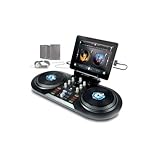
Overview: The Numark iDJ Live is a legacy mobile DJ controller designed specifically for Apple’s 30-pin iOS devices. This ultra-portable unit transforms your iPad, iPhone, or iPod Touch into a functional DJ setup, emphasizing simplicity and mobility over advanced features.
What Makes It Stand Out: Its single-plug 30-pin connector epitomizes plug-and-play convenience, requiring no drivers or complex configuration. The large, touch-sensitive scratch wheels deliver a surprisingly natural feel for a controller of this size and era. The streamlined control set—featuring a crossfader, bass, and treble controls—focuses on core mixing fundamentals without overwhelming beginners.
Value for Money: As a discontinued product, its value depends entirely on availability and price. For users with legacy 30-pin devices, it offers an inexpensive entry into mobile DJing. However, the obsolete connector severely limits its relevance, making it a poor investment compared to modern Bluetooth or Lightning/USB-C alternatives unless you specifically need 30-pin compatibility.
Strengths and Weaknesses: Pros include extreme portability, genuine vinyl-like scratch wheels, dead-simple operation, and zero-latency wired connection. Major cons are the outdated 30-pin connector (incompatible with modern iOS devices without rare adapters), limited feature set, lack of streaming integration, and discontinued software support.
Bottom Line: Only consider the iDJ Live if you own functional 30-pin devices and want a nostalgic, ultra-portable DJ toy. For everyone else, modern Bluetooth controllers offer vastly superior compatibility and features. It’s a relic of the early mobile DJ era, not a current solution.
8. Reloop Beatpad-2 Cross Platform DJ Controller for iPad, Android and Mac

Overview: The Reloop Beatpad-2 is a professional cross-platform DJ controller that bridges mobile and desktop DJing. Supporting iPad, Android, and Mac, this versatile unit targets DJs who demand flexibility without sacrificing performance features.
What Makes It Stand Out: The multi-sensorial pad section offers eight color-coded performance modes including Hot Cue, Sampler, Auto-Loop, Bounce Loop, Touch FX, Jog FX, Slicer, and Slice Loop—providing studio-level creativity in a portable package. The EQ preset switch toggles between Filter and 3-Band EQ modes, while harmonic mixing capabilities enable key-matched sets. Seamless Spotify integration through DJAY gives access to over 70 million tracks instantly.
Value for Money: Positioned in the mid-range price bracket, the Beatpad-2 delivers exceptional value for platform-agnostic DJs. Its build quality and feature set rival controllers costing significantly more. The cross-platform compatibility eliminates the need for separate controllers for different devices, while the advanced pad modes provide performance capabilities typically found in high-end units.
Strengths and Weaknesses: Strengths include robust cross-platform support, comprehensive performance pads, Spotify integration, harmonic mixing, and professional-grade build. Weaknesses include the reliance on DJAY software (which requires a subscription for full features), no standalone mixer capability, and a slightly larger footprint than ultra-portable alternatives.
Bottom Line: The Beatpad-2 is a powerhouse for DJs who refuse to be tied to one ecosystem. If you value platform flexibility, streaming integration, and professional performance features in a single controller, this is your best bet. It successfully merges mobile convenience with club-ready capabilities.
9. Hercules DJControl Mix - Bluetooth Wireless DJ Controller for Smartphones - 2 Decks
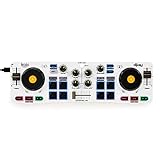
Overview: The Hercules DJControl Mix redefines portability as a Bluetooth wireless DJ controller designed exclusively for smartphones and tablets. This ultra-compact unit enables genuine two-deck mixing on iOS and Android devices, targeting DJs who prioritize mobility above all else.
What Makes It Stand Out: Bluetooth Low Energy connectivity eliminates cables entirely, allowing you to DJ from anywhere within range. The included foldable smartphone stand creates a self-contained mini DJ booth, while the headphone splitter cable enables proper cue monitoring—a critical feature rarely included with controllers this small. Direct integration with the free DJAY app provides a complete software solution without hidden costs.
Value for Money: As one of the most affordable controllers on the market, it delivers remarkable functionality per dollar. The wireless freedom and included accessories (stand and splitter) add significant value. While it can’t match wired controllers for latency or feature depth, it offers an unmatched price-to-portability ratio for casual mixing and practice sessions.
Strengths and Weaknesses: Pros include true wireless operation, extreme portability, included accessories, free software integration, and universal mobile device compatibility. Cons are Bluetooth latency limitations (unsuitable for professional use), small controls that challenge precise mixing, limited feature set, and dependence on device battery life.
Bottom Line: Perfect for impromptu parties, travel practice, or beginners testing DJing interest without investment. The DJControl Mix excels as a secondary practice controller or primary ultra-portable solution. Don’t expect club-level performance, but for smartphone-based mixing, it’s surprisingly capable and ridiculously convenient.
10. ADJ Products Mydmx Go, App, Wireless DMX Lighting Controller

Overview: The ADJ Mydmx Go is a specialized wireless DMX lighting controller, not a DJ controller. This app-based system transforms iPad or Android tablets into powerful lighting consoles, controlling up to 256 DMX channels across two universes for stage and event lighting.
What Makes It Stand Out: Its zero-programming philosophy democratizes lighting control, offering 21 automatic effects and 50 user presets that generate professional light shows without manual DMX programming. The massive fixture library (15,000+ profiles) ensures compatibility with virtually any DMX-enabled light. Wireless WiFi control and included O-Clamp brackets enable flexible truss mounting and operation from anywhere in the venue.
Value for Money: For mobile DJs, small venues, and event producers, it eliminates the need for expensive hardware lighting consoles costing thousands. The sub-$200 price point delivers professional lighting control capabilities that would otherwise require complex software and hardware investments. The ability to integrate existing fixtures prevents costly equipment upgrades.
Strengths and Weaknesses: Strengths include intuitive app interface, extensive fixture library, wireless operation, zero-programming effects, and professional mounting hardware. Weaknesses include the need for a dedicated tablet, potential WiFi interference in crowded venues, limited advanced programming for complex shows, and the learning curve for users unfamiliar with DMX concepts.
Bottom Line: If you’re a DJ or event organizer looking to add professional lighting to your setup without becoming a lighting engineer, the Mydmx Go is a game-changer. It offers remarkable control and convenience at a fraction of traditional lighting console costs. Just ensure you have a reliable tablet and understand basic DMX principles.
Why iPad DJing Has Revolutionized Mobile Mixing
The shift toward iPad-based DJing isn’t just about convenience—it’s about fundamentally changing where and how you perform. Modern iPads feature ultra-low latency audio processing, robust MIDI implementation, and battery life that laughs at traditional laptops. When paired with the right controller, you get tactile control over professional-grade software without the weight, boot times, or fan noise of a computer. This mobility means you can practice on your commute, test mixes at a friend’s house, or play impromptu sets anywhere inspiration strikes. The key is finding hardware that respects iOS’s unique architecture rather than treating it as an afterthought.
What Defines a Beginner-Friendly Controller in 2026
Beginner-friendly doesn’t mean “toy.” It means intelligent design choices that accelerate learning while preventing common pitfalls. In 2026, this translates to plug-and-play iOS recognition, intuitive layout mapping that mirrors professional club gear, and firmware that receives regular updates. The best entry-level controllers strip away complexity without sacrificing the core two-deck-and-a-mixer paradigm that teaches transferable skills. They also include features like LED feedback that visually reinforces beatmatching concepts and performance pads sized for learning combinations without accidental triggers.
Core Functionality vs. Feature Overload
Manufacturers love stuffing controllers with gimmicks—air gestures, touch strips, and dozens of tiny buttons that look impressive in product photos. For beginners, this creates a steep learning curve and decision paralysis. Focus on units that nail the fundamentals: responsive jog wheels for pitch bending and scratching, smooth faders for level control, and a straightforward cue system. Every additional feature should serve a clear purpose in your workflow. Ask yourself: will I use this during my first 50 practice sessions? If not, it’s probably clutter.
iOS Compatibility: What Actually Matters
“Works with iPad” is one of the most misleading phrases in DJ gear marketing. True compatibility means more than a Lightning or USB-C connection—it requires class-compliant MIDI and audio interfaces that iOS recognizes instantly. Controllers needing proprietary drivers are non-starters for mobile setups. Check for MFi (Made for iPhone/iPad) certification, but don’t stop there. Verify the manufacturer explicitly supports iPadOS 18+ and has a track record of updating firmware when Apple releases new iOS versions. The best controllers also include a powered USB hub built-in, solving the iPad’s single-port limitation.
Understanding Apple’s Audio and MIDI Frameworks
iOS handles audio and MIDI differently than desktop OSes. Core Audio and Core MIDI are Apple’s frameworks, and controllers must speak this language fluently. Look for devices that advertise “class-compliant” operation—meaning they use standard protocols requiring no drivers. Some controllers include a dedicated iOS mode that optimizes power consumption and remaps controls for touchscreen workflows. This isn’t just technical jargon; it’s the difference between a stable gig and a mid-set crash when your controller draws too much power or sends conflicting MIDI messages.
The Software Ecosystem: Apps That Power Your Performance
Your controller is only as good as the software it controls. In 2026, the iPad DJ app landscape has matured beyond basic consumer toys into professional tools. The key is matching controller hardware to your chosen app’s strengths. Some controllers are designed ground-up for specific software, offering deep integration where every knob and button maps perfectly. Others are more flexible but require manual mapping. Understanding this relationship before buying prevents the disappointment of discovering your dream controller has limited functionality in your preferred app.
From djay to DJ Player Pro: Navigating Your Options
While we won’t name specific apps as “best,” the ecosystem falls into two categories: all-in-one solutions with streaming integration, and modular apps offering deeper control for local files. Beginners should prioritize software with robust sync options, clear waveforms, and built-in learning resources. More importantly, verify the app supports external controllers natively—some popular apps still treat hardware as a secondary consideration. Check community forums for mapping files and confirm the app receives regular updates that maintain compatibility with new iPad models.
Portability vs. Performance: Finding Your Sweet Spot
The most portable controller fits in a laptop bag and weighs under two pounds. But extreme portability often means tiny jog wheels, cramped layouts, and plastic construction. On the flip side, performance-grade controllers offer full-size controls but defeat the purpose of mobile mixing. The sweet spot for beginners is a device that’s backpack-friendly while maintaining jog wheels at least four inches in diameter and faders with decent throw length. Consider your realistic use cases: bedroom practice, mobile gigs, or both? This determines whether you prioritize size or durability.
Essential Features That Actually Matter for New DJs
Beyond basic playback controls, certain features accelerate skill development. Instant loop encoders teach phrasing and structure. Filter knobs on each channel develop EQ intuition before diving into three-band mixing. Performance pads for hot cues build muscle memory for track navigation. The best beginner controllers include these without burying them in shift-key combinations. Pay attention to button tactility—rubberized pads provide better feedback than cheap clicky switches, making practice sessions more satisfying and helping you develop a consistent touch.
Jog Wheels: Size, Feel, and Responsiveness
Jog wheel quality separates serious controllers from toys. For learning beatmatching, you need wheels with enough mass to simulate vinyl inertia—this means metal construction or weighted plastic, not hollow lightweight discs. The surface should have a textured grip for slip-free control. Capacitive touch sensitivity is crucial: the wheel should know when you’re touching the top for scratching versus the edge for pitch bending. In 2026, look for wheels with adjustable sensitivity settings accessible via hardware controls, not buried in software menus.
Mixer Section: What You Need vs. What You Don’t
A proper mixer section includes channel faders, a smooth crossfader, gain trims, and EQ controls. That’s it. Beginners don’t need per-channel effects sends, complex routing matrices, or built-in samplers. What matters is fader curve adjustability—being able to switch between smooth blending and sharp cuts teaches different mixing styles. EQ knobs should have clear center detents so you know when they’re at unity gain. Avoid controllers where critical functions require holding down shift keys; this interrupts workflow and makes learning clumsy.
Audio Interface Integration: The Hidden Dealbreaker
Many beginner controllers skimp on the audio interface, forcing you to use the iPad’s headphone jack for output. This is unacceptable for anything beyond bedroom practice. A proper controller includes a built-in audio interface with at least two independent outputs: one for the main mix, one for cueing. Check the specs: you want 24-bit/44.1kHz minimum, with low-latency drivers. Some controllers offer balanced XLR outputs—overkill for beginners, but nice for future-proofing. More important is the headphone amplifier quality; weak amps make it impossible to cue properly in noisy environments.
Power Solutions: Battery, Bus-Powered, or AC Adapter?
Power management can make or break a mobile setup. Bus-powered controllers draw juice from your iPad, which is convenient but can drain your tablet during long sessions. Some include passthrough charging, letting you power the iPad while using the controller—this is a must-have feature for gigging. Battery-powered controllers offer ultimate portability but add another device to charge. AC adapters provide stability but tether you to wall power. For beginners, a bus-powered controller with passthrough charging offers the best balance, giving you mobility without battery anxiety.
Build Quality: Surviving the Mobile DJ Lifestyle
Your controller will get tossed in bags, knocked around, and possibly spilled on. Budget controllers often use hollow plastic chassis that flex and creak. Look for units with metal faceplates or reinforced corners. Knobs should be bolted securely to the faceplate, not just pressed onto potentiometers. Faders should have dust covers to prevent grime buildup. While you don’t need military-grade construction, the controller should feel solid when you aggressively pitch bend or trigger pads. Check user reviews specifically mentioning durability after months of use, not just first impressions.
Budget Tiers: What Your Money Gets You in 2026
Price directly correlates with component quality and feature set, but the law of diminishing returns hits hard. Understanding the tiers helps you allocate budget wisely rather than overspending on flashy specs you’ll never use. The controller market has stabilized into clear categories, each with distinct trade-offs that matter more to beginners than raw feature counts.
Entry-Level ($100-$250): The Basics Done Right
Controllers in this range focus on core functionality. Expect plastic construction, smaller jog wheels (4-5 inches), and basic but functional audio interfaces. The key is finding units that don’t compromise on fader quality or MIDI stability. Many include software subscriptions, which adds value but shouldn’t be the deciding factor. At this price, prioritize controllers with upgradeable firmware and active user communities that share mapping files. Avoid anything without a dedicated headphone cue output—some ultra-budget models cheat by using splitter cables, which is a recipe for disaster.
Mid-Range ($250-$450): The Sweet Spot for Serious Beginners
This is where you find the best value for skill development. Controllers feature larger jog wheels (5-6 inches), metal faceplates, and more robust audio interfaces with better headphone amps. You’ll get additional performance pads, onboard effects controls, and possibly standalone mixer mode—letting you use the controller with external media players as you grow. The build quality jump is significant; these units survive real gigs. For beginners committed to learning proper technique, this tier offers professional-grade fundamentals without the pro price tag.
Future-Proofing Your Investment
A controller should last through your first year of gigs, not become obsolete when you upgrade your iPad. Future-proofing means choosing hardware with firmware update history, USB-C connectivity (the standard is here to stay), and enough control density to grow into advanced techniques. Some controllers include expandability options like aux inputs for external devices or MIDI out ports for controlling lighting. While these seem unnecessary now, they prevent you from outgrowing your gear. Also consider the manufacturer’s ecosystem—companies that make pro gear often trickle down features and support to their entry-level lines.
Firmware Updates and Longevity
Check how frequently a manufacturer releases firmware updates. A controller that hasn’t been updated since iPadOS 16 will likely have issues with newer versions. The best brands publish update logs showing active development and bug fixes. Some even add features post-launch based on user feedback. This commitment indicates the controller is an investment, not a disposable toy. Avoid brands with a history of abandoning products after 12-18 months, which is common in the budget segment.
Setting Up Your Mobile Rig: A Practical Workflow
Your first setup session sets the tone for your DJ journey. Start with a clean iPad install—delete unnecessary apps and turn off notifications that could interrupt your set. Connect your controller and test every knob, fader, and button before installing any software. This isolates hardware issues from software configuration. Organize your music library locally on the iPad; streaming services are convenient but unreliable for gigs. Create a practice playlist of 20 tracks you know well, and spend your first week mastering just the basics: cueing, beatmatching, and simple blending. Resist the urge to explore advanced features until these fundamentals are automatic.
Learning Resources and Community Support
The controller is just a tool; your skills determine your success. Prioritize manufacturers that offer free video tutorials specifically for their hardware. Active user forums are invaluable for troubleshooting and discovering workflow tips. Some brands sponsor online communities where experienced DJs mentor newcomers. This ecosystem matters more than a slightly better spec sheet. Before buying, search YouTube for tutorial content—if you find dozens of videos showing real techniques (not just unboxing), that’s a good sign. Also check for third-party mapping communities; a controller with active MIDI mapping scene means you can customize it as your style develops.
Frequently Asked Questions
1. Will any USB-C controller work with my iPad Pro?
Not necessarily. The iPad requires class-compliant MIDI and audio devices. Many USB-C controllers still need drivers designed for Windows/Mac. Always verify iOS compatibility in the manufacturer’s specifications, not just the connector type.
2. Do I need a controller with a built-in audio interface?
Yes, if you plan to DJ anywhere outside your bedroom. Without separate main and cue outputs, you can’t preview tracks before playing them to your audience, which is essential for beatmatching and set flow.
3. Can I use Bluetooth headphones for cueing?
Bluetooth introduces unacceptable latency for DJing (often 100ms+), making beatmatching impossible. Always use wired headphones connected directly to your controller’s audio interface for cueing.
4. How much storage do I need on my iPad for DJing?
A 128GB iPad handles a substantial music library, but 256GB is safer if you use lossless audio files. Remember that iOS apps and system files consume 15-20GB, and you need free space for caching and recording mixes.
5. What’s the difference between bus-powered and battery-powered controllers?
Bus-powered units draw power from your iPad via the connection cable, while battery-powered controllers have their own internal battery. Bus-powered is simpler but drains your iPad faster; battery-powered adds weight but preserves tablet battery life.
6. Should I buy a controller designed for a specific DJ app?
Controllers designed for specific apps offer plug-and-play convenience and deeper integration. However, flexible controllers let you switch apps as your needs evolve. For beginners, app-specific controllers reduce setup friction and let you focus on learning.
7. How important are performance pads for a beginner?
Performance pads accelerate learning hot cues and basic sampling, which are fundamental modern DJ skills. They’re not strictly necessary but highly recommended. Prioritize quality over quantity—eight good pads beat sixteen cheap ones.
8. Can I upgrade my controller’s firmware myself?
Most modern controllers allow user-initiated firmware updates via USB connection to a computer or directly through the iPad app. This is crucial for maintaining iOS compatibility. Check the manufacturer’s website for update tools before purchasing.
9. What’s the lifespan of a beginner DJ controller?
With proper care, a quality beginner controller lasts 3-5 years. The hardware often outlives its software support, so choose brands with proven track records of long-term firmware updates to maximize your investment.
10. Do I need a case for my controller?
Absolutely. Mobile DJing means constant transport, and even budget controllers benefit from protection. Look for padded cases specifically fitted for your model; generic bags leave room for damaging movement. This $30-50 investment prevents costly replacements.
See Also
- 10 Beginner-Friendly DJ Controllers for Kids Under 14 in 2026
- Top 10 Best DJ Controllers for Beginner Producers in 2026
- We Tested 50 DJ Controllers—Here Are the 10 Best for Mobile DJs in 2026
- 10 Beginner-Friendly DJ Controllers with Tutorial Lights in 2026
- 10 DJ Controllers for STEM Mixing on Twitch Without Software Latency